


Yamir.1
Associate II
June 25, 2023
Question

Unable to boot my STM32MP157F-EV1 card from SD
  • June 25, 2023
  • 5 replies
  • 4108 views

Screenshot from 2023-06-25 16-35-37.png

Hello,

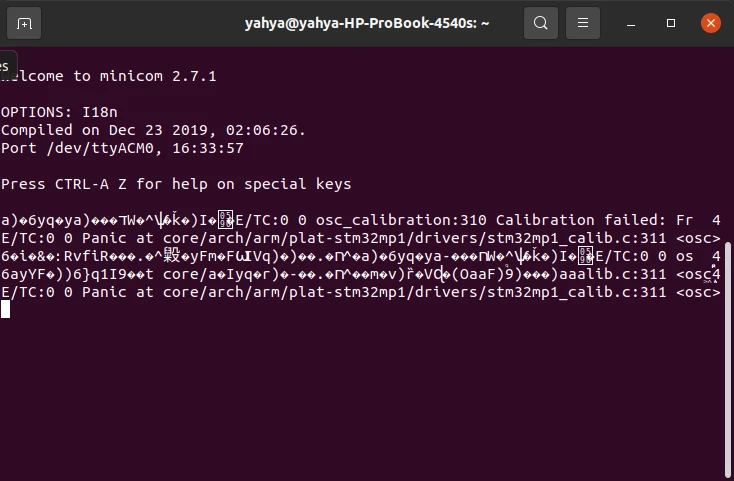
I've been trying to boot my STM32MP157F-EV1 evaluation board from the SD card but I get the result that is shown in the image when using minicom. I used to work on the board for a long time with no problem, but recently I tried booting it again and this happened. I'm not sure if it's a hardware or a software problem. I made sure that the SD card is inserted correctly and that the boot switch configuration is set for SD card. I tried ping and ssh commands with the IP address but no connection is visible.

Is there a way to fix this problem? Any help would be appreciated.

This topic has been closed for replies.

5 replies

PatrickF
ST Employee
June 26, 2023

Hi @Yamir.1 

Did you try flashing again the Latest Starter Package on a different SD-Card ?

https://wiki.st.com/stm32mpu/wiki/Getting_started/STM32MP1_boards/STM32MP157x-EV1/Let%27s_start/Populate_the_target_and_boot_the_image


Regards.

In order to give better visibility on the answered topics, please click on 'Best Answer' on the reply which solved your issue or answered your question.Tip of the day: Try Sidekick STM32 AI agent
Yamir.1
Yamir.1Author
Associate II
June 27, 2023

Hello

I tried using a different SD card but when I try to populate it by following the instructions in the link you provided the STM32CubeProgrammer fails to detect the USB port when I press the refresh button, which is the same result when doing it with the previous SD card.

Yamir1_0-1687881065752.png

I made sure that the boot switches are in the right position and to reset the board. I also made sure that I have both the OTG and ST-Link USB ports connected to my PC and that their LED indicators are on.

Best Regards,

PatrickF
ST Employee
June 28, 2023

HI @Yamir.1 

To flash the board, please try BOOT pins = 0b0000 (all switch on 'ON' side).

Is the red led (LD2) stop toggling when you connect a PC on CN16 (motherboard) ?

Could you try connecting only STLINK (CN4 of Dautherboard) and dump ROM boot traces using https://wiki.st.com/stm32mpu/wiki/STM32_MPU_ROM_trace_analyzer ?

Regards

In order to give better visibility on the answered topics, please click on 'Best Answer' on the reply which solved your issue or answered your question.Tip of the day: Try Sidekick STM32 AI agent
Yamir.1
Yamir.1Author
Associate II
July 1, 2023

Hello,

Yes, the red LED does stop toggling when I connect my PC to CN16 with that BOOT pin configuration that you gave. As for dumping ROM boot traces I followed the instructions and I got the following result in my console.

Screenshot from 2023-07-01 16-07-02.png

However, I am still unable to connect to my board.

Best Regards,

PatrickF
ST Employee
July 19, 2023

Hi @Yamir.1 ,
To get bootrom traces decoded, you should then process the trace.bin with the python script provided in https://wiki.st.com/stm32mpu/wiki/STM32_MPU_ROM_trace_analyzer#On_STM32MP15x_lines_2

save the script provided in a rom_trace_analyzer.py file, then:

python rom_trace_analyzer.py traces.bin


Regards

In order to give better visibility on the answered topics, please click on 'Best Answer' on the reply which solved your issue or answered your question.Tip of the day: Try Sidekick STM32 AI agent