Yli.8
Associate III
November 13, 2019
Solved

STM32MP157 NAND FLASH error

  • November 13, 2019
  • 4 replies
  • 2972 views

​We used nandflash of MT29F4g08ABADAWP and found that there was an error in startup. May I ask how to solve it?

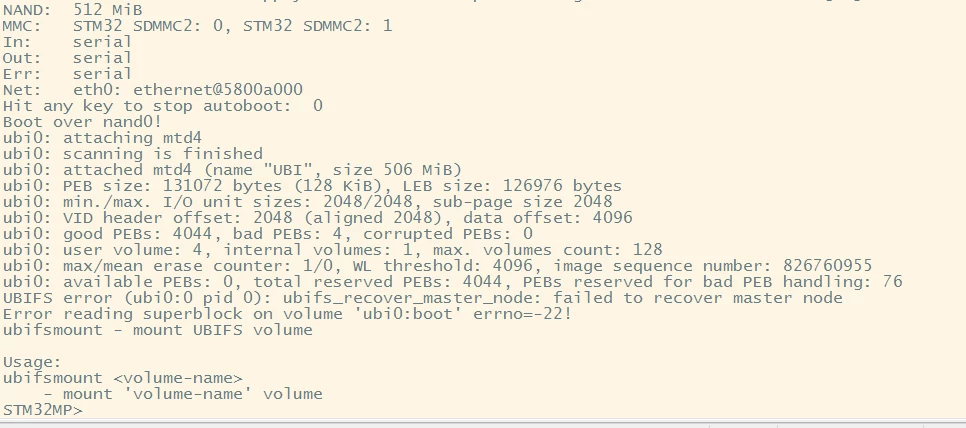
Boot over nand0!

ubi0: attaching mtd4

ubi0: scanning is finished

ubi0: volume 3 ("userfs") re-sized from 521 to 587 LEBs

ubi0: attached mtd4 (name "UBI", size 506 MiB)

ubi0: PEB size: 131072 bytes (128 KiB), LEB size: 126976 bytes

ubi0: min./max. I/O unit sizes: 2048/2048, sub-page size 2048

ubi0: VID header offset: 2048 (aligned 2048), data offset: 4096

ubi0: good PEBs: 4044, bad PEBs: 4, corrupted PEBs: 0

ubi0: user volume: 4, internal volumes: 1, max. volumes count: 128

ubi0: max/mean erase counter: 1/0, WL threshold: 4096, image sequence number: 826760955

ubi0: available PEBs: 0, total reserved PEBs: 4044, PEBs reserved for bad PEB handling: 76

UBIFS error (ubi0:0 pid 0): ubifs_recover_master_node: failed to recover master node

Error reading superblock on volume 'ubi0:boot' errno=-22!

ubifsmount - mount UBIFS volume

Usage:

ubifsmount <volume-name>

   - mount 'volume-name' volume

STM32MP>
0690X00000ArxrZQAR.png0690X00000ArxrPQAR.png0690X00000ArxrKQAR.png

This topic has been closed for replies.
Best answer by Olivier GALLIEN

Hi @昌�?� �?�​ 

Can you please share more detail when you get this message ?

Is it during flash procedure or when booting once flashed ?

Can you share the .tsv file you are using ?

Thanks,

Olivier

4 replies

Olivier GALLIEN
Olivier GALLIENBest answer
ST Technical Moderator
November 19, 2019

Hi @昌�?� �?�​ 

Can you please share more detail when you get this message ?

Is it during flash procedure or when booting once flashed ?

Can you share the .tsv file you are using ?

Thanks,

Olivier

In order to give better visibility on the answered topics, please click on 'Accept as Solution' on the reply which solved your issue or answered your question.
Yli.8
Yli.8Author
Associate III
November 26, 2019
  • Thank you. My problem has been solved

Olivier GALLIEN
ST Technical Moderator
November 26, 2019

Nice to read. Thanks for feedback.

Can you say more about the resolution and how my answer has helped you ?

Thx

Olivier

In order to give better visibility on the answered topics, please click on 'Accept as Solution' on the reply which solved your issue or answered your question.