Yli.8
Associate III
February 20, 2020
Solved

stm32mp157 Ethernet problem

  • February 20, 2020
  • 3 replies
  • 3843 views

hello:

    ​I made a board using the AR8035 phy chip. The system can find the phy, but it can't connect to the network.I need your help.

log:
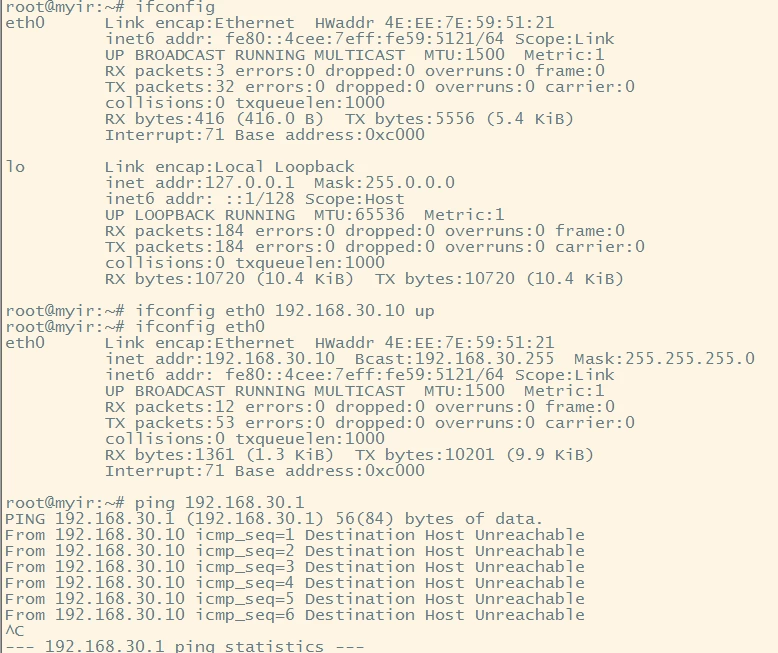
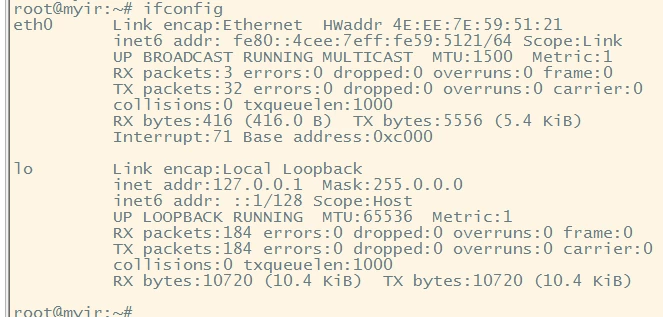
0690X00000DBx4zQAD.png0690X00000DBx4fQAD.png

0690X00000DBx41QAD.png0690X00000DBx3SQAT.png

This topic has been closed for replies.
Best answer by PatrickF

I had a quick look, just ensure the PG5 receive a 125MHz from the PHY (need SW config inside the PHY to output this frequency, otherwise you get 25MHz by default on CLK_25M pin).

3 replies

PatrickF
ST Technical Moderator
February 20, 2020

With the log you shared, we did not see any issue with the Ethernet, you end up at [12.232391] with a 'link-up' message.

Issue might be more on your Network Server set up. Seems you get an ipv6 address without ipv4, then you need to set manually an ipv4 address. Please look at your DHCP server config.

Did you made same tests using STM32MP157A-DK1 or STM32MP157C- DK2 board with default starter package ?

In order to give better visibility on the answered topics, please click on 'Best Answer' on the reply which solved your issue or answered your question.Tip of the day: Try Sidekick STM32 AI agent
Yli.8
Yli.8Author
Associate III
February 20, 2020

  • Thank you very much for your reply,But I've tested the same thing with normal networks

[  11.585842] Micrel KSZ9031 Gigabit PHY stmmac-0:06: attached PHY driver [Micrel KSZ9031 Gigabit PHY] (mii_bus:phy_addr=stmmac-0:06, irq=POLL)

[  11.687613] dwmac4: Master AXI performs any burst length

[  11.719501] stm32-dwmac 5800a000.ethernet eth0: No Safety Features support found

[  11.731984] stm32-dwmac 5800a000.ethernet eth0: IEEE 1588-2008 Advanced Timestamp supported

[  11.791796] stm32-dwmac 5800a000.ethernet eth0: registered PTP clock

[  11.844925] IPv6: ADDRCONF(NETDEV_UP): eth0: link is not ready

[  11.866000] cfg80211: Loading compiled-in X.509 certificates for regulatory database

[  11.901577] Bluetooth: hci0: BCM43430A1 (001.002.009) build 0264

[  11.975836] cfg80211: Loaded X.509 cert 'sforshee: 00b28ddf47aef9cea7'

[  12.112596] brcmfmac: brcmf_fw_alloc_request: using brcm/brcmfmac43430-sdio for chip BCM43430/1

[ OK ] Started Network Name Resolution.

[  12.401230] brcmfmac: brcmf_fw_alloc_request: using brcm/brcmfmac43430-sdio for chip BCM43430/1

[  12.491165] brcmfmac: brcmf_c_preinit_dcmds: Firmware: BCM43430/1 wl0: Sep 11 2018 09:22:09 version 7.45.98.65 (r707797 CY) FWID 01-b54727f

[  16.002705] stm32-dwmac 5800a000.ethernet eth0: Link is Up - 1Gbps/Full - flow control rx/tx

[  16.009802] IPv6: ADDRCONF(NETDEV_CHANGE): eth0: link becomes ready

[ OK ] Listening on Load/Save RF Kill Switch Status /dev/rfkill Watch.

PatrickF
ST Technical Moderator
February 20, 2020

On my side, I cannot help much more, experts told me that it could be a DHCP or your own network config which make the ping not working.

There is no error visible in the log.

When doing ifconfig after boot and few seconds after RJ45 cable connection, you should have both inet and inet6 defined without manual action, e.g. :

root@stm32mp1-eval:~# ifconfig
 eth0 Link encap:Ethernet HWaddr 00:80:E1:01:64:F9 
 inet addr:10.48.0.89 Bcast:10.48.3.255 Mask:255.255.252.0 <== here
 inet6 addr: fe80::280:e1ff:fe01:64f9/64 Scope:Link <== here
 UP BROADCAST RUNNING MULTICAST MTU:1500 Metric:1
 RX packets:68 errors:0 dropped:3 overruns:0 frame:0
 TX packets:47 errors:0 dropped:0 overruns:0 carrier:0
 collisions:0 txqueuelen:1000 
 RX bytes:10311 (10.0 KiB) TX bytes:9222 (9.0 KiB)
 Interrupt:60 

In order to give better visibility on the answered topics, please click on 'Best Answer' on the reply which solved your issue or answered your question.Tip of the day: Try Sidekick STM32 AI agent
Yli.8
Yli.8Author
Associate III
February 21, 2020

​Thank you very much for your reply

Can you help me check the hardware design of the phy

The phy address is 6

0690X00000DC1JAQA1.png0690X00000DC1J5QAL.png

PatrickF
PatrickFBest answer
ST Technical Moderator
February 21, 2020

I had a quick look, just ensure the PG5 receive a 125MHz from the PHY (need SW config inside the PHY to output this frequency, otherwise you get 25MHz by default on CLK_25M pin).

In order to give better visibility on the answered topics, please click on 'Best Answer' on the reply which solved your issue or answered your question.Tip of the day: Try Sidekick STM32 AI agent
VRoma.2
Associate II
January 8, 2022

AR8035 switches RX clock off without a cable or after some time passed.

How to reset gmac dma in absence of that clock?

Is there any official workaround for such a situation?