

Associate
October 3, 2024
Question

stm32mp157 apt-get install x-linux-ai-tool unable to locate

  • October 3, 2024
  • 3 replies
  • 1993 views

I am a newcomer and not very good at using Linux. I hope to try running the model on the device. I am using a third-party development board. Is the tutorial on the official website applicable or can I use an API
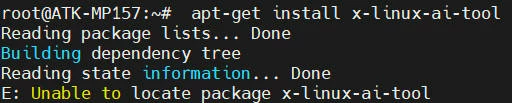
Snipaste_2024-10-03_22-45-11.jpg

This topic has been closed for replies.

3 replies

PatrickF
ST Employee
October 4, 2024

Hi @wink 

according to prompt I see on your capture, not sure you are using an ST Board with openSTLinux Starter Package.

For OpenSTLinux Starter Package, please see https://wiki.st.com/stm32mpu/wiki/X-LINUX-AI_Tool

Did 'apt-get update' works ?

I'm not expert, but if needed, the following link should help to build X-LINUX-AI for your board.
see https://wiki.st.com/stm32mpu/wiki/X-LINUX-AI_Developer_package or https://wiki.st.com/stm32mpu/wiki/X-LINUX-AI_Distribution_package

Regards.


In order to give better visibility on the answered topics, please click on 'Best Answer' on the reply which solved your issue or answered your question.Tip of the day: Try Sidekick STM32 AI agent
winkAuthor
Associate
October 4, 2024

I am not using the openSTLinux Starter Package, I am using a third-party development board and I am concerned that flashing this package may not work properly. I am looking for other ways to call the librarySnipaste_2024-10-04_14-45-32.jpg

Jean-Marc B
ST Employee
October 4, 2024

Hi @wink 

the x-linux packages installers are provided through the «updates» component of the OpenSTLinux distribution. This component has to be built separately.

Details are given here:

https://github.com/stmicroelectronics/meta-st-pkgrepo-updates

Best regards,

--JM