Ratataplam
Visitor II
November 18, 2021
Solved

STM32MP1 demo : how change the display resolution via command line

  • November 18, 2021
  • 1 reply
  • 873 views

Hi all, I'm using STM32MP1 and stress it so to understand until the display resolution it can support.

I'm using a demo board and the demo SW installed.

How can I change the display resolution via shell?

Thanks
This topic has been closed for replies.
Best answer by Kevin HUBER

Hello @Ratataplam​ ,

You can find all the configurations possible for the Wayland Weston framework in the wiki: https://wiki.st.com/stm32mpu/wiki/Wayland_Weston_overview#Configuration

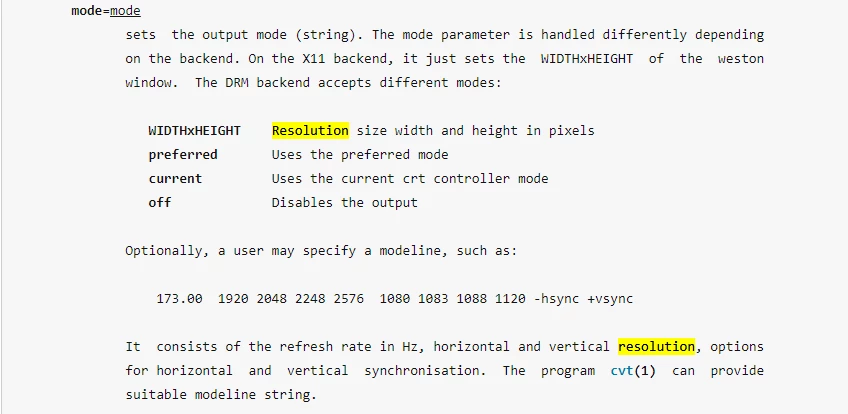
There is a link to the weston ini man page that explains the possibilities. The one that is interesting for you case is:

0693W00000GY36OQAT.png 

Regards,

Kevin

In order to give better visibility on the answered topics, please click on 'Select as Best' on the reply which solved your issue or answered your question. See also 'Best Answers'

1 reply

Kevin HUBER
Kevin HUBERBest answer
ST Employee
November 18, 2021

Hello @Ratataplam​ ,

You can find all the configurations possible for the Wayland Weston framework in the wiki: https://wiki.st.com/stm32mpu/wiki/Wayland_Weston_overview#Configuration

There is a link to the weston ini man page that explains the possibilities. The one that is interesting for you case is:

0693W00000GY36OQAT.png 

Regards,

Kevin

In order to give better visibility on the answered topics, please click on 'Select as Best' on the reply which solved your issue or answered your question. See also 'Best Answers'

In order to give better visibility on the answered topics, please click on 'Best answer' on the reply which solved your issue or answered your question.