


RMarg
Associate II
October 2, 2019
Solved

SSH connection to STM32MP15-DK2

  • October 2, 2019
  • 6 replies
  • 6366 views

Hello,

I've try to connect to the through SSH but it's seem no sshd is running :

BOARD $> ssh root@xx.xx.xx.xx
BOARD $> ssh: connect to host xx.xx.xx.xx port 22: Network is unreachable
BOARD $> systemctl sshd -l
BOARD $> No ssh.service found

I would like to install openssh through apt but I can't found any package.

Indeed /ect/apt/sources.lsit.d is empty.

Currently How to manage the debian packages in OpenSTLinux distribution doesn't provide any information.

Can someone told me how install openssh with apt on the board ?
This topic has been closed for replies.
Best answer by RMarg

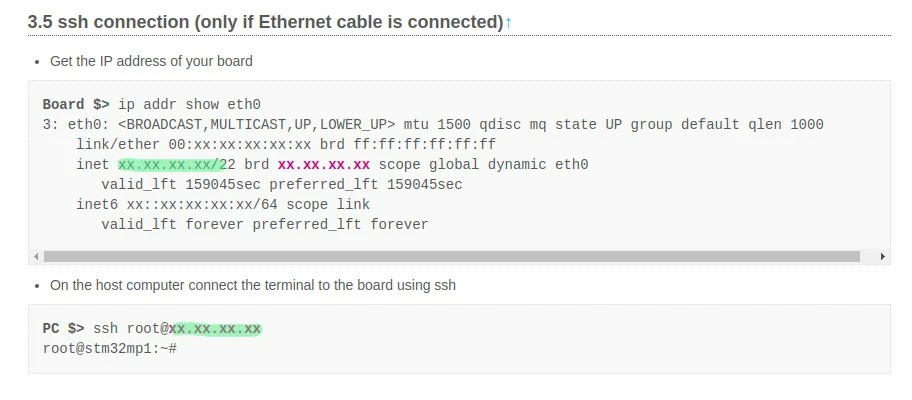
So I found the mistake, in the wiki the address used is the brd address instead the inet address.

0690X000009k18EQAQ.jpg

6 replies

After Forever
Senior III
October 2, 2019

It seems you already know about the stm32 mpu wiki pages, just write "ssh" in the search box at the top.

RMarg
RMargAuthor
Associate II
October 2, 2019

There is no helpful support on the wiki !

DBuer
Associate II
October 3, 2019

I have two DK2 here on my desk and are working well with SSH right out of the box.

You don't have to install anything on the DK2 in terms of SSH. And by the way, you can't. These are so called YOCTO based Linux boxes. That means they are flashed with a preconfigured Linux image witch can't be changed will running. To install new system software (packages), you have to generate a new Linux image on a separate PC and flash it to your DK2.

Attach a HDMI monitor, keyboard and maybe a mouse, boot you DK2 and login. Then check if you have a proper IP-Adress and gateway set for your local network. I think your IP setup on your DK2 is not ok, that's why you can't reach it from your PC. And btw, checking "sshd" on you PC doesn't make sense when you cant login to you r DK2....

RMarg
RMargAuthor
Associate II
October 3, 2019

I did a mistake on my message and I've test sshd on the board of course.

PatrickF
ST Employee
October 3, 2019
In order to give better visibility on the answered topics, please click on 'Best Answer' on the reply which solved your issue or answered your question.Tip of the day: Try Sidekick STM32 AI agent
RMarg
RMargAuthor
Associate II
October 3, 2019

For my part the ip addr show eth0 address give me a valid brd address. My board is connected to my pc via rj45 and I can ping servers.

RMarg
RMargAuthor
Associate II
October 3, 2019

It's really seem no ssh-server running on the board.

DBuer
Associate II
October 3, 2019

Don't search for a sshd, you have "dropbear" installed as your ssh server. Do you find that:

root@stm32mp1:~# ps -ef | grep dropbear

root    710   1 1 18:17 ?    00:00:00 /usr/sbin/dropbear -i -r /etc/dropbear/dropbear_rsa_host_key -B

And with netstat you should find something listening on port 22

root@stm32mp1:~# netstat -tuln

Active Internet connections (only servers)

Proto Recv-Q Send-Q Local Address      Foreign Address     State

tcp    0   0 127.0.0.1:8125     0.0.0.0:*        LISTEN

tcp    0   0 0.0.0.0:1534      0.0.0.0:*        LISTEN

tcp    0   0 0.0.0.0:19999      0.0.0.0:*        LISTEN

tcp    0   0 0.0.0.0:5355      0.0.0.0:*        LISTEN

tcp    0   0 :::22          :::*          LISTEN

RMarg
RMargAuthor
Associate II
October 3, 2019

Yes I see something listening on port 22 but when I try to connect to the board I get ssh: connect to host XX.XX.XX.XX port 22: Network is unreachable.

I'm sharing my wifi through rj45 maybe the problem is here ?

RMarg
RMargAuthorBest answer
Associate II
October 3, 2019

So I found the mistake, in the wiki the address used is the brd address instead the inet address.

0690X000009k18EQAQ.jpg

DBuer
Associate II
October 4, 2019

Ok, what you used is the so called "Broadcast" Address :) Never use that for a connection.

Tip, catch your preferred browser, go to the WWW and look for some basic tutorial around TCP/IP, Example: https://stevessmarthomeguide.com/basic-networking-course/ that will help you in the future.