

Associate II
September 27, 2026
Question

problems encounters during a day spent with STMCube, MX and ST-link

I’ve just recently started with the STM32 tool chain so some of these may be answered elsewhere. Platform is Debian.

Some problems have been encountered due to the editor in STM Cube IDE doing unexpected things, one of which led to the loss of a considerable amount of code. In general the editor is a bit week compared with e.g. Sublime text   Your IDE designers should try that - when copying and pasting, the indentations are correct, with CUBE the text ends up over indented. I’m now editing in Sublime and then pasting the complete text into Cube.

ST-link problem: This has a uart channel, on my STM32F4 Nucleo board, this is prewired to UART3 of the target, for printf type debugging. However, there is limited documentation on connecting a terminal to this UART (ST-Link PC end), and the listings in the /dev folder are :
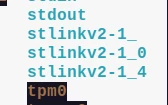
The debian terminal program “screen” will not connect to any of these. 

Also, on the redirection of printf on the target: most of the on-line resources for this topic indicate that the “_write()” function or the putchar() function can be over written in main.c, but I found this did not work, and that the function had to be edited in syscalls.c .


4 replies

Pavel A.
September 27, 2026

>  In general the editor is a bit week compared with e.g. Sublime text

The CubeIDE is basically Eclipse CDT. Naturally, Sublime is more advanced than the Eclipse editor - thus, its price tag :)

Alternative editor replacements for Eclipse exist, check the Marketplace.

Eclipse has native “style” settings that define the indenting etc. - see the editor settings. You can export these style settings and import into new projects.


> However, there is limited documentation on connecting a terminal to this UART (ST-Link PC end)

To know the terminal device name, compare the /dev content before and after plugging the Nucleo board.

> Also, on the redirection of printf on the target

As Linux users say - there’s more than one way to skin a cat. Some do this via editing syscalls, some in main.c. Whatever works for you.

MikeD2Author
Associate II
September 27, 2026

Re the terminal access: I tried all three of the ST related devices listed in the /dev folder. All returned with permission denied. Even using root access.

Pavel A.
September 28, 2026

All 3 device names in your post don’t look like serial terminals. These names depend on the st-link driver (namely, the udev scripts installed by the driver). It’s hard to tell why your Nucleo does not create names like /dev/ttyACM .