zqizh.1
Associate III
February 14, 2022
Solved

How to solve "DSI display mismatch with QtCreator's UI" on STM32MP157C-DK2

  • February 14, 2022
  • 6 replies
  • 2189 views

Hi,

I create a QT project and run it on the board STM32MP157C-DK2  with command " /tmp/testqt/bin/testqt". The data display on the DSI display is mismatch my testing project's UI.

LCD_picture.jpg is DSI display data.

QT_UI.jpg is Qt project's UI.

Please advise how to solve it.

Thanks,

QiZhang

This topic has been closed for replies.
Best answer by Erwan SZYMANSKI

Hello @zqizh.1​

Finally, your problem comes from a configuration of QtCreator itself. You need to configure the resolution of the target of the Designer tool.

How to do that ?

In QtCreator, go to Tools -> Options -> Designer -> Embedded Design.

Here you will create a new Device profile that will deals with your real target resolution. In the case of the native screen of the STM32MP15, we have something like 234 x 236 dpi.
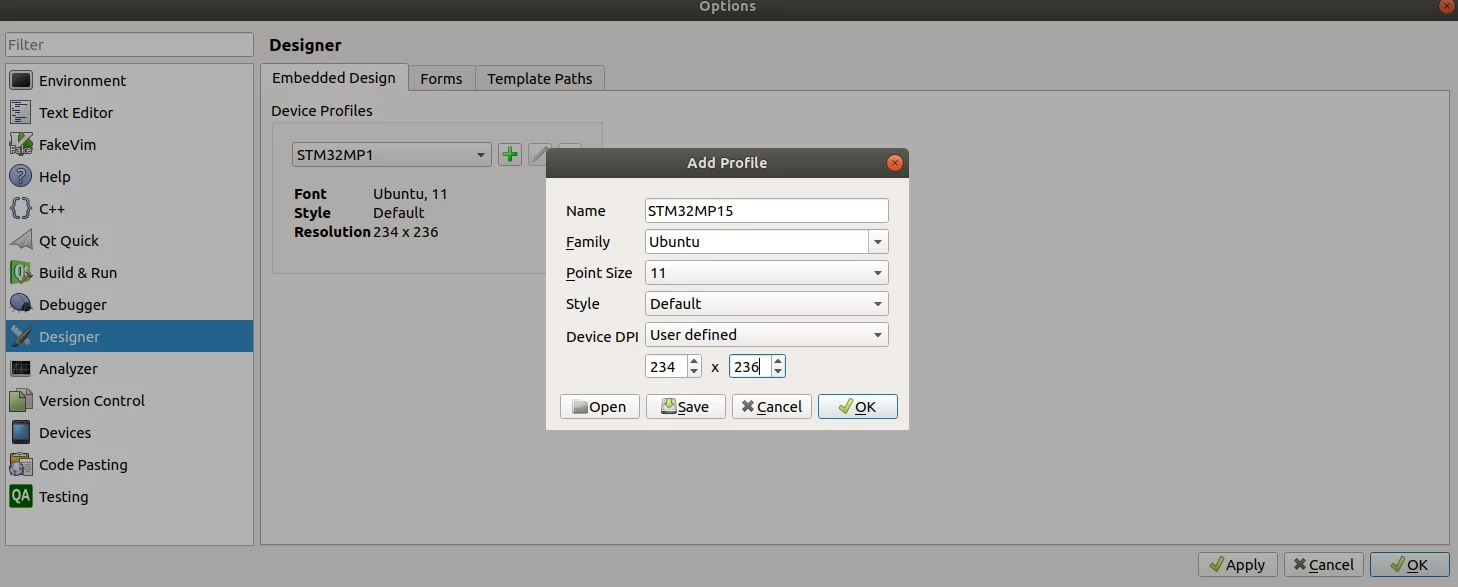
0693W00000JPtgcQAD.pngThen you will restart QtCreator (it seems that it needs it to reconfigure the preview). And now the preview is in phase with what you can observe on your target:
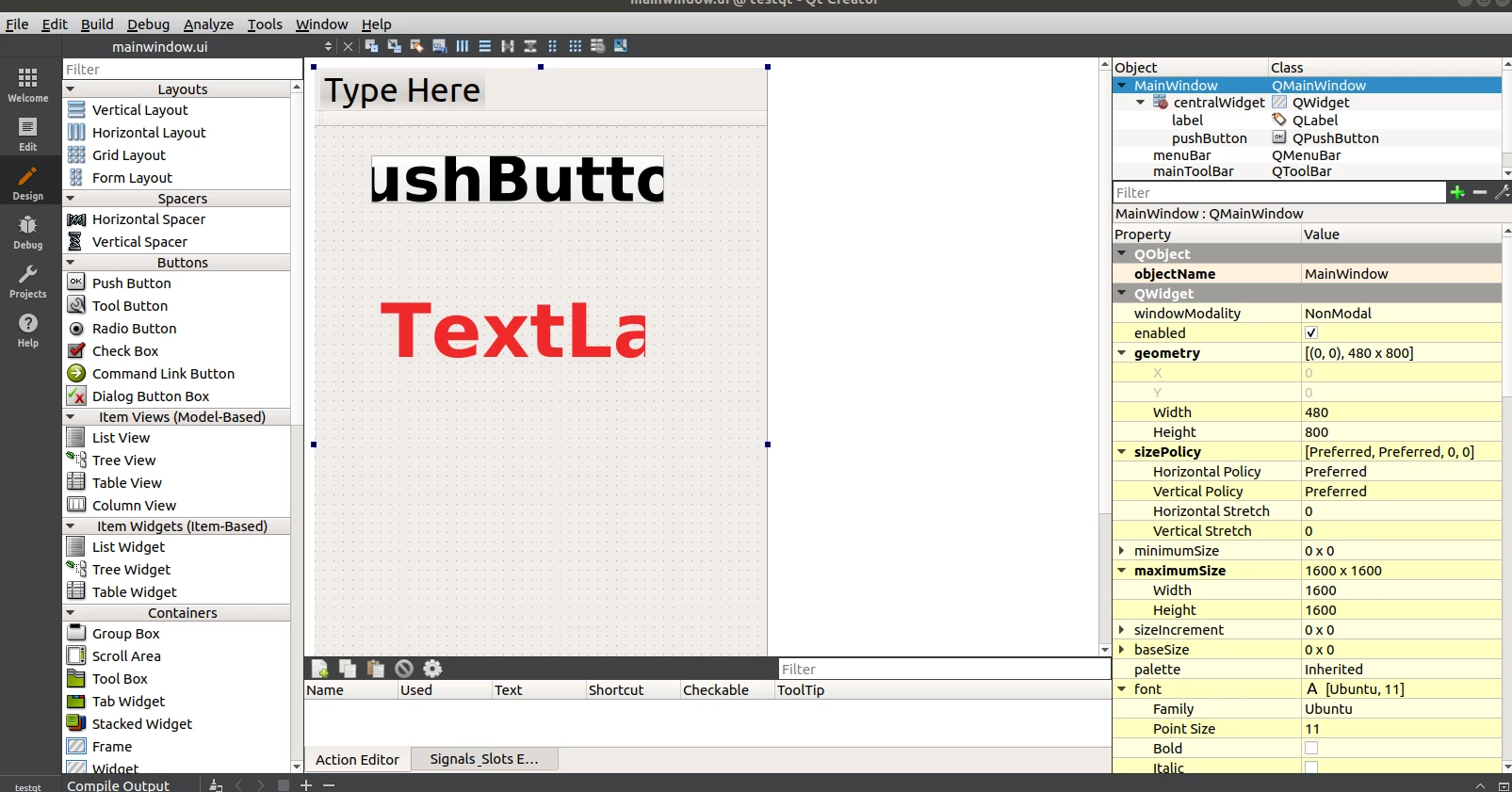
0693W00000JPtiOQAT.pngNow you can adjust the font size of the QButton and the QLabel properly depending of what you want.

Hope it will help you.

Regards.

Erwan.

6 replies

zqizh.1
zqizh.1Author
Associate III
February 14, 2022

My LCD resolution is 480X800, and I configured the UI's geometry parameter to [(0,0),480x800]

zqizh.1
zqizh.1Author
Associate III
February 14, 2022

My project file, unzip it with "tar zxf "

Kevin HUBER
ST Employee
February 14, 2022

Hello @zqizh.1​ ,

I don't know why the geometry property doesn't work.

If you check the resolution of the screen by using modetest as explained in this page: https://wiki.st.com/stm32mpu/wiki/DRM_KMS_overview#Show_display_overall_status

By using the command

modetest -M stm

You can double check the resolution, but the only supported is 480x800, so it must be ok.

I don't have Qt installed so I can't test your project, but you can maybe try to force the geometry of your mainwindow to the size of the screen by calling in your constructor this:

resize(QDesktopWidget().availableGeometry(this).size());

Or you can check the current size of your mainwindow by displaying the value of the property "geometry" to check what is going on.

Regards,

Kevin

In order to give better visibility on the answered topics, please click on 'Best answer' on the reply which solved your issue or answered your question.
Erwan SZYMANSKI
ST Technical Moderator
February 15, 2022

Hello @zqizh.1​ and @Kevin HUBER​,

I had QtCreator installed and linked with the ST Qt SDK. I can so reproduce the setup and I can observe the same things as @zqizh.1​.

The resize option seems to be bypassed by the application, I think that EGLFS platform forces a sort of "fullscreen". We can observe it because if you configure the geometry with [0,0,200,300], you obtain exactly the same display on the screen.

@zqizh.1​ can you share the different Qt environment variable that are configured on your board ? (enter the following command:

Board $> env | grep QT

)

Regards,

Erwan.

In order to give better visibility on the answered topics, please click on 'Accept as Solution' on the reply which solved your issue or answered your question.

Erwan SZYMANSKI
Erwan SZYMANSKIBest answer
ST Technical Moderator
February 15, 2022

Hello @zqizh.1​

Finally, your problem comes from a configuration of QtCreator itself. You need to configure the resolution of the target of the Designer tool.

How to do that ?

In QtCreator, go to Tools -> Options -> Designer -> Embedded Design.

Here you will create a new Device profile that will deals with your real target resolution. In the case of the native screen of the STM32MP15, we have something like 234 x 236 dpi.

0693W00000JPtgcQAD.pngThen you will restart QtCreator (it seems that it needs it to reconfigure the preview). And now the preview is in phase with what you can observe on your target:

0693W00000JPtiOQAT.pngNow you can adjust the font size of the QButton and the QLabel properly depending of what you want.

Hope it will help you.

Regards.

Erwan.

In order to give better visibility on the answered topics, please click on 'Accept as Solution' on the reply which solved your issue or answered your question.

zqizh.1
zqizh.1Author
Associate III
February 16, 2022

Hi Erwan,

Thank you very much.

