VRoma.2
Associate II
January 10, 2022
Solved

How to setup stm32mp1 board to use with FileZilla?

  • January 10, 2022
  • 4 replies
  • 2999 views

Hello!

I'm using MYD-YA15XC-T board based on stm32mp151 kernel 5.4.

And wanted to share files with it via FileZilla ftp/sftp file manager on the PC.

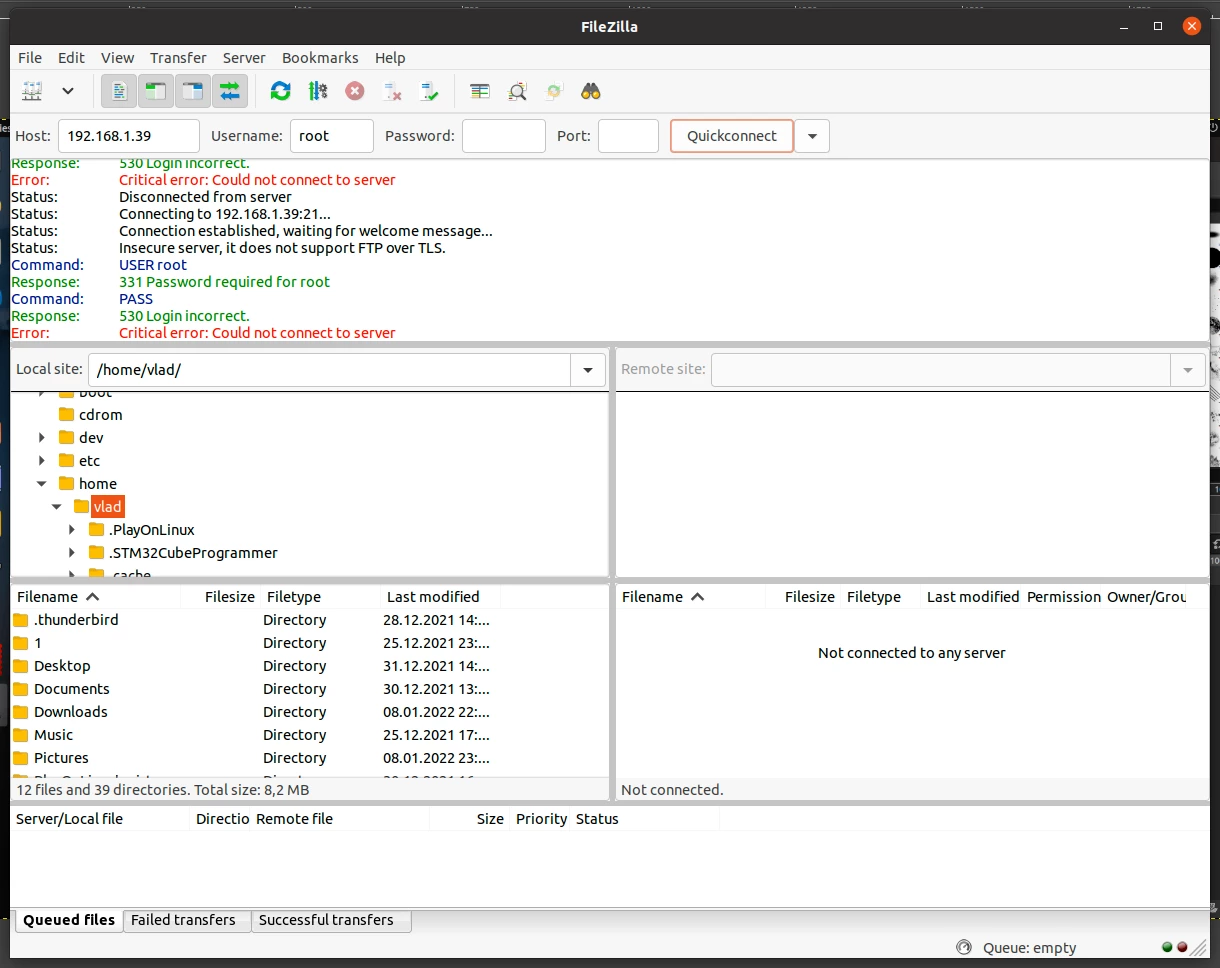
But i could not connect to the board, there is always login incorrect error, whichever login or password I try to use:

0693W00000Hr92tQAB.png 

My board uses automatic login, so there is no password that i know, really.

And i believe the openssh-sftp package is installed.

Do i missing something for sftp/ftp connection to work?

Regards, Vlad.

This topic has been closed for replies.
Best answer by Jean-Marc B

Hi @VRoma.2​ 

the package openssh-sftp belongs to the Starter Kit image and should not be removed as we do not provide it through the package repository service. That explains why you don't find it on our packages server. I am sorry to have misled you and let you uninstall the package.

To bypass this trouble, either you reflash your board with the Starter Kit image or you build the openssh-sftp package through Yocto, copy it into your board and install it with the command apt-get install ./openssh-sftp_8.2p1-r0.deb.

The missing of /usr/libexec/sftp-server is quite unexpected too. This binary program is also provided by default in the Starter Kit image (and so can't be downloaded from our package server) through the package openssh-sftp-server:

root@stm32mp1:/# dpkg -S /usr/libexec/sftp-server
openssh-sftp-server: /usr/libexec/sftp-server
root@stm32mp1:/# apt-cache policy openssh-sftp-server
openssh-sftp-server:
 Installed: 8.2p1-r0
 Candidate: 8.2p1-r0
 Version table:
 *** 8.2p1-r0 100
 100 /var/lib/dpkg/status

If you had a specific image for your board, please check the packages openssh-sftp and openssh-sftp-server are included into your image.

Best regards,

--JM

4 replies

Jean-Marc B
ST Employee
January 11, 2022

Hello @VRoma.2​ 

The openssh-sftp is installed by default. You can check with this command (from OpenSTLinux 3.1):

root@stm32mp1:/# apt-cache policy openssh-sftp
openssh-sftp:
 Installed: 8.2p1-r0
 Candidate: 8.2p1-r0
 Version table:
 *** 8.2p1-r0 100
 100 /var/lib/dpkg/status

If not, install the package with the command:

root@stm32mp1:/# apt-get install openssh-sftp

From your PC, could you open a sftp session?

PC $> sftp root@<your board IP>
Connected to <your board IP>.
sftp>

If it works, I think the trouble comes from the FileZilla configuration.

Best regards,

--JM

VRoma.2
VRoma.2Author
Associate II
January 11, 2022

Hello Jean-Marc B (ST Employee)

I have checked and got that the openssh-sftp is installed indeed and apt-cache policy openssh-sftp

command output is just the same as yours.

But trying to connect results in error:

vlad@vlad-MS-7C71:~$ sftp root@192.168.1.39
root@192.168.1.39's password: 
sh: /usr/libexec/sftp-server: not found
Connection closed

It seems that sftp-server is missing.

I removed openssh-sftp by apt-get remove openssh-sftp but when trying to reinstall it again by apt-get install openssh-sftp got another error:

root@myir-ya151c-t:~# apt-get install openssh-sftp
Reading package lists... Done
Building dependency tree
Reading state information... Done
Package openssh-sftp is not available, but is referred to by another package.
This may mean that the package is missing, has been obsoleted, or
is only available from another source
 
E: Package 'openssh-sftp' has no installation candidate

What should I do?

Regards, Vlad.

Jean-Marc B
Jean-Marc BBest answer
ST Employee
January 11, 2022

Hi @VRoma.2​ 

the package openssh-sftp belongs to the Starter Kit image and should not be removed as we do not provide it through the package repository service. That explains why you don't find it on our packages server. I am sorry to have misled you and let you uninstall the package.

To bypass this trouble, either you reflash your board with the Starter Kit image or you build the openssh-sftp package through Yocto, copy it into your board and install it with the command apt-get install ./openssh-sftp_8.2p1-r0.deb.

The missing of /usr/libexec/sftp-server is quite unexpected too. This binary program is also provided by default in the Starter Kit image (and so can't be downloaded from our package server) through the package openssh-sftp-server:

root@stm32mp1:/# dpkg -S /usr/libexec/sftp-server
openssh-sftp-server: /usr/libexec/sftp-server
root@stm32mp1:/# apt-cache policy openssh-sftp-server
openssh-sftp-server:
 Installed: 8.2p1-r0
 Candidate: 8.2p1-r0
 Version table:
 *** 8.2p1-r0 100
 100 /var/lib/dpkg/status

If you had a specific image for your board, please check the packages openssh-sftp and openssh-sftp-server are included into your image.

Best regards,

--JM

VRoma.2
VRoma.2Author
Associate II
January 11, 2022

Hi Jean-Marc B (ST Employee)

I did it! I copied sftp-server executable from another image archive, set its permissions and it worked! Both in console and in the FileZilla!

Do not think it could be so easy!

My current working SD card image based on MYiR minimalistic core distributive, which lacks some even basic features, it must be because of this...

Thanks a lot again, it real pleasure see you guys helping people here, even newbies just like me :)

Regards, Vlad.