Hi @longfeili_00001,
I written a wiki page which answers to your question, but it's not yet published.
I copy paste the content of the article:
How to update the metadata content?
The mkfwumdata tool (from U-Boot) is used to generate the metadata partition.
Metadata generation is described in the following wiki article: Metadata generation tool, nevertheless, this version of mkfwumdata doesn't support valid bank state (only accepted and invalid are supported).
So, please apply the following patch in U-Boot to bring the feature (this patch will be integrated in v6.1.0 Ecosystem Release): autoboot-propagate-boot-index.patch .
FWU states vs Firmware Update states
FWU metadata considers three states where two of them can correspond to Firmware update state machine:
Steps to run a FOTA update
- Prerequisite: system is running on bank A (fip-a, bootfs-a, rootfs-a...)
- The update manager which is in touch with the software provisioning server is notified about a new update that will be written into bank B (fip-b, bootfs-b, rootfs-b...)
- When the new image is downloaded into the bank B, the update manager:
- can execute some scripts to adapt the new flashed image to bank B (ex: partition mount points)
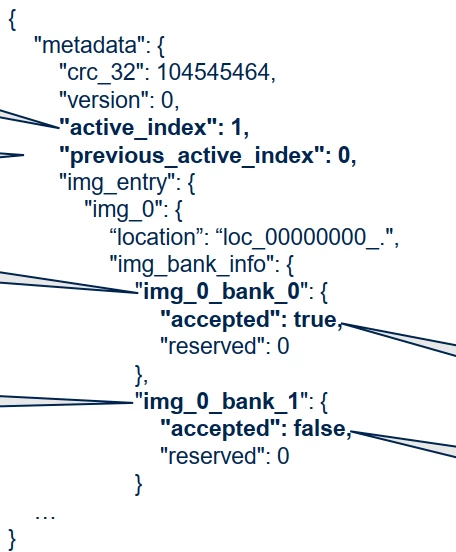
- update the metadata partition to request TF-A to try to boot on the new bank B: so the update manager will change the metadata partition by:
- updating active_index to bank B (see -a option), so bank A becomes previous_active_index (see -p option)
- switching bank B as Valid (see -s option). Bank A will be kept as Accepted, in case of failure of bank B.
UUID_LIST="8a7a84a0-8387-40f6-ab41-a8b9a5a60d23,19d5df83-11b0-457b-be2c-7559c13142a5,4fd84c93-54ef-463f-a7ef-ae25ff887087,09c54952-d5bf-45af-acee-335303766fb3"
OPTIONS="-g -i 1 -b 2 -v 2"
bank_state="A,V"
mkfwumdata ${OPTIONS} -s ${bank_state} -a 1 -p 0 ${UUID_LIST} /dev/disk/by-partlabel/metadata1
mkfwumdata ${OPTIONS} -s ${bank_state} -a 1 -p 0 ${UUID_LIST} /dev/disk/by-partlabel/metadata2
Don't forget to update /dev/disk/by-partlabel/metadata2 which is the backup of metadata1, and will be used by TF-A in case of CRC error of metadata1 partition.
- On reboot, TF-A will boot bank B, and we have now two possibilities:
- bank B crashs: as the watchdog is enabled, the platform will reboot on crash. As bank B is in trial mode, the bootcount is decremented on each reboot. After 3 attempts (default value), TF-A will consider the bank B is not able to boot, so it will switch back to bank A. As active_index is bank B, but bank A is active, the update manager can consider bank B as Invalid, and notify the software provisioning server if needed.
- bank B successfully boots: the update manager from bank B can update the metadata partition to switch the bank B state to Accepted: on the next reboot, TF-A will consider this bank Accepted, and will disable the bootcount:
UUID_LIST="8a7a84a0-8387-40f6-ab41-a8b9a5a60d23,19d5df83-11b0-457b-be2c-7559c13142a5,4fd84c93-54ef-463f-a7ef-ae25ff887087,09c54952-d5bf-45af-acee-335303766fb3"
OPTIONS="-g -i 1 -b 2 -v 2"
bank_state="A,A"
mkfwumdata ${OPTIONS} -s ${bank_state} -a 1 -p 0 ${UUID_LIST} /dev/disk/by-partlabel/metadata1
mkfwumdata ${OPTIONS} -s ${bank_state} -a 1 -p 0 ${UUID_LIST} /dev/disk/by-partlabel/metadata2
This can be done in a systemd service:
$ cat status-mark-good.service [Unit] Description=Good-marking Service [Service] ExecStart=/bin/bash /usr/bin/st-status-mark-good.sh [Install] WantedBy=multi-user.target
where st-status-mark-good.sh script asks the update manager to update the metadata partition to switch the bank B state to Accepted.
BR,
Christophe
In order to give better visibility on the answered topics, please click on 'Accept as Solution' on the reply which solved your issue or answered your question.