June 14, 2021
Solved

Using STM32WB55RGV6 to program another board

  • June 14, 2021
  • 10 replies
  • 1928 views

Hello! On the board STM32WB55RGV6 there is the connector CN13, where is written STLINK (reserved). Can I use these pins to program another board?

This topic has been closed for replies.
Best answer by Mike_ST

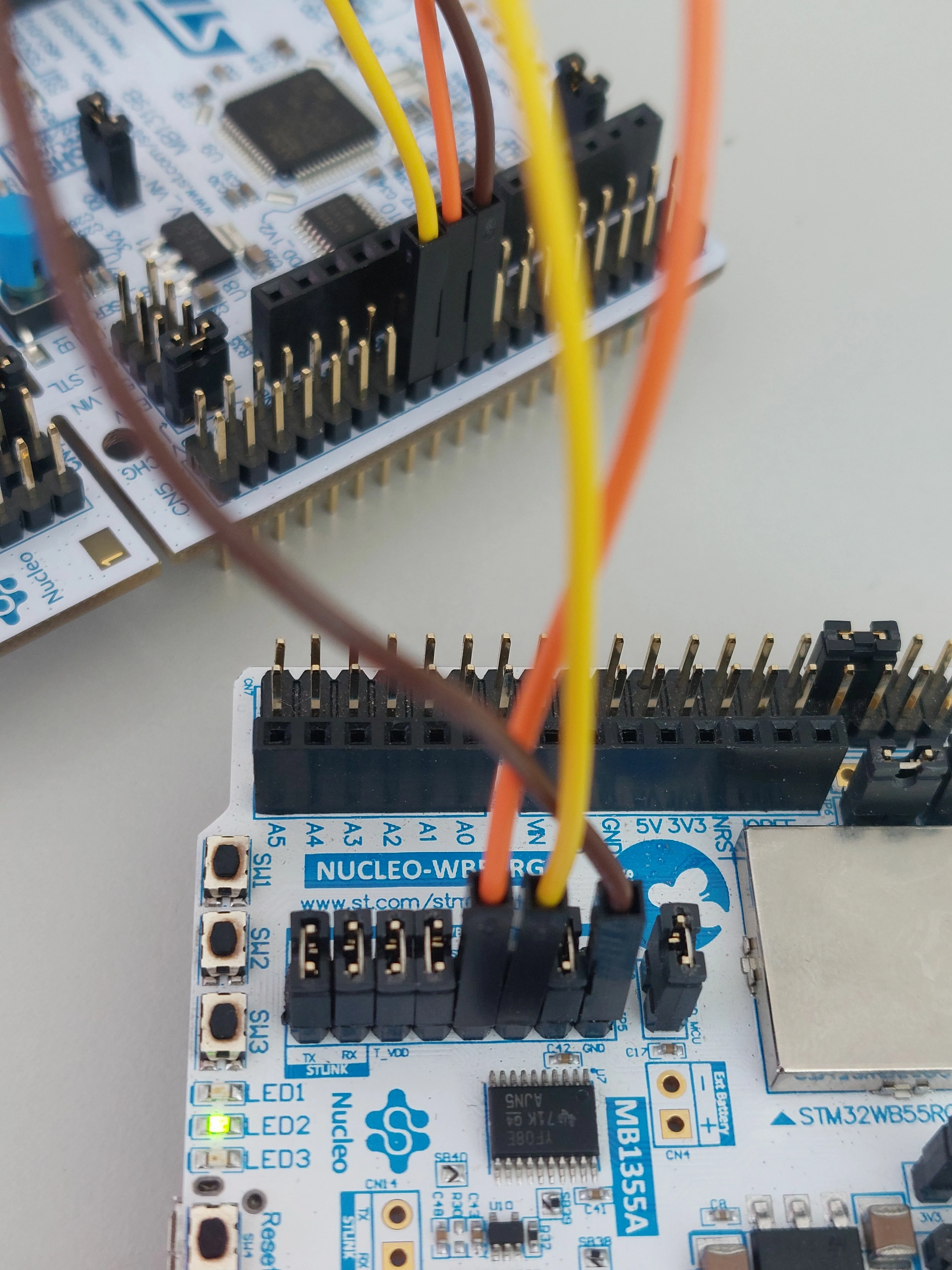
Just tested, it is working fine with STM32CubeProgrammer. I connected an MB1355 to an MB1319 (STM32L452) with 3 wires only.

MB1319 ST-LINK is kept under reset to allow using MB1355 one.

0693W00000BawSsQAJ.jpg

10 replies

Mike_ST
ST Technical Moderator
June 14, 2021

Hello,

No, as you wrote, CN13 is a "reserved" connector, so please avoid touching it.

Use JP5 and remove appropriate jumpers to get the SWDIO/SWDCLK/GND signals and plug them to another target. Should work.

Please check MB1355 schematics here:

https://www.st.com/en/evaluation-tools/p-nucleo-wb55.html#cad-resources

In order to give better visibility on the answered topics, please click on 'Best answer' on the reply which solved your issue or answered your question. 
June 14, 2021

i'll try it thank you

June 14, 2021

@Mike_ST​ Keil uVision cannot find the target (SWDIO: no target connected) . The target is an usb dongle

Tesla DeLorean
Guru
June 14, 2021

More details...

You'll need to pick the ST-LINK and the target.

Make sure the jumpers are in place to connect the on-board ST-LINK to the internal target.

Perhaps also try to validate connectivity using STM32 Cube Programmer.

Current version of Keil, most up to date ST-LINK .DLL's etc?

Tips, Buy me a coffee, or three.. PayPal Venmo (See Profile) Up vote any posts that you find helpful, it shows what's working..
Tesla DeLorean
Guru
June 14, 2021

The STM32WB55RGV6 is a chip, not a board.

The NUCLEO/DISCO boards will have an on-board ST-LINK/V2 or V3 debugger implemented in an F103 or F723 IC

Tips, Buy me a coffee, or three.. PayPal Venmo (See Profile) Up vote any posts that you find helpful, it shows what's working..
Mike_ST
Mike_STBest answer
ST Technical Moderator
June 14, 2021

Just tested, it is working fine with STM32CubeProgrammer. I connected an MB1355 to an MB1319 (STM32L452) with 3 wires only.

MB1319 ST-LINK is kept under reset to allow using MB1355 one.

0693W00000BawSsQAJ.jpg

In order to give better visibility on the answered topics, please click on 'Best answer' on the reply which solved your issue or answered your question. 
June 15, 2021

@Mike_ST​ I see that you put a jumper between VDD and BOOT0. Did you put a jumper somewhere else on the MB1355 ?

Mike_ST
ST Technical Moderator
June 15, 2021

This BOOT0 jumper is not important as the ST-LINK probe on the MB1355 is disconnected from the STM32WB55.

I haven't done anything else.

In order to give better visibility on the answered topics, please click on 'Best answer' on the reply which solved your issue or answered your question. 
June 15, 2021

@Community member​ Current version of Keil, most up to date ST-LINK .DLL's etc?

And how can I do this?

June 15, 2021

Thank you @Community member​  and @Mike_ST​ ! I did exactly as @Mike_ST​ did on the photo above and it now works. I had to put put all jumpers correctly.