


FRest.1
Associate III
Aug 29, 2022 8:16 PM UTC
Question

Use of STM32CubeIDE with LoRaWAN_End_Node: create a project.

I'm working with STM32CubeWL, version 1.1.0. Starting a new project from .ioc file seems that the firmware will be upgraded to the version 1.2.0. Is this correct?

Can I find, somewhere in the source code, the firmware version?
0693W00000Su0mEQAR.pngCan I avoid this behavior? The built project compile with error (fatal error: stm32wlxx_nucleo_radio.h: No such file or directory and similar).

Starting a new project from .project file (C:\Users\fabrizio\Downloads\STM32Cube_FW_WL_V1.1.0\Projects\NUCLEO-WL55JC\Applications\LoRaWAN\LoRaWAN_End_Node\STM32CubeIDE). On this case, the project can be built without error.

F.

This topic has been closed for replies.

5 replies

FRest.1
FRest.1Author
Associate III
Aug 30, 2022 6:51 AM UTC

Ok, one less. The firmware version is coded on the lora_app_version.h file.

Louis AUDOLY
ST Employee
Aug 30, 2022 7:44 AM UTC

Hello @FRest.1​ ,

You can choose which firmware package you want to use by default in the "Project Manager/Project" tab, in the last section you can choose the "Firmware Relative Path" to the firmware you want to use.

I hope this help

Regards

Louis

FRest.1
FRest.1Author
Associate III
Aug 30, 2022 3:06 PM UTC

Thank @Louis AUDOLY​ for your help, but I don't find the menu (Project Manager) on the STM32CubeIDE

Louis AUDOLY
ST Employee
Aug 30, 2022 3:45 PM UTC

@FRest.1​ When you open the ioc file relative to your STM32CubeIDE project you will display the CubeMx interface and you could access the the Project Manager tab

Regards

FRest.1
FRest.1Author
Associate III
Aug 30, 2022 5:11 PM UTC

I've found it.

Anyway, I'm not able to change the "Firmware Relative Path", it's not editable even removing flag to Use Default Firmware Location.

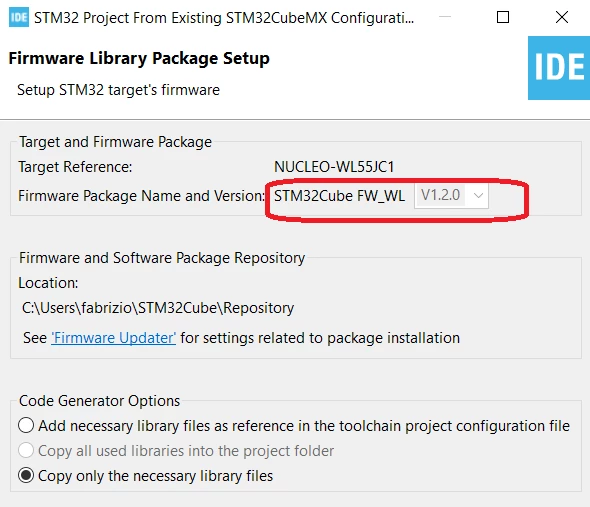
Even the field "Firmware Package Name and Version" is greyed if I start new project from STM32CubeIDE.

0693W00000Su6bHQAR.pngI suppose that the same behavior is obtained editing the .ioc file and setting the item ProjectManager.LastFirmware=false

Thank you for your help.