

Associate II
January 10, 2024
Solved

STM32WB5MM-DK, Zigbee_OnOff_Client_Router, FATAL ERROR

  • January 10, 2024
  • 7 replies
  • 2576 views

Hello,

I have STM32WB5MM-DK evaluation kit and I am trying to get example Zigbee_OnOff_Client_Router working. I updated FUS (v. 1.2.0) and Zigbee FFD (v.1.18.0). Example do not work, I get an error "Fatal Error" on terminal and display:

[M4 APPLICATION] APP_ZIGBEE_Init
[M4 APPLICATION] **********************************************************
[M4 APPLICATION] WIRELESS COPROCESSOR FW:
[M4 APPLICATION] VERSION ID = 1.18.0
[M4 APPLICATION] **** Fatal error = ERROR Unknown (Err = 0)

I debugged application and I found that error comes on this point (stm32_seq.c)

/* Execute the task */
TaskCb[CurrentTaskIdx]( );

Any idea, what could be wrong? I tested all other zigbee examples also and all have the same error. I am using latest Stm32CubeIde.
 

This topic has been closed for replies.
Best answer by Ouadi

Good to know that your issue is solved.

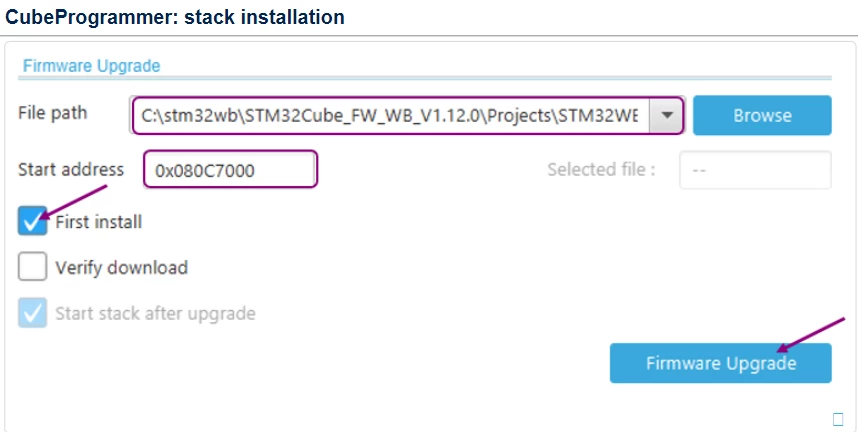
Indeed, the start of the wireless stack after upgrade is supposed to be performed directly by the CubeProgrammer as follow :

The option Start stack after upgrade is checked by default

Ouadi_1-1705072764207.png

Starting manually the wireless stack is possible in order to verify the correct installation of the firmware, and to prevent any stuck on M0 side.

Best regards

Ouadi

7 replies

eskomjAuthor
Associate II
January 10, 2024

I debugged more and I found that error hapens when FUS version etc. is checked on function SHCI_GetWirelessFwInfo(). Now I am wondering where is stated what version is needed.

eskomjAuthor
Associate II
January 10, 2024

I debugged more and found that stack version is now 0. Should be 48 (INFO_STACK_TYPE_ZIGBEE_FFD). 

eskomjAuthor
Associate II
January 10, 2024

This gives 0, should be 48:

wireless_firmware_infoStack = p_fus_device_info_table->WirelessFirmwareBleInfo;

There is only WirelessFirmwareBleInfo and WirelessFirmwareThreadInfo. But the stack is zigbee?

ST Technical Moderator
January 10, 2024

Hello @eskomj,

It seems that the Wireless stack firmware is not installed correctly on your device, you can check the firmware versions for both FUS/STACK directly on the STM32CubeProgrammer which gives you also the possibility to start the FUS / Wireless stack after a download complete. 

Have you installed the binary at the right address following the release note document ? Could you please share a capture of your configuration on the STM32CubeProgrammer ? 

You can also refer to this wiki page that describes step by step how to update FUS and Wireless stack on your device.

Best regards,

Ouadi 

eskomjAuthor
Associate II
January 11, 2024

Here is the FUS info:

Read_Fus_Infos.jpg


eskomjAuthor
Associate II
January 11, 2024

I think, I solved the problem. I had to start wireless stack. That is not mentioned in FUS update guide. Should it be application's task?

start_wireless_stack.jpg

OuadiBest answer
ST Technical Moderator
January 12, 2024

Good to know that your issue is solved.

Indeed, the start of the wireless stack after upgrade is supposed to be performed directly by the CubeProgrammer as follow :

The option Start stack after upgrade is checked by default

Ouadi_1-1705072764207.png

Starting manually the wireless stack is possible in order to verify the correct installation of the firmware, and to prevent any stuck on M0 side.

Best regards

Ouadi