LZure
Associate
Jun 28, 2022 3:23 PM UTC
Question

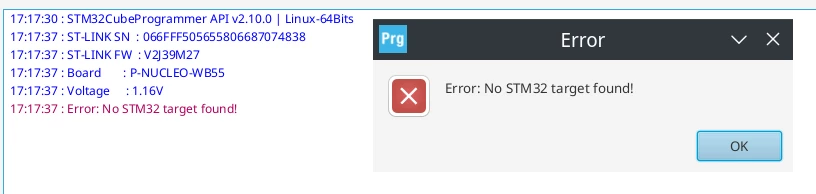
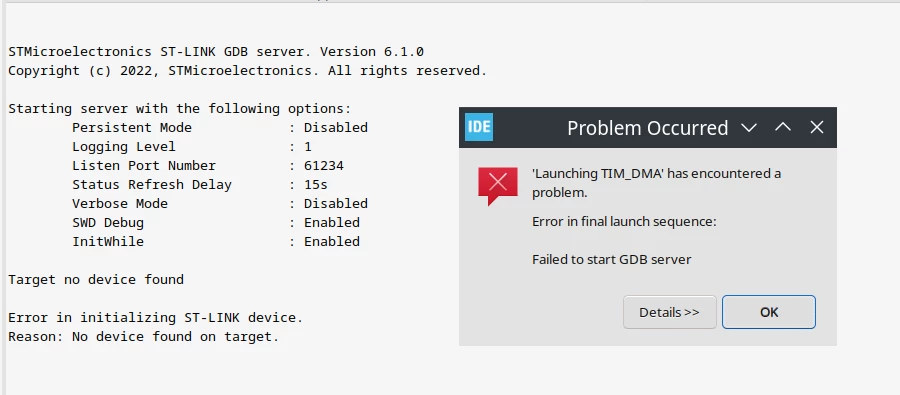
STM32WB55RG Error in initializing ST-LINK device. Reason: No device found on target

I have two P-Nucleo-WB boards and both of them end up in this state.

CubeIDE trying to load binary:
0693W00000NsyFLQAZ.pngCubeProgrammer:

0693W00000NsyIyQAJ.png 

Found several topic that looks the same however nothing helped. Has anyone solved this problem?

This topic has been closed for replies.

18 replies

LZure
LZureAuthor
Associate
Jul 19, 2022 11:27 AM UTC

This is how my Linux recognize device:

0693W00000QLW33QAH.pngJumpers are set up as you described. I can't connect by DFU:

0693W00000QLW3SQAX.png 

Remy ISSALYS
ST Technical Moderator
Jul 19, 2022 2:44 PM UTC

Hello,

In order to connect the board using USB DFU mode, you must have the following configuration:

  • BOOT0 pin HIGH: connect CN7 pin 5 to CN7 pin 7
  • JP1 ([5-6] on USB MCU).
  • JP2 is ON
  • JP3 is ON
  • Use USB_USER connector

The following configuration is used to connect the board using ST LINK:

  • JP1 ([7-8] on USB STL).
  • JP2 is ON
  • JP3 is ON 
  • Use ST-LINK connector

Best Regards

LZure
LZureAuthor
Associate
Jul 19, 2022 4:37 PM UTC

Hi Remy,

I was able to connect with USB DFU mode however I don't know how to recover option bytes. Could you please tell me how to do that?

Best regards

Remy ISSALYS
ST Technical Moderator
Jul 20, 2022 10:19 AM UTC

Hello,

Can you try to connect your board to STM32CubeProgrammer using ST LINK by following these steps ?

  • STM32CubeProgrammer configuration: Mode => Normal, Reset mode => Software reset
  • Maintain reset button on the board pressed
  • Click on connect
  • Release reset button pressed

Best Regards

rolla
Visitor II
Jul 20, 2022 11:13 AM UTC

make sure your power supply is good then you should try. i think your problem is form power supplier or low voltage system.

KiptonM
Senior III
Jul 20, 2022 1:46 PM UTC

Are you using an unpowered hub to connect to the board to?

I plug mine directly into the computer.

I have also had luck with a powered USB 3.1 Hub. The powered hub has its own power supply and does not pull power from the PC. Mine is an Inland 7 port hub with a 2000 mA power supply. It has no model number on the case.

I got it from Microcenter here is a link:

Inland 7 Port USB 3.1 Gen 1 Hub - Black - Micro Center

rolla
Visitor II
Jul 25, 2022 9:19 PM UTC

Hi Remy,

Don't worry about it, you're fine. The last time I bricked something was about four years ago. When I first used this product, I thought that my cell phone would blow up. Can it be recovered?

Best regards

LZure
LZureAuthor
Associate
Jul 31, 2022 8:18 PM UTC

Hi All,

Thanks for all your replies. I have tested voltages with few chargers and still got this same result.Tested both ports: USB MCU and ST-LINK (jumpers in correct settings). I am not using any USB hub. I used to plug it directly to laptop - laptop voltage is ok (5V).

@Remy ISSALYS​ 

Tried to connect they way you said but it still fails: Error: No STM32 target found!