Rizzie Kim
Associate
March 25, 2022
Question

STM32WB55RG BLE does not work.

  • March 25, 2022
  • 4 replies
  • 3288 views

Hello~

Hello. I am developing a BLE device using STM32WB55RG.

The test board I am using is as follows.

P-NUCLEO-WB55

MB1335D-01

After receiving the board for the first time, I wrote Middleware BLE of STM32_WPAN at STM32CUBE IDE, and communication with my mobile phone's ST BLE ToolBox was very good.

However, after upgrading the stack using STM32 CubeProgrammer, P-NUCLEO-WB55RG cannot be found in ST BLE ToolBox.

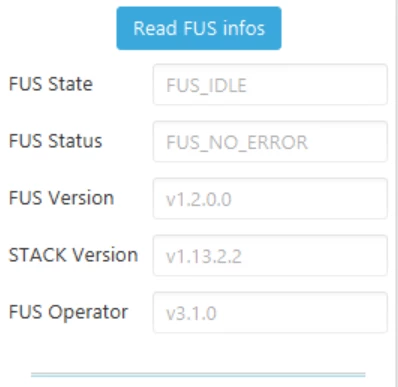
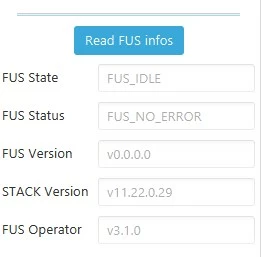
The picture below is the stack information at the time it was initially received, and the following picture is the stack information I updated.
0693W00000LvhQZQAZ.jpg<default stack - work ble >

0693W00000LvhQoQAJ.png<updated stack - do not work ble>

Can I get some help?

Or can I get the same version of the Stack as when I first got it?

Thank you very much.

This topic has been closed for replies.

4 replies

Remi QUINTIN
ST Technical Moderator
March 25, 2022

Values look OK.

Could you provide us the values of the SFSA and SBRV option bytes?

My suspicion is on the wireles stack that may have been erased.

Rizzie Kim
Associate
March 26, 2022

a few seconds ago

Actions for this Feed Item Comment

Hello, thanks for your reply. This problem is resolved.

After stack update, start the stack via SWD CLI. then it's resolved.

I have one more question. Is there no way to start the stack at the STM32Cube Programmer GUI?

Rizzie Kim
Associate
March 26, 2022

Hello, thanks for your reply. This problem is resolved.

After stack update, start the stack via SWD CLI. then it's resolved.

I have one more question. Is there no way to start the stack at the STM32Cube Programmer GUI?

Remi QUINTIN
ST Technical Moderator
March 26, 2022

> Is there no way to start the stack at the STM32Cube Programmer GUI?

Yes you just have to check the "Start stack after upgrade" button at the time you program the wireless stack with CubeProgrammer.. See attached image.