
OShen.1
Associate II
October 13, 2021
Question

[STM32WB55 Nucleo] Unable to update FUS or the wireless stack (FUS_STATE_ERR_UNKNOWN)

  • October 13, 2021
  • 10 replies
  • 4797 views

I was trying to flash my STM32WB Nucleo board with the latest (v1.2.0) FUS image using the CubeProgrammer. However, it fails with the following error.

 14:15:16 : Old Firmware delete ...
 14:15:16 : Warning: Option Byte: nSWboot0, value: 0x0, was not modified.
 14:15:16 : Warning: Option Byte: nboot0, value: 0x1, was not modified.
 14:15:16 : Warning: Option Byte: nboot1, value: 0x1, was not modified.
 14:15:16 : Warning: Option Bytes are unchanged, Data won't be downloaded
 14:15:16 : Succeeded to set nSWboot0=0 nboot1=1 nboot0=1 
 14:15:16 : Memory Programming ...
 14:15:16 : Opening and parsing file: 0x495_FUS_Operator.bin
 14:15:16 : File : 0x495_FUS_Operator.bin
 14:15:16 : Size : 8 KBytes
 14:15:16 : Address : 0x08000000 
 14:15:16 : Erasing memory corresponding to segment 0:
 14:15:16 : Erasing internal memory sectors [0 1]
 14:15:16 : Download in Progress:
 14:15:17 : File download complete
 14:15:17 : Time elapsed during download operation: 00:00:00.267
 14:15:17 : Application is running, Please Hold on...
 14:15:24 : Reconnecting...
 14:15:24 : Reconnected !
 14:15:24 : Error: FUS_STATE_ERR_UNKNOWN

I tried "Start FUS" and "Read FUS infos" and got this:
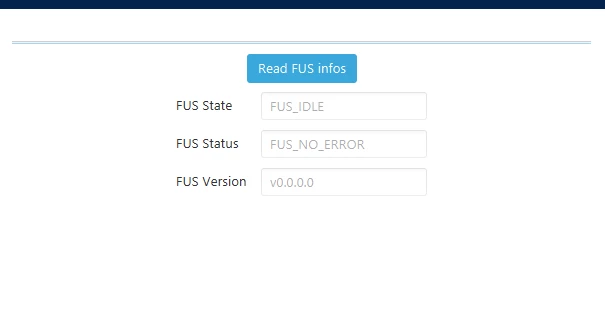
0693W00000FCJ0YQAX.pngIt indicates that the FUS Version is v0.0.0.0, which looks quite weird! Besides, the option byte reading of the MCU is:

   -------------------------------------------------------------------

            STM32CubeProgrammer v2.8.0

   -------------------------------------------------------------------

ST-LINK SN : 066FFF3736324D5043233624

ST-LINK FW : V2J38M27

Board    : P-NUCLEO-WB55

Voltage   : 3.26V

SWD freq  : 4000 KHz

Connect mode: Normal

Reset mode : Software reset

Device ID  : 0x495

Revision ID : Rev Y

Device name : STM32WB5x

Flash size : 1 MBytes

Device type : MCU

Device CPU : Cortex-M4

BL Version : 0xd5

Debug in Low Power mode enabled

UPLOADING OPTION BYTES DATA ...

 Bank     : 0x00

 Address    : 0x58004020

 Size     : 96 Bytes

██████████████████████████████████████████████████ 100%

 Bank     : 0x01

 Address    : 0x58004080

 Size     : 8 Bytes

██████████████████████████████████████████████████ 100%

OPTION BYTES BANK: 0

  Read Out Protection:

   RDP     : 0xAA (Level 0, no protection)

  BOR Level:

   BOR_LEV   : 0x0 (BOR Level 0 reset level threshold is around 1.7 V)

  User Configuration:

   nBOOT0    : 0x1 (nBOOT0=1 Boot from main Flash)

   nBOOT1    : 0x1 (Boot from code area if BOOT0=0 otherwise system Flash)

   nSWBOOT0   : 0x0 (BOOT0 taken from the option bit nBOOT0)

   SRAM2RST   : 0x0 (SRAM2 erased when a system reset occurs)

   SRAM2PE   : 0x1 (SRAM2 parity check disable)

   nRST_STOP  : 0x1 (No reset generated when entering the Stop mode)

   nRST_STDBY  : 0x1 (No reset generated when entering the Standby mode)

   nRSTSHDW   : 0x1 (No reset generated when entering the Shutdown mode)

   WWDGSW    : 0x1 (Software window watchdog)

   IWGDSTDBY  : 0x1 (Independent watchdog counter running in Standby mode)

   IWDGSTOP   : 0x1 (Independent watchdog counter running in Stop mode)

   IWDGSW    : 0x1 (Software independent watchdog)

   IPCCDBA   : 0x0 (0x0)

  Security Configuration Option bytes - 1:

   ESE     : 0x1 (Security enabled)

  PCROP Protection:

   PCROP1A_STRT : 0x1FE (0x80FF000)

   PCROP1A_END : 0x0 (0x8000800)

   PCROP_RDP  : 0x0 (PCROP zone is kept when RDP is decreased)

   PCROP1B_STRT : 0x1FE (0x80FF000)

   PCROP1B_END : 0x0 (0x8000800)

  Write Protection:

   WRP1A_STRT  : 0xFF (0x80FF000)

   WRP1A_END  : 0x0 (0x8000000)

   WRP1B_STRT  : 0xFF (0x80FF000)

   WRP1B_END  : 0x0 (0x8000000)

OPTION BYTES BANK: 1

  Security Configuration Option bytes - 2:

   SFSA     : 0xF6 (0x80F6000)

   FSD     : 0x0 (System and Flash secure)

   DDS     : 0x1 (CPU2 debug access disabled)

   C2OPT    : 0x1 (SBRV will address Flash)

   NBRSD    : 0x0 (SRAM2b is secure)

   SNBRSA    : 0x10 (0x2003C000)

   BRSD     : 0x1 (SRAM2a is non-secure)

   SBRSA    : 0x0 (0x20030000)

   SBRV     : 0x3D800 (0x20000000)

Could someone please kindly advise why I am getting this error ((FUS_STATE_ERR_UNKNOWN) and how I can solve this issue? Thanks in advance!

This topic has been closed for replies.

10 replies

OShen.1
OShen.1Author
Associate II
October 13, 2021

Could anyone help with this please? @Remi QUINTIN​ @Imen DAHMEN​ 

Remi QUINTIN
Technical Moderator
October 13, 2021

According to the SFSA value, you still have the original FUS on your board.

Assuming you are using the latest WB FV v1.12, you must use the stm32wb5x_FUS_fw_for_fus_0_5_3. bin file to update the FUS.

I see you are using CubeProgrammer v2.8 and this is OK. Once you 'll manage to upgrade the FUS, you should be able to see the FUS version even when using the SWD port for the programming.

OShen.1
OShen.1Author
Associate II
October 13, 2021

Thank you so much for your advice. However, I have tried programming stm32wb5x_FUS_fw_for_fus_0_5_3. bin but still failed with the same error:

PS C:\Program Files\STMicroelectronics\STM32Cube\STM32CubeProgrammer\bin> .\STM32_Programmer_CLI.exe -c port=swd -fwupgrade C:\Users\myuser\STM32Cube\Repository\STM32Cube_FW_WB_V1.12.1\Projects\STM32WB_Copro_Wireless_Binaries\STM32WB5x\stm32wb5x_FUS_fw_for_fus_0_5_3.bin 0x080EC000

   -------------------------------------------------------------------

            STM32CubeProgrammer v2.8.0

   -------------------------------------------------------------------

ST-LINK SN : 066FFF3736324D5043233624

ST-LINK FW : V2J38M27

Board    : P-NUCLEO-WB55

Voltage   : 3.26V

SWD freq  : 4000 KHz

Connect mode: Normal

Reset mode : Software reset

Device ID  : 0x495

Revision ID : Rev Y

Device name : STM32WB5x

Flash size : 1 MBytes

Device type : MCU

Device CPU : Cortex-M4

BL Version : 0xd5

Debug in Low Power mode enabled

Old wireless stack delete ...

Warning: Option Byte: nSWboot0, value: 0x0, was not modified.

Warning: Option Byte: nboot0, value: 0x1, was not modified.

Warning: Option Byte: nboot1, value: 0x1, was not modified.

Warning: Option Bytes are unchanged, Data won't be downloaded

Succeeded to set nSWboot0=0 nboot1=1 nboot0=1

Memory Programming ...

Opening and parsing file: 0x495_FUS_Operator.bin

 File     : 0x495_FUS_Operator.bin

 Size     : 8 KBytes

 Address    : 0x08000000

Erasing memory corresponding to segment 0:

Erasing internal memory sectors [0 1]

Download in Progress:

██████████████████████████████████████████████████ 100%

File download complete

Time elapsed during download operation: 00:00:00.311

Application is running, Please Hold on...

Reconnecting...

Reconnected !

Error: FUS_STATE_ERR_UNKNOWN

Error:

Old Firmware delete failed

Could you advise? Does it have something to do with the current "v0.0.0.0" FUS version? Thanks!

Remi QUINTIN
Technical Moderator
October 14, 2021

FUS_STATE_ERR_UNKNOWN means the FUS is not activated.

Could you tell me the value of the SBSFA and SBRV option bytes?

Try also press the "Start FUS" button and then read the FUS version.

OShen.1
OShen.1Author
Associate II
October 14, 2021

The value of SBRV is 0x3D800 and as for the other option byte, SBRSA is 0x0, SNBRSA is 0x01, and SFSA is 0xF6. I also tried press "Start FUS" button and read the FUS version. The FUS version is "v0.0.0.0".

Remi QUINTIN
Technical Moderator
October 14, 2021

I really do not see any reason why the FUS version is not detected. The option byte values are OK.

Last trials:

  • Try the quite recent V2.8.1 CubeProg version.
  • Set RDP value to 0xBB and the back to 0xAA. This erase the user part of the Flash memory, to be sure the download is done on a clean memory.
akarp.2161
Associate II
December 25, 2021

Hi!)

Has the issue been resolved?

I have a similar problem. Previously, I successfully used WB55CGU6 (rev. Y) in my device, now I'm trying WB55CEU6 (rev. Y) (bought in June 2021 on Arrow.com ).

1. I tried to run on 5 boards in USB DFU mode - to no avail. I rechecked the OB combinations several times, physically pin BOOT0 to pull up to Vdd. The USB circuits actually work - I checked using a separate USB Mass Storage Device firmware.

2. When trying to work with FUS via SWD (of course at the changed addresses for CE), I get FUS_STATE_ERR_UNKNOWN errors.

3. Reading RAM at 0x20030890 gives all zeros.

Could these be "special" chips with damaged FUS?)

Help me) Thanks!0693W00000Hpmr3QAB.jpg0693W00000HpmrDQAR.jpg0693W00000Hpmr8QAB.jpg

Remi QUINTIN
Technical Moderator
January 14, 2022

Before going any further , are you able to know the FW version of the FUS installed on your new boards?

Then Which FUS file do you want to program? Which WB FW version are you using?

 a )Using the USB_USER port in DFU mode, be sure to set the PH3/BOOT0 pin to high and set the nSWBOOT0 option byte to 1 and nBOOT1 option byte to 1. NBOOT0 option byte is not applicable as the Value is set by the external BOOT0 pin. If those options bytes are not set properly, you need to revert to the SWD port to configure them.

Your new board is now having only 512KB flash memory. What is the FW stack to program? Did you check its size?


b) Now using SWD port, it looks like you are able to connect your board. In that case can you check and the FUS version?

akarp.2161
Associate II
January 14, 2022

1. An attempt to read the status and version of FUS via SWD ends with the error FUS_STATE_ERR_UNKNOWN

At the same time, the data in the first flash sectors changes from 0xFF to some data.

2.I use the FW_WB V1.10.1 version

FUS version: first stm32wb5x_FUS_fw_1_0_2.bin, after - stm32wb5x_FUS_fw.bin from FW_WB V1.10.1. addr: 0x0807A000.

3.I tried USB DFU again - it doesn't work! Under the same conditions on WB55CG - everything is OK

4. I use BLUE_STACK_FULL, ~162kB

Log from CubeProgrammer when trying to read FUS infos:

 21:13:37 : Reconnected !

 21:13:37 : Succeeded to set nSWboot0=0 nboot1=1 nboot0=1 

 21:13:37 : Memory Programming ...

 21:13:37 : Opening and parsing file: 0x495_FUS_Operator.bin

 21:13:37 :  File     : 0x495_FUS_Operator.bin

 21:13:37 :  Size     : 8 KBytes

 21:13:37 :  Address    : 0x08000000 

 21:13:37 : Erasing memory corresponding to segment 0:

 21:13:37 : Erasing internal memory sectors [0 1]

 21:13:37 : Download in Progress:

 21:13:37 : File download complete

 21:13:37 : Time elapsed during download operation: 00:00:00.370

 21:13:37 : Application is running, Please Hold on...

 21:13:37 : Reconnecting...

 21:13:37 : Reconnected !

 21:13:37 : Error: FUS_STATE_ERR_UNKNOWN

 21:13:37 : the Fus getState command Failed

 21:13:37 : Read FUS state Operation Failure! Please, try again

Remi QUINTIN
Technical Moderator
January 14, 2022

WB FW V1.10.2 is an old version now as the most recent one is v1.13.1.

I would definitely recommend to try this version and check again.

Ok no issue regarding the stack size.

Are you using the latest CubeProgrammer version v 2.8.1?

This version has some additional features to trigger the FUS and read the FUS version whatever programming port is used.

akarp.2161
Associate II
January 14, 2022

Ok, I'll try the new v1.13.1.

CubeProgrammer version - v 2.9.0

Thanks!

Remi QUINTIN
Technical Moderator
January 14, 2022

>FUS version: first stm32wb5x_FUS_fw_1_0_2.bin, after - stm32wb5x_FUS_fw.bin from FW_WB V1.10.1. addr: 0x0807A000.

Was the update of stm32wb5x_FUS_fw_1_0_2.bin OK?

So the issue is with stm32wb5x_FUS_fw.bin?

Try the one which is part of WB FW v 1.13.

akarp.2161
Associate II
January 16, 2022

>Was the update of stm32wb5x_FUS_fw_1_0_2.bin OK?

No, this is the sequence I was aiming for.

The problem cannot be related to the library version.

I get an error FUS_STATE_ERR_UNKNOWN with any operation with FUS - fwdelete, read fuse infos, start FUS. The strangest thing is that USB DFU does not work on these chips yet. Is there a possible manufacturing error that the necessary firmware was not loaded into the chips?

Remi QUINTIN
Technical Moderator
January 16, 2022

USB DFU works if the 3 option bytes are properly set:

•nBOOT0 = N/A

•nBOOT1 = 1 (Checked = Use SysMemBL)

•nSWBOOT0 = 1 = Checked (Taken from pin)

•Set PH3/BOOT0 pin to High.

Could you check this?

akarp.2161
Associate II
January 16, 2022

I've checked it many times. Moreover, on boards with WB55CG everything works without problems.

Remi QUINTIN
Technical Moderator
January 16, 2022

Did you trigger "START FUS" button with CubeProgrammer and then read the version?

akarp.2161
Associate II
January 16, 2022

At any operation with FUS, including "Start FUS" I get an error:

FUS_STATE_ERR_UNKNOWN