


LPetr.1
Senior
Jul 27, 2021 9:02 AM UTC
Question

STM32WB55 nucleo board SPI clock not working

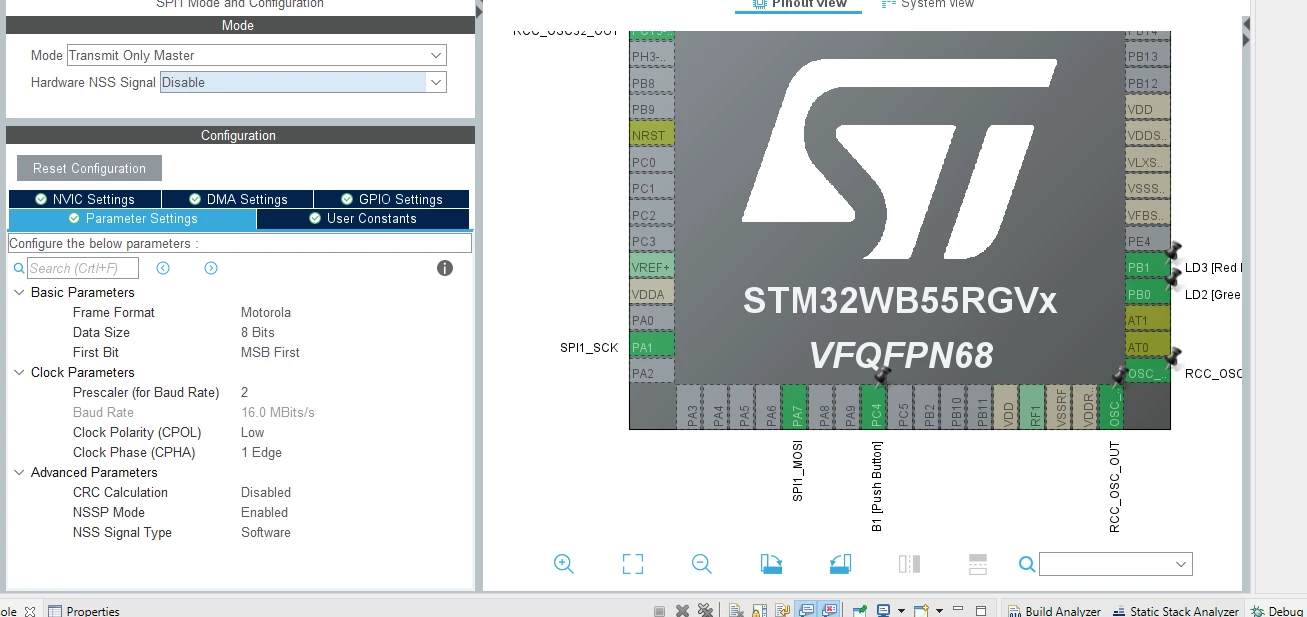
Hello. I am trying to setup SPI1 on the STM32WB55 nucleo board. I have setup the nucleo board with the default peripheral configuration using STM32CUBEMX and I have enabled SPI1 Transmit Only Master mode:
0693W00000D0iYdQAJ.png 

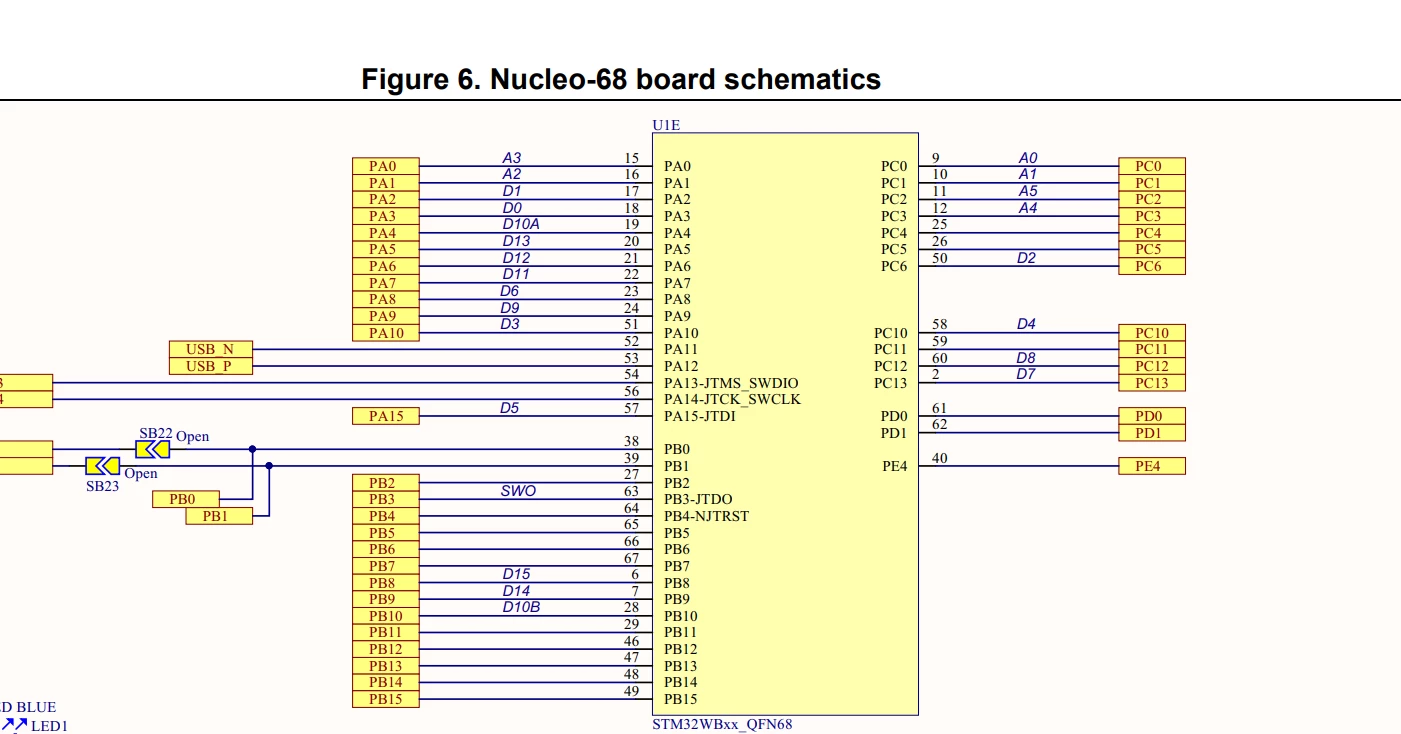
In my code, all I am trying to do is SPI1 transmit every 1 second and I use oscilosscope to probe SP1 clock pin ( supposed to be A2 pin on the header according to the stm32wb55 nucleo datasheet.
0693W00000D0iZMQAZ.png 

My main.c and loop:

```

const uint8_t EEPROM_RDSR = 0b00000101;

/* USER CODE END 0 */

/**

 * @brief The application entry point.

 * @retval int

 */

int main(void)

{

 /* USER CODE BEGIN 1 */

 /* USER CODE END 1 */

 /* MCU Configuration--------------------------------------------------------*/

 /* Reset of all peripherals, Initializes the Flash interface and the Systick. */

 HAL_Init();

 /* USER CODE BEGIN Init */

 /* USER CODE END Init */

 /* Configure the system clock */

 SystemClock_Config();

 /* USER CODE BEGIN SysInit */

 /* USER CODE END SysInit */

 /* Initialize all configured peripherals */

 MX_GPIO_Init();

 MX_USART1_UART_Init();

 MX_SPI1_Init();

 /* USER CODE BEGIN 2 */

 /* USER CODE END 2 */

 /* Infinite loop */

 /* USER CODE BEGIN WHILE */

 while (1)

 {

  /* USER CODE END WHILE */

 HAL_SPI_Transmit(&hspi1, (uint8_t *)&EEPROM_RDSR, 1, 100);

 HAL_Delay(1000);

  /* USER CODE BEGIN 3 */

 }

 /* USER CODE END 3 */

}

```

On the scope, the SPI1 clock is not toggling at all. Please suggest possible ways to debug/solve this issue

This topic has been closed for replies.

5 replies

Mike_ST
ST Technical Moderator
Jul 27, 2021 10:26 AM UTC

Hello,

I tried your code after quickly setting up a cubeMX project for this nucleo.

It is working.

I suspect you don't see the frame on the scope. Please try to remove the HAL_Delay, to have continuous transmission.

In order to give better visibility on the answered topics, please click on 'Best answer' on the reply which solved your issue or answered your question. 
LPetr.1
LPetr.1Author
Senior
Jul 27, 2021 11:21 AM UTC

Hello. Thank you very much for the response. I am big noob debugging hardware and never really had an opportunity to have a look at SPI through an oscilloscope. I have managed to capture some sort of signal on clock pin with trigger option on my osciloscope. Please see the image below:

0693W00000D0jxPQAR.jpg 

Does that look like a decent SPI clock? I have measured the time difference between the start of the spike and end of the spike and it looks like 60ns

Mike_ST
ST Technical Moderator
Jul 27, 2021 12:13 PM UTC

Near 62.5ns + 8 spikes, it works.

The signal is not square at all.

Maybe your probe/scope need to be calibrated.

In order to give better visibility on the answered topics, please click on 'Best answer' on the reply which solved your issue or answered your question. 
LPetr.1
LPetr.1Author
Senior
Jul 27, 2021 12:17 PM UTC

Once I have set the prescaler to 256, the signal is square. Now the clock period is 125Khz and that is correct since the CPU cluck frequency is 32Mhz/256 = 125kHz. Maybe my scope is too old to handle 16Mhz? Anyways, thanks. That confirmed the SPI is working as expected

Mike_ST
ST Technical Moderator
Jul 27, 2021 12:23 PM UTC

>> Maybe my scope is too old to handle 16Mhz ?

I can't answer to that question. :)

Most of that time max freq it is written in front of the scope.

In order to give better visibility on the answered topics, please click on 'Best answer' on the reply which solved your issue or answered your question.