

bboulet
Associate II
October 22, 2019
Question

STM32WB55 FUS issue ==> firmware not authentic or reconnexion issue during upgrade

  • October 22, 2019
  • 8 replies
  • 8368 views

Hello,

I' trying to update the FUS on my STM32WB55CG (1M), I have the latest STM32Cube_FW_WB_V1.3.0, I followed the Release_Notes in the STM32WB_Copro_Wireless_Binaries :

for information I use this chip on my own board (not a nucleo)

I switched the MCU in bootloader

then

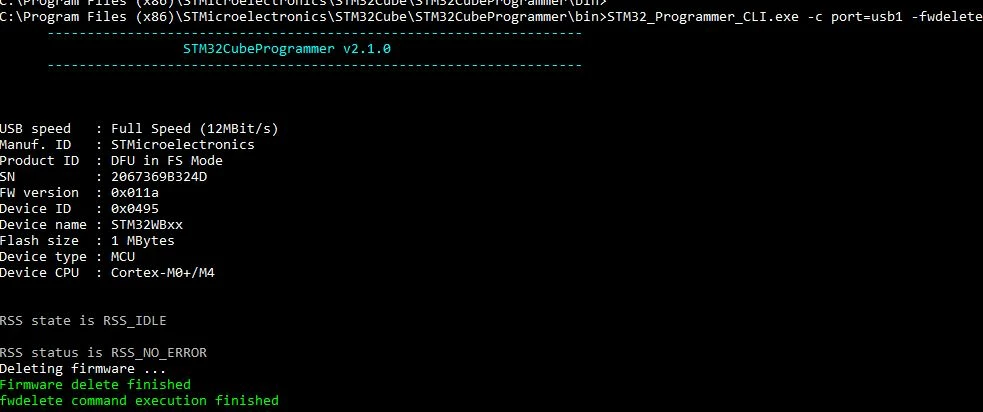
  • STEP 3 : Delete current wireless stack :
    • STM32_Programmer_CLI.exe -c port=usb1 -fwdelete
0690X00000AqhqnQAB.jpg

then

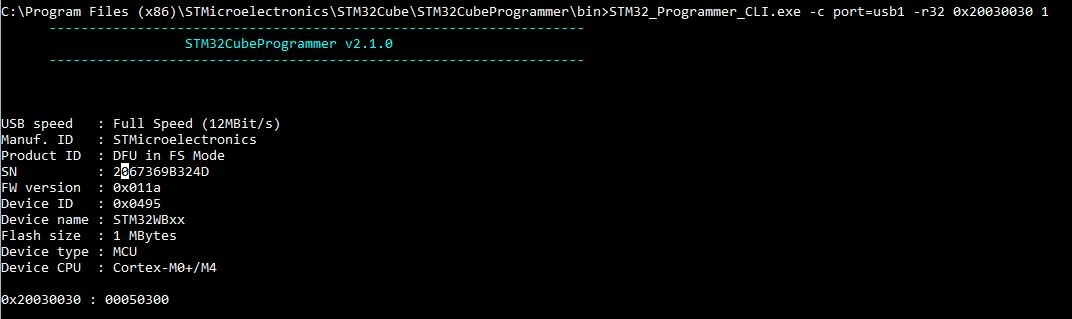
STEP 4 : Read and upgrade FUS Version

  • STM32_Programmer_CLI.exe -c port=usb1 -r32 0x20030030 1
    • 0x20030030 : 00050300 : FUSv0.5.3 => Must be updated using STEP 5.
    • 0x20030030 : 01000100 or 01000200 : FUSv1.0.x => Up to date, you can download the new wireless stack using STEP6.
0690X00000AqhuVQAR.jpg

so I need to update it

STEP 5 : Download new FUS :

  • STM32_Programmer_CLI.exe -c port=usb1 -fwupgrade [FUS_Binary] [Install@] firstinstall=0

in my case

STM32_Programmer_CLI.exe -c port=usb1 -vb 2 -fwupgrade stm32wb5x_FUS_fw.bin 0x080EC000 firstinstall=0

I increse the verbose mode to 2 (I join the log file flash_FUS_VB2)

most of the time the upgrade fail during the reconnecting process after Deleting firmware...0690X00000AqiduQAB.jpg
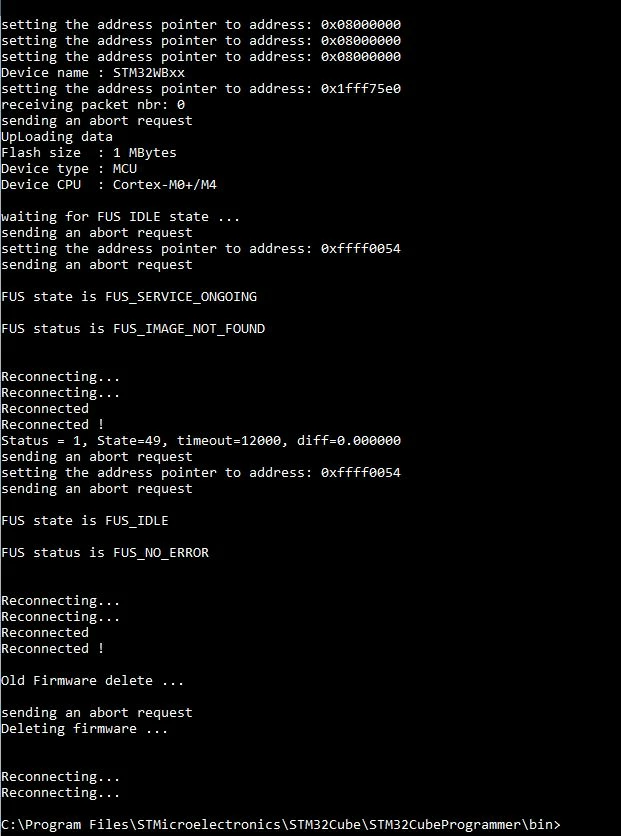
if this part pass I have a firmware not authentic at the end

Reconnecting...

Reconnected

Reconnected !

sending an abort request

setting the address pointer to address: 0xffff0054

sending an abort request

FUS state is FUS_UPGRADE_ONGOING

FUS status is FUS_IMAGE_NOT_AUTHENTIC

Error: Firmware not authentic!

and obviously because of this I can't upload the BLE stack.

Your help would be really appreciate, we have a nice project based on this and we would like move forward on this topic.

regards,

Benjamin

This topic has been closed for replies.

8 replies

October 23, 2019

Hi, Benjamin.

In AN5185, "Table 1" is written:

If an STM32WB5xG device has FUS V1.0.1, then there is no need to upgrade to V1.0.2, since it does not bring any new feature/change vs. V1.0.1.

In case FUS V1.0.2 installation is started by user on an STM32WB5xG device with FUS V1.0.1, FUS returns FUS_STATE_IMG_NOT_AUTHENTIC error and discard the upgrade.

Best regards,

Vyacheslav.

bboulet
bbouletAuthor
Associate II
October 23, 2019

Hello Vyacheslav,

I agree with you but in my case the stm32wb55cg has FUSv0.5.3 installed, and I have this problem when I try to upgrade in FUS1.0.1.

regards,

Benjamin

October 23, 2019

Oh, sorry.

It happens to me too.

I try to fill in the FUS several times with the firstinstall value I set it to 0 or to 1.

But I did not notice the logic when a successful update occurs.

bboulet
bbouletAuthor
Associate II
October 23, 2019

I also selected 0 then 1 but the result is :

if firstinstall is 1 :

most of the time the upgrade fail during the reconnecting process after Deleting firmware.

if firstinstall is 0:

FUS status is FUS_IMAGE_NOT_AUTHENTIC

Error: Firmware not authentic!

October 23, 2019

How about to try to load FUS ver 1.0.1 from SDK 1.1.0 ?

bboulet
bbouletAuthor
Associate II
October 23, 2019

Good idea, I gonna try !

bboulet
bbouletAuthor
Associate II
October 23, 2019

It worked, but I'm not comfortable to understand why, and I would do this only on one board I don't have more in provious version anymore

October 23, 2019

It’s the same with me.

After I put the fus 1.0.1, I don’t touch it anymore :)

It seems to me, that this is due to the first revisions of stones that have some kind of glitches.

bboulet
bbouletAuthor
Associate II
November 14, 2019

Finally I understood my problem, the boot pin SHALL be pull to VDD during ALL the update

furkan
Visitor II
January 9, 2020

I'm having the same problem. despite everything I still do not get results. you solved the problem by pulling the boot pin to the VDD. I tried but did not. Is there a solution you can offer?

abbas14
Associate III
March 7, 2020

Same here!

Here's my full version log:

USB speed : Full Speed (12MBit/s)
Manuf. ID : STMicroelectronics
Product ID : DFU in FS Mode
SN : 207B38843036
FW version : 0x011a
Device ID : 0x0495
Device name : STM32WBxx
Flash size : 1 MBytes
Device type : MCU
Device CPU : Cortex-M0+/M4
 
 
Reading 32-bit memory content
 Size : 4 Bytes
 Address: : 0x20030030
 
0x20030030 : 00050300

Notice 0x20030030 : 00050300 (FUSv0.5.3 => Must be updated using STEP 5.), yet getting the same error!

Here's the last section of the upgrade log:

Updating firmware ...
Waiting for firmware upgrade end
 
FUS state is WIRELESS_STACK_UPGRADE_ONGOING
 
FUS status is FUS_NO_ERROR
 
FUS state is WIRELESS_STACK_UPGRADE_ONGOING
 
FUS status is FUS_IMAGE_NOT_AUTHENTIC
Error: Firmware not authentic!

It would be really nice if someone could help us getting our controllers upgraded.

TYin.1
Visitor II
December 17, 2020

v0.5.3 can not directly upgrade to v1.1.0, first upgrade to v1.0.2, then upgrade to 1.1.0.