CBuek.1
Associate II
August 3, 2022
Solved

STM32WB15 BLE not working

Hi, I have shared my project schematic. it's should work or not? (SMPs not used)

Problem : BLE cannot advertise, but this configuration in STM32CubeIDE can work with NUCLEO-WB55.

This topic has been closed for replies.
CBuek.1
CBuek.1Best answer
Associate II
August 9, 2022

Hello.

Now my custom board is working.

This is my solution step by step and some problem I saw in code generation.

STM32CudeIDE version 1.10.1

STM32WBCube version 1.14.1

#1 : Install wireless stack firmware. (new IC MCU)

For new IC MCU need to flash wireless stack firmware. In my case user stm32wb1x_BLE_Stack_full_fw.bin found in

../../STM32Cube/Repository/STM32Cube_FW_WB_V1.14.1/Projects/STM32WB_Copro_Wireless_Binaries/STM32WB1x/stm32wb1x_BLE_Stack_full_fw.bin

upload this firmware to the MCU by using STM32CubeProgrammer start address 0x08021000

please see instructions in "Release_Notes.html" (important)

#2 ​ : Test with example

This step make sure your board can work.

In my case I test with BLE_HeartRate example.

../../STM32Cube/Repository/STM32Cube_FW_WB_V1.14.1/Projects/NUCLEO-WB15CC/Applications/BLE/BLE_HeartRate

Import to STM32CudeIDE and compile without change anything the start debug or just upload to the board

#3 : Create new project

Please follow project configuration in YouTube STMicroelectronics channel

Simple BLE application generated from CubeMX

for STM32WB15xx please change some configuration because of RAM limitation ref: NUCLEO-STM32WB15 HardFault Error with BLE custom Template.
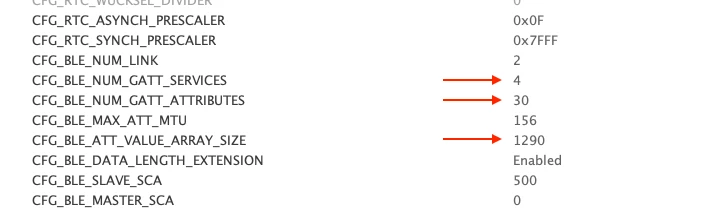
0693W00000QNI4aQAH.png config : (in example use this config value I don't known how to calculation :grinning_face_with_sweat: )

Minimum Heap Size : 0x400

Minimum Stack Size : 0x1000

# 3.1 Fix code generation (for 1.14.1)

# fix startup script (this bug or developer need to change manually? )

replace all script startup_stm32wb15ccux.s generated with STM32CudeIDE by startup_stm32wb15ccux.s script in BLE_HeartRate example project. (see #2)

# fix app_entry.c

​ In this step the BLE can advertise but not normal working (don't known why). GPIO repeat toggle without init or not using (my LED blink repeatedly). I have fixed by modified in MX_APPE_Init() function code generated with

void MX_APPE_Init(void)
{
 System_Init(); /**< System initialization */
 
 SystemPower_Config(); /**< Configure the system Power Mode */
 
 HW_TS_Init(hw_ts_InitMode_Full, &hrtc); /**< Initialize the TimerServer */
 
/* USER CODE BEGIN APPE_Init_1 */
	APPD_Init();
 
	 /**
	 * The Standby mode should not be entered before the initialization is over
	 * The default state of the Low Power Manager is to allow the Standby Mode so an request is needed here
	 */
	 UTIL_LPM_SetOffMode(1 << CFG_LPM_APP, UTIL_LPM_DISABLE);
 
 
/* USER CODE END APPE_Init_1 */
 appe_Tl_Init();	/* Initialize all transport layers */
 
 /**
 * From now, the application is waiting for the ready event (VS_HCI_C2_Ready)
 * received on the system channel before starting the Stack
 * This system event is received with APPE_SysUserEvtRx()
 */
/* USER CODE BEGIN APPE_Init_2 */
 
/* USER CODE END APPE_Init_2 */
 return;
}

# Compile and Run ➡�? :beaming_face_with_smiling_eyes:

# Found some bug (or I missed something?)

In code generation I can't start advertising with low power mode by change APP_BLE_FAST_ADV to APP_BLE_LP_ADV in Adv_Request(APP_BLE_LP_ADV); function.

because in this function always with fast mode ?
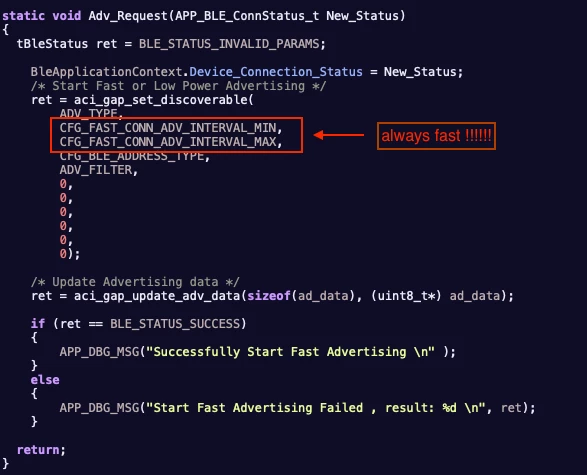
0693W00000QNICeQAP.pngsolution

BleApplicationContext.Device_Connection_Status = NewStatus;
 /* Start Fast or Low Power Advertising */
 ret = aci_gap_set_discoverable(ADV_TYPE,
		 NewStatus == APP_BLE_FAST_ADV ? CFG_FAST_CONN_ADV_INTERVAL_MIN : CFG_LP_CONN_ADV_INTERVAL_MIN,
				 NewStatus == APP_BLE_FAST_ADV ? CFG_FAST_CONN_ADV_INTERVAL_MAX : CFG_LP_CONN_ADV_INTERVAL_MAX,
 CFG_BLE_ADDRESS_TYPE,
 ADV_FILTER,
 0,
 0,
 0,
 0,
 0,
 0);

Thanks,

Chatchai

1 reply

CBuek.1
CBuek.1AuthorBest answer
Associate II
August 9, 2022

Hello.

Now my custom board is working.

This is my solution step by step and some problem I saw in code generation.

STM32CudeIDE version 1.10.1

STM32WBCube version 1.14.1

#1 : Install wireless stack firmware. (new IC MCU)

For new IC MCU need to flash wireless stack firmware. In my case user stm32wb1x_BLE_Stack_full_fw.bin found in

../../STM32Cube/Repository/STM32Cube_FW_WB_V1.14.1/Projects/STM32WB_Copro_Wireless_Binaries/STM32WB1x/stm32wb1x_BLE_Stack_full_fw.bin

upload this firmware to the MCU by using STM32CubeProgrammer start address 0x08021000

please see instructions in "Release_Notes.html" (important)

#2 ​ : Test with example

This step make sure your board can work.

In my case I test with BLE_HeartRate example.

../../STM32Cube/Repository/STM32Cube_FW_WB_V1.14.1/Projects/NUCLEO-WB15CC/Applications/BLE/BLE_HeartRate

Import to STM32CudeIDE and compile without change anything the start debug or just upload to the board

#3 : Create new project

Please follow project configuration in YouTube STMicroelectronics channel

Simple BLE application generated from CubeMX

for STM32WB15xx please change some configuration because of RAM limitation ref: NUCLEO-STM32WB15 HardFault Error with BLE custom Template.

0693W00000QNI4aQAH.png config : (in example use this config value I don't known how to calculation :grinning_face_with_sweat: )

Minimum Heap Size : 0x400

Minimum Stack Size : 0x1000

# 3.1 Fix code generation (for 1.14.1)

# fix startup script (this bug or developer need to change manually? )

replace all script startup_stm32wb15ccux.s generated with STM32CudeIDE by startup_stm32wb15ccux.s script in BLE_HeartRate example project. (see #2)

# fix app_entry.c

​ In this step the BLE can advertise but not normal working (don't known why). GPIO repeat toggle without init or not using (my LED blink repeatedly). I have fixed by modified in MX_APPE_Init() function code generated with

void MX_APPE_Init(void)
{
 System_Init(); /**< System initialization */
 
 SystemPower_Config(); /**< Configure the system Power Mode */
 
 HW_TS_Init(hw_ts_InitMode_Full, &hrtc); /**< Initialize the TimerServer */
 
/* USER CODE BEGIN APPE_Init_1 */
	APPD_Init();
 
	 /**
	 * The Standby mode should not be entered before the initialization is over
	 * The default state of the Low Power Manager is to allow the Standby Mode so an request is needed here
	 */
	 UTIL_LPM_SetOffMode(1 << CFG_LPM_APP, UTIL_LPM_DISABLE);
 
 
/* USER CODE END APPE_Init_1 */
 appe_Tl_Init();	/* Initialize all transport layers */
 
 /**
 * From now, the application is waiting for the ready event (VS_HCI_C2_Ready)
 * received on the system channel before starting the Stack
 * This system event is received with APPE_SysUserEvtRx()
 */
/* USER CODE BEGIN APPE_Init_2 */
 
/* USER CODE END APPE_Init_2 */
 return;
}

# Compile and Run ➡�? :beaming_face_with_smiling_eyes:

# Found some bug (or I missed something?)

In code generation I can't start advertising with low power mode by change APP_BLE_FAST_ADV to APP_BLE_LP_ADV in Adv_Request(APP_BLE_LP_ADV); function.

because in this function always with fast mode ?

0693W00000QNICeQAP.pngsolution

BleApplicationContext.Device_Connection_Status = NewStatus;
 /* Start Fast or Low Power Advertising */
 ret = aci_gap_set_discoverable(ADV_TYPE,
		 NewStatus == APP_BLE_FAST_ADV ? CFG_FAST_CONN_ADV_INTERVAL_MIN : CFG_LP_CONN_ADV_INTERVAL_MIN,
				 NewStatus == APP_BLE_FAST_ADV ? CFG_FAST_CONN_ADV_INTERVAL_MAX : CFG_LP_CONN_ADV_INTERVAL_MAX,
 CFG_BLE_ADDRESS_TYPE,
 ADV_FILTER,
 0,
 0,
 0,
 0,
 0,
 0);

Thanks,

Chatchai