

Associate II
December 2, 2025
Solved

STM32WB05KZ – Cannot Connect After Uploading BLE Beacon Firmware (“Unable to get core ID”)

  • December 2, 2025
  • 2 replies
  • 777 views


Hello,

I am using an STM32WB05KZ board and it was working normally with SWD through STM32CubeProgrammer.
However, after uploading a BLE beacon example firmware, I can no longer connect to the MCU.

CubeProgrammer shows the following errors:

Error: Unable to get core ID
Error: ST-LINK error (DEV_TARGET_CMD_ERR)
No STM32 target found

My setup:

  • SWDIO, SWCLK, and RST are connected through through-hole pads.

  • ST-LINK V2 firmware: V2J46M33

  • Voltage: 3.21 V

  • SWD frequency tested from 4 MHz down to 100 kHz

  • Tried "Under Reset", "Hotplug", and "Normal" modes

  • Tried holding RESET while connecting → still no success

It seems the BLE firmware is blocking SWD or reconfiguring PA13/PA14 very early during boot.

Requested Help:

  • How can I recover the STM32WB05KZ and re-enable SWD?

  • Is there a recommended recovery procedure for WB devices stuck after BLE firmware?

  • Does the WB05KZ support BOOT0 or another method to force the system bootloader?

  • How can I prevent BLE examples from disabling SWD pins or entering STOP mode?

Any guidance from ST engineers or community experts would be greatly appreciated.

Thank you.
Best answer by Imen.D

Hello @pradeepaan 

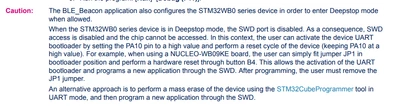
Did you try to set PA10 high and reset to activate the UART bootloader?

You can recover the board by forcing it into bootloader mode. For the NUCLEO-WB05KZ, this is done by connecting pin 5 and pin 7 on the JP3 jumper found on CN3. 

Please refer to the following articles that may help you:  

Refer also to the UM3205, on "How to run an STM32_BLE application" section.

ImenD_0-1764776697869.png


2 replies

Associate II
December 2, 2025

PA 2 = SWD

PA3 = SWCLK

Imen.DBest answer
ST Technical Moderator
December 3, 2025

Hello @pradeepaan 

Did you try to set PA10 high and reset to activate the UART bootloader?

You can recover the board by forcing it into bootloader mode. For the NUCLEO-WB05KZ, this is done by connecting pin 5 and pin 7 on the JP3 jumper found on CN3. 

Please refer to the following articles that may help you:  

Refer also to the UM3205, on "How to run an STM32_BLE application" section.

ImenD_0-1764776697869.png


In order to give better visibility on the answered topics, please click on 'Best answer' on the reply which solved your issue or answered your question. Thanks
Associate II
December 5, 2025

Hello Imen.D,

I have designed my own PCB using the STM32WB05KZ chip.

Before, I was able to program the board normally through SWD, but after flashing the BLE example once, the SWD interface can no longer be detected.

I understand your suggestion about pulling PA10 high and resetting the device to force entry into the UART bootloader. Since I am using a custom PCB (not the NUCLEO-WB05KZ), I manually pull PA10 to VDD and then perform a reset, but the SWD connection still fails.

For reference, I have attached:

  • My PCB pinout

  • The ST-LINK programmer wiring

  • The exact SWD / UART connections used on the board

If you could review my setup and confirm whether the bootloader activation method is correct for the WB05KZ in a custom design, that would be very helpful.
At the moment, the board enters DeepStop after running the BLE example, and I can no longer regain SWD access.

Thank you.

pradeepaan_0-1764910710915.jpegpradeepaan_1-1764910748081.jpegpradeepaan_2-1764910779606.jpegpradeepaan_3-1764910816205.jpegpradeepaan_4-1764910851666.pngpradeepaan_5-1764910919759.pngpradeepaan_6-1764910984554.png