
Standby mode - Power peaks when measuring power consumption, a normal thing?
Hi there,
i am currently working on a BLE Customboard using a STM32WB55.
The current setup allows for a 1 second long BLE Advertising, to transmit sensor data.
After this second the device is going into STANDBY MODE using the tiny_lpm class:
// from app_ble.c -> Callback when the HW_TIM has timedout after 1 second.

static void Adv_Mgr(void) {
 aci_gap_set_non_discoverable();
 UTIL_LPM_EnterLowPower();
}
In the stm32_lpm_if.c i am doing the following to actually stretch the wakeup time to be several minutes / hours:
void PWR_EnterOffMode(void) {
/* USER CODE BEGIN PWR_EnterOffMode_1 */
 HAL_RTCEx_DeactivateWakeUpTimer(&hrtc);
 if (HAL_RTCEx_SetWakeUpTimer_IT(&hrtc, RTC_WAKEUP_COUNTER, RTC_WAKEUPCLOCK_CK_SPRE_16BITS) != HAL_OK) {
 Error_Handler();
 }

.....
The rest of the function as it is.
Overall this seems to work quite nice since i am ending up with a power consumption of 0.6-0.7 uA which is matching with the datasheet.
I wanted to clarify if the spikes you see in the screenshot below are a normal thing?
The device itself is in standby and NOT waking up as expected. The power-consumption is at minimum but if i zoom in the time axis i can see spikes occouring in a regular pattern.
I am not sure if this is normal / or maybe has sth. to do with measuring inconsistencies.
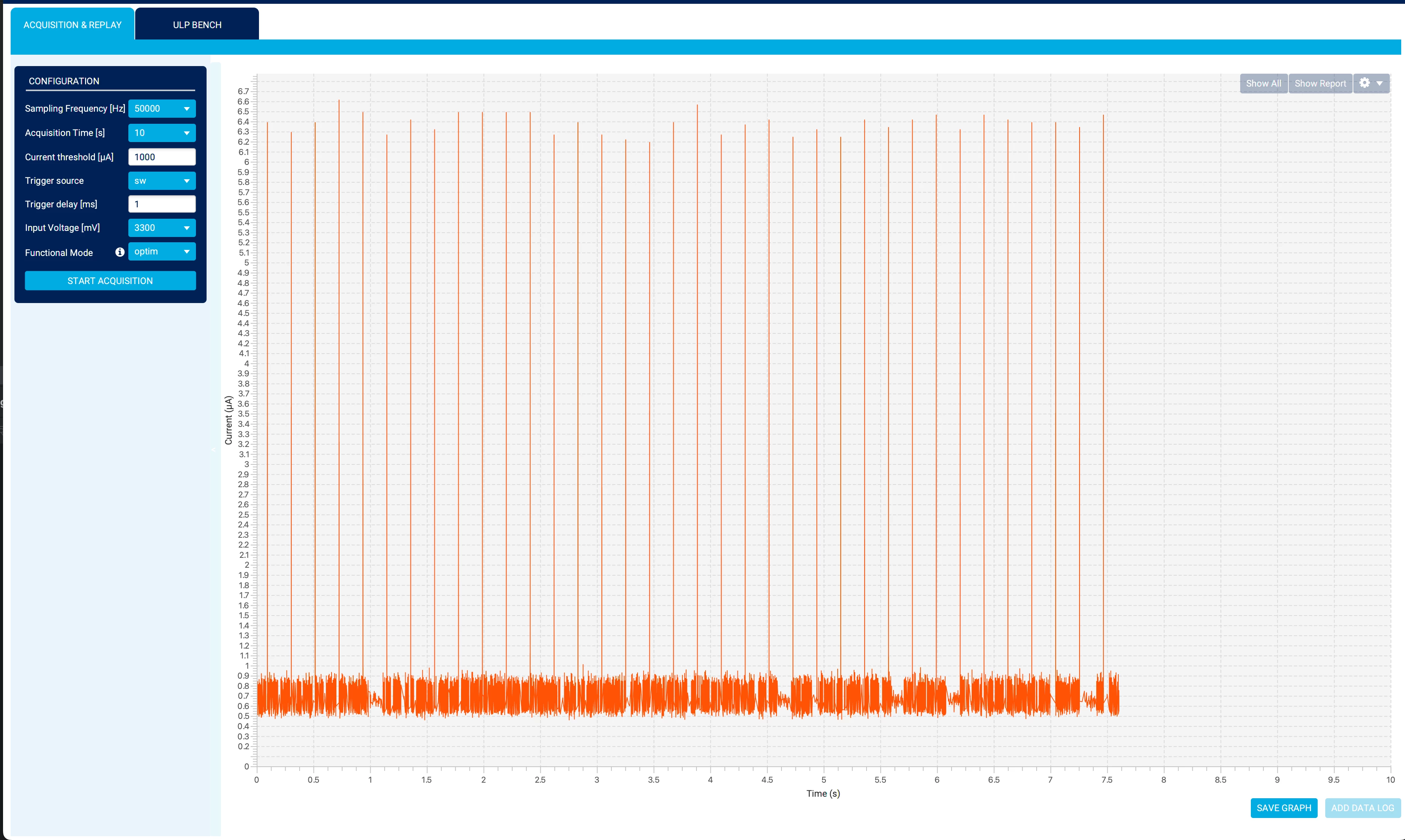
The RTC-Timer itself should be powered through LSI-Clock.
void HAL_RTC_MspInit(RTC_HandleTypeDef *hrtc) {
 RCC_PeriphCLKInitTypeDef PeriphClkInitStruct = {0};
 if (hrtc->Instance == RTC) {
 /* USER CODE BEGIN RTC_MspInit 0 */

 /* USER CODE END RTC_MspInit 0 */

 /** Enable access to the backup domain
 */
 HAL_PWR_EnableBkUpAccess();

 /** Initializes the peripherals clock
 */
 PeriphClkInitStruct.PeriphClockSelection = RCC_PERIPHCLK_RTC;
 PeriphClkInitStruct.RTCClockSelection = RCC_RTCCLKSOURCE_LSI;
 if (HAL_RCCEx_PeriphCLKConfig(&PeriphClkInitStruct) != HAL_OK) {
 Error_Handler();
 }

 /* Peripheral clock enable */
 __HAL_RCC_RTC_ENABLE();
 __HAL_RCC_RTCAPB_CLK_ENABLE();
 /* RTC interrupt Init */
 HAL_NVIC_SetPriority(RTC_WKUP_IRQn, 0, 0);
 HAL_NVIC_EnableIRQ(RTC_WKUP_IRQn);
 /* USER CODE BEGIN RTC_MspInit 1 */

 /* USER CODE END RTC_MspInit 1 */
 }
}
And:
static void MX_RTC_Init(void) {
 /** Initialize RTC Only
 */
 hrtc.Instance = RTC;
 hrtc.Init.HourFormat = RTC_HOURFORMAT_24;
 hrtc.Init.AsynchPrediv = CFG_RTC_ASYNCH_PRESCALER;
 hrtc.Init.SynchPrediv = CFG_RTC_SYNCH_PRESCALER;
 hrtc.Init.OutPut = RTC_OUTPUT_DISABLE;
 hrtc.Init.OutPutPolarity = RTC_OUTPUT_POLARITY_HIGH;
 hrtc.Init.OutPutType = RTC_OUTPUT_TYPE_OPENDRAIN;
 hrtc.Init.OutPutRemap = RTC_OUTPUT_REMAP_NONE;
 if (HAL_RTC_Init(&hrtc) != HAL_OK) {
 Error_Handler();
 }

 /** Enable the WakeUp
 */
 if (HAL_RTCEx_SetWakeUpTimer_IT(&hrtc, 0, RTC_WAKEUPCLOCK_RTCCLK_DIV16) != HAL_OK) {
 Error_Handler();
 }
}
Thank you for some feedback!
