

Associate II
February 11, 2025
Solved

Setting SC_KEY_TYPE to debug mode fails in STM32WB55

  • February 11, 2025
  • 2 replies
  • 646 views

Hello, 

I want to enable the secure connection key type as 'DEBUG' in STM32WB55 with my custom setup. The cube IDE does not allow this setting in the configuration of .ioc file. I followed this tutorial and added the following line in my code inside the definition of Ble_Hci_Gap_Gatt_Init() function, but it returns with error code 0x12 (Invalid HCI parameters). What am I missing here? 

static const uint8_t SC_KEY_TYPE_DEBUG = 1;
static const uint8_t SC_KEY_TYPE_NORMAL = 0;
 
ret = aci_hal_write_config_data(0x35U, 1, (uint8_t*)&SC_KEY_TYPE_DEBUG);
 if (ret != BLE_STATUS_SUCCESS)
 {
 APP_DBG_MSG(" Fail : aci_hal_write_config_data command - CONFIG_DATA_SC_KEY_TYPE_OFFSET, result: 0x%x \n", ret);
 }
 else
 {
 APP_DBG_MSG(" Success: aci_hal_write_config_data command - CONFIG_DATA_SC_KEY_TYPE_OFFSET\n");
 }

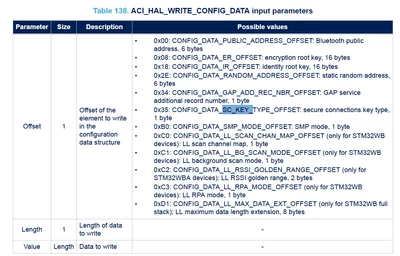
I am also following AN5270 for development, and the offset to set SC_KEY_TYPE seems to be correct. 
tmk_0-1739237869435.png

This is what I am seeing when I run the code: 

tmk_1-1739238012604.png

I made sure that CFG_SC_SUPPORT is set to 0x02 (supported and mandatory). What am I missing here? 

Any help is appreciated! 


This topic has been closed for replies.
Best answer by tmk

Hi @STTwo-32 , 

Thanks for your reply. However, I was able to resolve the issue. Turns out, I was using a very old firmware version for the Bluetooth and was not aware that there is a newer version available. After updating to the latest version, the issue is now resolved. 

2 replies

STTwo-32
ST Technical Moderator
March 4, 2025

Hello @tmk 

I've sent this question to the concerned team (under internal ticket number 204530) and we will reach to you soon.

Best Regards.

STTwo-32

To give better visibility on the answered topics, please click on Accept as Solution on the reply which solved your issue or answered your question.
tmkAuthorBest answer
Associate II
March 6, 2025

Hi @STTwo-32 , 

Thanks for your reply. However, I was able to resolve the issue. Turns out, I was using a very old firmware version for the Bluetooth and was not aware that there is a newer version available. After updating to the latest version, the issue is now resolved.