

ledi001
Associate III
Sep 26, 2024 5:44 PM UTC
Solved

Problem with NUCLEO-WBA55CG Board - Failed to start GDB server

Hi,

Today I received a new board from a distributor and used the Hands-On_WS_WBA55 example for initial tests. Everything worked fine. A few hours later, I reconnected the board to the USB board and wanted to flash the firmware. Since then I get the error message:

Error in final launch sequence:
Failed to start GDB server.
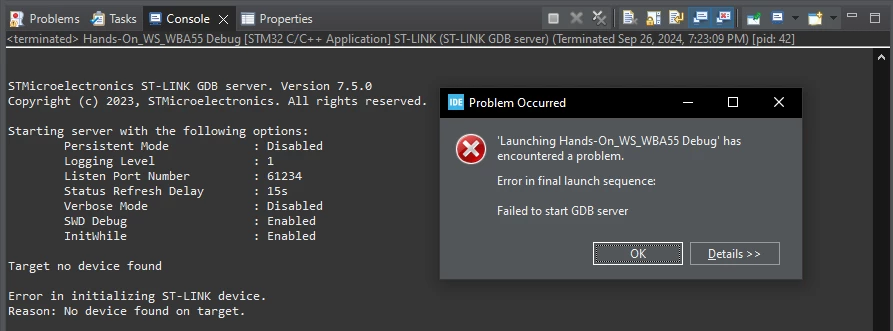
2024-09-26_19h35_22.png

I have tried the usual procedures (plugging and unplugging, restarting the PC, reinstalling the driver), but unfortunately without success. I also have a NUCLEO-WBA52CG EVAL board and there are no problems with flashing.

Please help!
This topic has been closed for replies.
SefGen77Best answer
Explorer II
Oct 2, 2024 6:27 AM UTC

Figured out how to flash my device. May or may not be helpful to you.


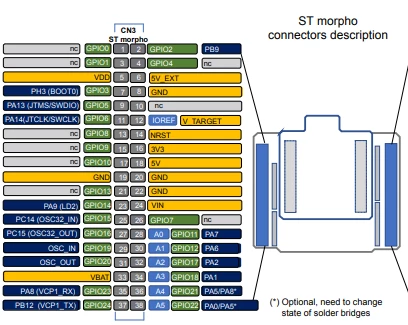
1. Jump IO Pins 5 & 7: This will pull up the BOOT0 Pin, allowing flash programming

SefGen77_2-1727850291908.png

2. Disconnect ST-Link. Unplug USB-C Cable

3. Reconnect ST-Link.

4. Program Device

5. Remove Jumper Between Pins 5 & 7

6. Disconnect and Reconnect ST-Link


These steps have allowed me to program my device, at the very least.


4 replies

ledi001
ledi001Author
Associate III
Sep 30, 2024 9:03 AM UTC

Today I tried another PC with Windows 11, but unfortunately I got the same results. But here in the details section is some more information, maybe that can help narrow down the problem.

2024-09-30_10h51_37.png

Explorer II
Oct 2, 2024 4:41 AM UTC

I am also having this issue with this board. In my case however, I am receiving a slightly different error message:

SefGen77_0-1727844026238.png

I have used a few Nucleo boards in the past and have never had this issue. I am thinking maybe debugging and flashing through st-link is disabled by default on this board or something of that nature. 

Should also state that USB-C cable has data transfer capabilities(confirmed).

Additionally, when trying to program using STM32CubeProgrammer, am seeing this:

SefGen77_1-1727846632260.png

Clearly its recognizing my board, yet still having issues. Any help would be appreciated!


SefGen77Best answer
Explorer II
Oct 2, 2024 6:27 AM UTC

Figured out how to flash my device. May or may not be helpful to you.


1. Jump IO Pins 5 & 7: This will pull up the BOOT0 Pin, allowing flash programming

SefGen77_2-1727850291908.png

2. Disconnect ST-Link. Unplug USB-C Cable

3. Reconnect ST-Link.

4. Program Device

5. Remove Jumper Between Pins 5 & 7

6. Disconnect and Reconnect ST-Link


These steps have allowed me to program my device, at the very least.
