Visitor II
January 7, 2025
Solved

Problem with configuration STM32 project in STMCubeIDE

  • January 7, 2025
  • 1 reply
  • 1179 views

Hi,

I have problem with configuration STM project in STM Cube IDE.

I created project based on STM32WB55 Board, after open *.ioc file i have a problem with reconfigure GPIO ports:
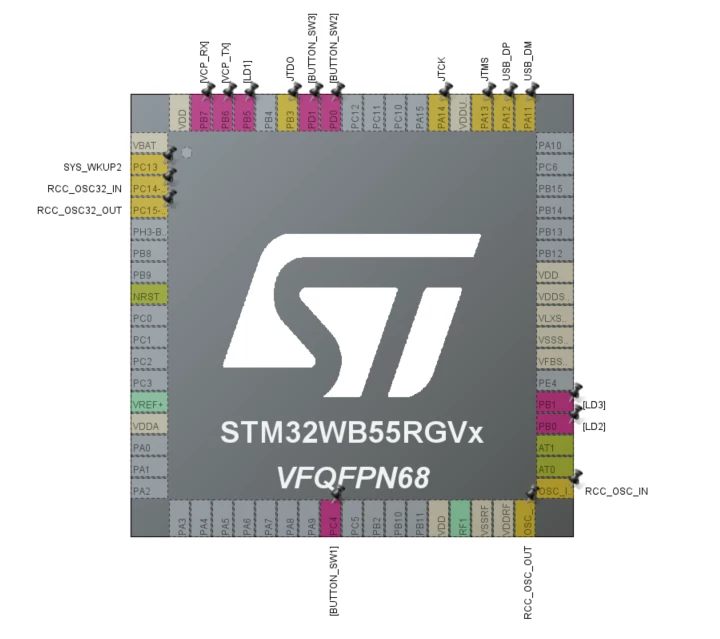
kawa1593_0-1736279942125.png

I am using the latest STM Cube IDE version: 1.17.0

How to solve it?

 

This topic has been closed for replies.
Best answer by STTwo-32

Hello @kawa1593 

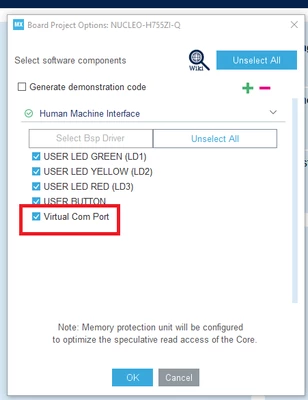
When select the MCU and generate the code, you will have this message:

STTwo32_0-1736281300016.png

If you click on OK without selecting the Unselect All option, those pins Will be automatically set by the CubeMX.

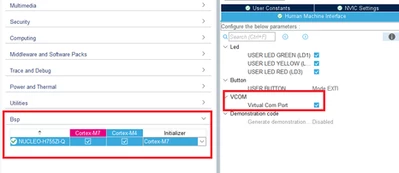
If you want to reconfigure them, you can go to Bsp section and disable the LED, Button and VCom configuration. After that, those pins Will be free again and you can select them for your configuration:

STTwo32_1-1736281299792.png


Best Regards.

STTwo-32


1 reply

STTwo-32
STTwo-32Best answer
ST Technical Moderator
January 7, 2025

Hello @kawa1593 

When select the MCU and generate the code, you will have this message:

STTwo32_0-1736281300016.png

If you click on OK without selecting the Unselect All option, those pins Will be automatically set by the CubeMX.

If you want to reconfigure them, you can go to Bsp section and disable the LED, Button and VCom configuration. After that, those pins Will be free again and you can select them for your configuration:

STTwo32_1-1736281299792.png


Best Regards.

STTwo-32


To give better visibility on the answered topics, please click on Accept as Solution on the reply which solved your issue or answered your question.