BNamu.1
Associate III
October 24, 2022
Question

No St Link Detected STM32WL55JC2

Hello, I recently bought an STM32WL55JC2 board (nucleo). I have downloaded the STM32 IDE.

When I connect the card in USB directly to my pc there are three LEDS that blink successively (red green blue).

I can build my project (empty) on STM32IDE on both cores.

Except that I have the error NO ST LINK DETECTED.

I tried to change debugger but nothing to do.

I also tried to install STLINK via the ST site but it does not change.

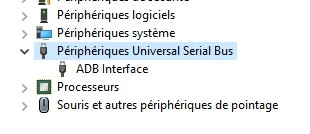
In the USB device manager I see that "ADB interface".

In the ST folder I tried to install the STLINK driver but it does not change my error.

Should I buy a debugger in addition to the card? Thanks
 0693W00000Uoei8QAB.jpg0693W00000UoehyQAB.jpg

This topic has been closed for replies.

13 replies

Tesla DeLorean
Guru
October 24, 2022

Use quality cables, not charging cables.

Avoid hubs or docking stations.

Avoid Virtual Machines.

Avoid AV and policies blocking USB MSC (Flash Sticks)​

Tips, Buy me a coffee, or three.. PayPal Venmo (See Profile) Up vote any posts that you find helpful, it shows what's working..
BNamu.1
BNamu.1Author
Associate III
October 24, 2022

My STM32WL55JC2 wasn't provided with a cable so i'm using cables from my computer (headphone cables etc...)

I've tried two different cables, when ive changed and i got a STLINK V3 upgrade which failed and after that i got the same error No ST LINK detected.

My cable is directly connected to my computer case.

Tesla DeLorean
Guru
October 24, 2022

So you did a failed upgrade?

Is the ADB Interface device the ST-LINK/V3 ?

If it's not in Device Manager as an ST-LINK not much hope of other apps "finding" it.​

You should try STM32 Cube Programmer first.​

Tips, Buy me a coffee, or three.. PayPal Venmo (See Profile) Up vote any posts that you find helpful, it shows what's working..
BNamu.1
BNamu.1Author
Associate III
October 24, 2022

Well, i've tried my nucleo on an Arduino environment and it doesn't detected my board too. I guess the cable is the main problem

Tesla DeLorean
Guru
October 24, 2022

The ST-LINK/V3 uses USB-HS it's significantly less tolerant of low quality, shielded, cables.

Tips, Buy me a coffee, or three.. PayPal Venmo (See Profile) Up vote any posts that you find helpful, it shows what's working..
BNamu.1
BNamu.1Author
Associate III
October 24, 2022

Good update : i've tried with a new cable and got this error : 0693W00000Uof1KQAR.jpg0693W00000Uof1AQAR.jpgI've done this update before the error above : 0693W00000Uof2NQAR.jpg

ChahinezC
Associate II
October 24, 2022

Hello @BNamu.1​,

Based on the screenshot you shared, an update is required again. You can click on "Upgrade" to update the ST-Link FW and solve the issue.

Chahinez.

BNamu.1
BNamu.1Author
Associate III
October 24, 2022

@ChahinezC​ 

I have done this upgrade , i got this error now :

0693W00000Uof6AQAR.jpg

BNamu.1
BNamu.1Author
Associate III
October 24, 2022

@Community member​ 

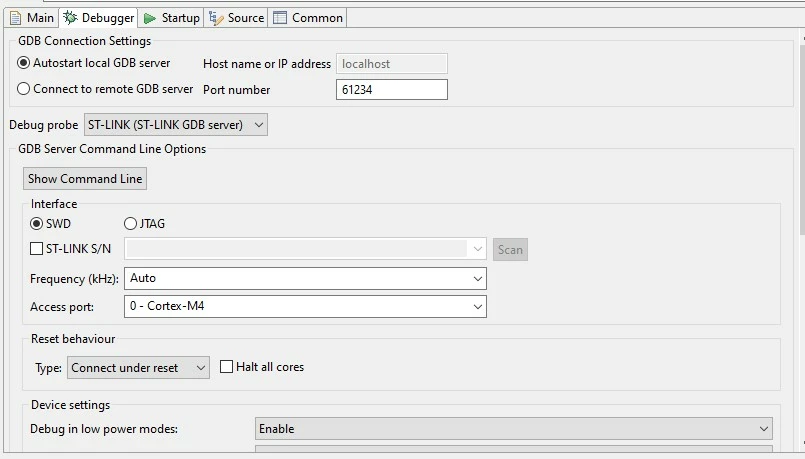
0693W00000UogaVQAR.jpgI was already using "Connect Under Reset" and i also tried the others...

The board is now working properly on the Arduino Environment but i have to use STM32 IDE to use LoRa

Tesla DeLorean
Guru
October 24, 2022

>>..but i have to use STM32 IDE to use LoRa

Trying to establish why it's not working, STM32 CubeIDE gets in the way of itself for the purposes of diagnosing what exact is wrong.

Pulling BOOT0 High can keep it from entering user code, perhaps allowing for that to be erased if it's putting the chip to sleep.

Tips, Buy me a coffee, or three.. PayPal Venmo (See Profile) Up vote any posts that you find helpful, it shows what's working..
BNamu.1
BNamu.1Author
Associate III
October 24, 2022

So what do you suggest me to do by "Pulling BOOT0 High" ?

ChahinezC
Associate II
October 28, 2022

Hello @BNamu.1​,

Please check your connecting cables and try to connect the board using STM32CubeProgrammer. You can refer to the UM2237.

Regards,

Chahinez.