MSuva.1
Associate II
September 9, 2022
Question

No issues flashing STM32WB55 M4 via STM32CubeIDE but cannot flash coprocessor with BLE stack with STM32CubeProgrammer.

  • September 9, 2022
  • 4 replies
  • 7071 views

Here is the output of STM32CubeIDE on flashing the custom board:

On STM32CubeProgrammer I am not able to consistently get a connection (by hitting the connect button).

There are some instances if the configuration is set to "Shared" mode that the device connects but there is no way to write/read to the FUS or perform any flashing.

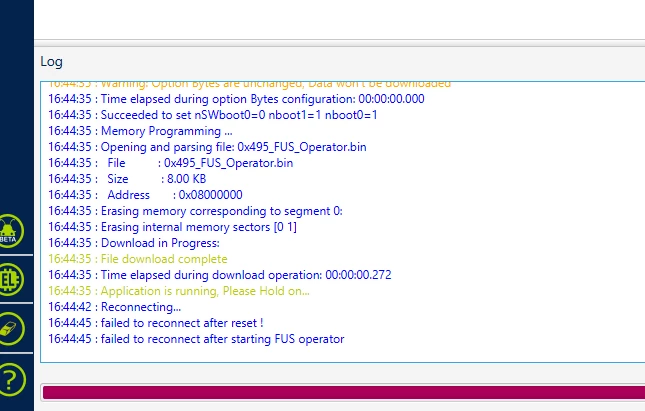
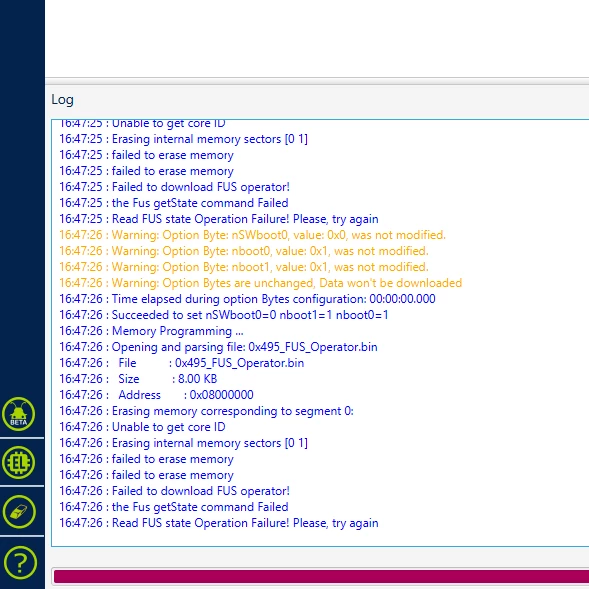
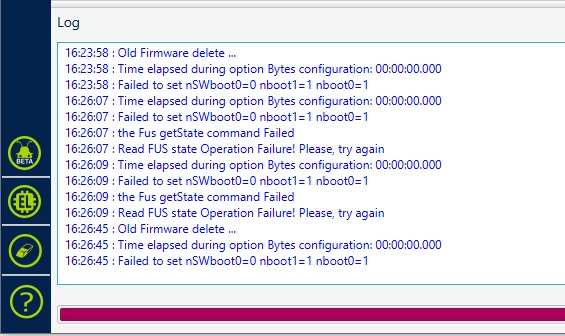
Here's some screenshots of the outputs I've seen while attempting to write to the FUS using Programmer:
0693W00000Sv0HrQAJ.png0693W00000Sv0I1QAJ.png0693W00000Sv0G1QAJ.png 

I've had a hard time figuring out how to approach debugging this issue since I have not been able to get consistent results.

Any advice or suggestions is much appreciated, thank you.

This topic has been closed for replies.

4 replies

MM..1
Chief III
September 9, 2022

You read ? file:///C:/Users/xxxSTM32Cube/Repository/STM32Cube_FW_WB_V1.1y.z/Projects/STM32WB_Copro_Wireless_Binaries/STM32WB5x/Release_Notes.html

MSuva.1
MSuva.1Author
Associate II
September 9, 2022

Yes, I have. I have been able to flash the coprocessor on the stm32wb55 dev board I have no problem.

MM..1
Chief III
September 9, 2022

Then try write where you stuck

How to flash the Wireless Coprocessor Binary via SWD/JTAG by ST-LINK (STM32CubeProgrammer GUI)
 
Inside the below procedure, the references to binaries name and install address are provided in the section Main Changes of this file.
 
STEP 1: Use STM32CubeProgrammer GUI
 
Version 2.7.0 or higher.
 
It gives access to Firmware Upgrade Service (FUS) (AN5185 : ST firmware upgrade services for STM32WB Series.) through Bootloader.
 
It is currently available as Graphical User Interface (GUI) mode (or Command Line Interface (CLI) mode).
 
STEP 2: Access to SWD Interface (system flash)
 
For P-NUCLEO-WB55.Nucleo :
Power ON via ST-LINK and Jumper JP1(USB_STL)
For P-NUCLEO-WB55.USBDongle :
remain switch SW2 to Boot1
Connect P-NUCLEO-WB55.USBDongle
For STM32WB5MM-DK :
Power ON via ST-LINK and Jumper JP2(USB_STL)
open STM32CubeProgrammer GUI and select “ST-LINK�?
in ST-LINK configuration: (Port: SWD) then select “Connect�?
STEP 3: select “Start FUS�? in Firmware Upgrade Services
 
STEP 4: Read and upgrade FUS Version
 
it can been obtained selecting “Read FUS infos�?
00050300: FUSv0.5.3 => Must be updated using STEP 5.
010X0Y00: FUSv1.x.y => Must be updated using STEP 6 (when x < 2).
01020000: FUSv1.2.0 => Up to date, you can download the new wireless stack using STEP 7.

MM..1
Chief III
September 12, 2022

Seems FUS cant reconnect to Programmer app. Try change config to shared disabled .

MSuva.1
MSuva.1Author
Associate II
September 12, 2022

If I have shared disabled then there is no communication.

0693W00000SvAfeQAF.pngPressing "Connect" in the above window with Shared set to "Disabled" yields no response from the software.

MM..1
Chief III
September 12, 2022

Maybe this need solve, on youtube video about FUS is disabled.

Remy ISSALYS
Technical Moderator
September 21, 2022

Hello,

Can you try to connect using STM32CubeProgrammer with the following parameters:

0693W00000SvsVOQAZ.png 

Then try the following steps:

> Perform a full chip erase

> Start the FUS

> Read FUS

> Perform a FUS upgrade

If it's not working, can you share the log from STM32cubeProgrammer with verbosity level at 3 and the option bytes configuration ?

Best Regards

MSuva.1
MSuva.1Author
Associate II
September 27, 2022

I am not able to connect to the board at all with the "Shared" option set to Disabled. It has to be enabled or else pressing connect does nothing.

How would I go about exporting the option bytes? Or should I just take screenshots of the option bytes tab?

Thanks

Remy ISSALYS
Technical Moderator
September 28, 2022

Hello,

According to UM2237, the "Shared" option allows connection of two or more instances of STM32CubeProgrammer or other debugger to the same ST-LINK probe. So, if you can't connect to the board when the "Shared" option is set to Disabled, maybe your board is connected to another software.

Yes you can take screenshots of the option bytes tab.

Best Regards

MSuva.1
MSuva.1Author
Associate II
September 28, 2022

It isn't connected to other software. I do not have this issue with my Nucleo-stm32wb55 dev boards which I assume would exhibit the same behavior if there was other software interfering.