


FBrin.1
Associate II
June 11, 2021
Solved

LoRa-E5 mini (STM32WLE5JC) programming using STM32CubeIDE

Hi,

I am using LoRa-E5 mini board from seeed studio (https://www.seeedstudio.com/LoRa-E5-mini-STM32WLE5JC-p-4869.html)

To program it using STM32CubeIDE, do we need to connect it to pc using ST-Link or we can simply program it via Type C cable?
This topic has been closed for replies.
Imen.DBest answer
ST Technical Moderator
June 15, 2021

Hi @FBrin.1​ ,

Sorry for the delay to answer you, as this period is very busy for me with many tasks.

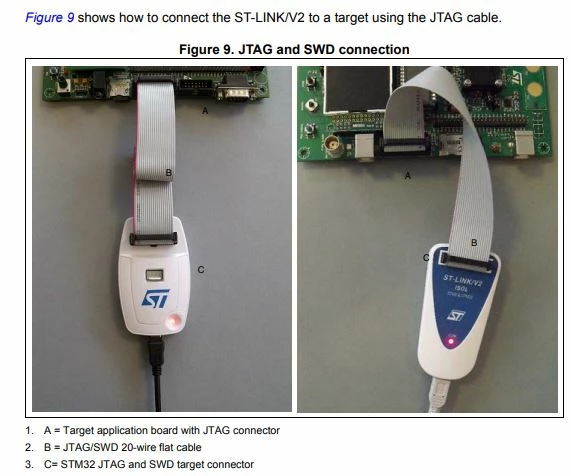
You need to connect the ST-LINK to a target using the SWD cable as you can see below.

You can check the SWD pins connections in the UM1075, Table 4. JTAG/SWD cable connections.

0693W00000Bb2vXQAR.jpgI hope this helps !

Imen

In order to give better visibility on the answered topics, please click on 'Best answer' on the reply which solved your issue or answered your question. Thanks

13 replies

ST Technical Moderator
June 11, 2021

Hello @FBrin.1​ ,

Connect the STM32WLE5 board to the computer with a USB cable type C to the Type C port for power and serial communication, and connect another micro USB cable to the ST-Link side to the SWD pins.

You can refer to this resources for more help:

Hope this help you!

When your question is answered, please close this topic by choosing Select as Best.

Imen

In order to give better visibility on the answered topics, please click on 'Best answer' on the reply which solved your issue or answered your question. Thanks
FBrin.1
FBrin.1Author
Associate II
June 11, 2021

Thanks Imen,

Can you please clarify this part : "connect another micro USB cable to the ST-Link side to the SWD pins."

Where can I get this ST-Link cable?

FBrin.1
FBrin.1Author
Associate II
June 15, 2021

Hi @Imen DAHMEN​ 

Can you please clarify this part : "connect another micro USB cable to the ST-Link side to the SWD pins."

Which ST-Link cable should be connected to SWD pins?

Will this work ? https://www.adafruit.com/product/2548 

Imen.DBest answer
ST Technical Moderator
June 15, 2021

Hi @FBrin.1​ ,

Sorry for the delay to answer you, as this period is very busy for me with many tasks.

You need to connect the ST-LINK to a target using the SWD cable as you can see below.

You can check the SWD pins connections in the UM1075, Table 4. JTAG/SWD cable connections.

0693W00000Bb2vXQAR.jpgI hope this helps !

Imen

In order to give better visibility on the answered topics, please click on 'Best answer' on the reply which solved your issue or answered your question. Thanks
FBrin.1
FBrin.1Author
Associate II
June 15, 2021

Thanks @Imen DAHMEN​ 

Will this be compatible? https://www.adafruit.com/product/2548 

ST Technical Moderator
June 15, 2021

Yes, it is compatible. You can use it.

Imen

In order to give better visibility on the answered topics, please click on 'Best answer' on the reply which solved your issue or answered your question. Thanks
SHATE.1
Associate III
June 17, 2021

Hello

You discussed about hardware issue but you didn't talk about the more important!!!! how to make an End Node LORAWAN object that make join and send data to network with the STM32WLE5J8I for example.

NO information and no help on this subject!!!

FBrin.1
FBrin.1Author
Associate II
June 17, 2021
SHATE.1
Associate III
June 17, 2021

Thank you for your answer but i want an example for the STM32WLE5J8I and the Nucleo use the STM32WL55 and it's not the same thing!!!

Strooom
Senior
November 23, 2022

Can you please give us an updated link to a github repository. The link above does no longer work.