BNamu.1
Associate III
November 14, 2022
Solved

LED1/2/3 working on arduino but not on CUBEMX

  • November 14, 2022
  • 9 replies
  • 6020 views

Hello, i just bought a STM32WL55JC2. It's working perfectly on Arduino but i want to use the LORA module and Arduino doesn't support it.

I've configured my stm on CubeMX and tried a basic HAL_GPIO_WritePin but it doesn't work and i can't figure why.

0693W00000WIFX9QAP.jpg0693W00000WIFXiQAP.jpgArduino working code :0693W00000WIFROQA5.jpg0693W00000WIFXdQAP.jpgThank you :)

This topic has been closed for replies.
Best answer by AScha.3

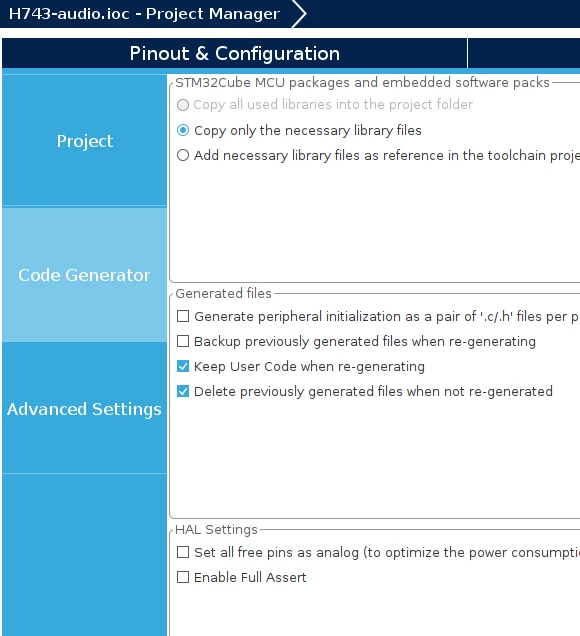
check: did you

0693W00000WIIGBQA5.png 

x set free pins as analog ?

+

to test : just write

GPIOB->MODER = 0x55555555 ;

while ....set pin .... .

9 replies

AScha.3
Super User
November 14, 2022

why only download ?

try : debug and you can see the port registers , when you step in your prog.

"If you feel a post has answered your question, please click ""Accept as Solution""."
BNamu.1
BNamu.1Author
Associate III
November 14, 2022

0693W00000WIHF7QAP.jpg@AScha.3​ I can't figure which register is attached to my LEDs ? Thank you

edit : r1 and r2 have changed for 512 after 1 while loop

Tesla DeLorean
Guru
November 14, 2022

The registers in the GPIOB peripheral, ie GPIO->ODR

And the clocking of the GPIOB via the RCC peripheral

Tips, Buy me a coffee, or three.. PayPal Venmo (See Profile) Up vote any posts that you find helpful, it shows what's working..
BNamu.1
BNamu.1Author
Associate III
November 14, 2022

Thank you, where do i check the GPIO->ODR state in the debug mode ?

AScha.3
Super User
November 14, 2022

BSRR is write only. so nothing to read!

and ODR shows ffff , what you write in. so whats wrong ??

"If you feel a post has answered your question, please click ""Accept as Solution""."
BNamu.1
BNamu.1Author
Associate III
November 14, 2022

if my gpiob->ODR shows ffff the led on my board should be turned on right ?

AScha.3
Super User
November 14, 2022

yea, but i see: _MODER shows 0xFFFF... -> pins are on analog mode !!!!! so no hi/lo output.

where you set it analog? check!

"If you feel a post has answered your question, please click ""Accept as Solution""."
BNamu.1
BNamu.1Author
Associate III
November 14, 2022

0693W00000WIHuyQAH.jpgi generated the code automatically so i didn't change anything. I don't know how to change this.

AScha.3
AScha.3Best answer
Super User
November 14, 2022

check: did you

0693W00000WIIGBQA5.png 

x set free pins as analog ?

+

to test : just write

GPIOB->MODER = 0x55555555 ;

while ....set pin .... .

"If you feel a post has answered your question, please click ""Accept as Solution""."
BNamu.1
BNamu.1Author
Associate III
November 14, 2022

Nop this parameter isn't enable. BUT with GPIOB->MODER = 0x55555555 ; my led is now working !!! Thank youu, i still don't know why my pins are on analog mode but it's fine

AScha.3
Super User
November 14, 2022

ok, not fine , but we got it going.

there is some instruction doing this - or is an error in Cube/HAL , then you should set pins yourself and not trust in HAL . (it has some errors, shure.)

+

 When your question is answered, please close this topic by choosing Select as Best.

"If you feel a post has answered your question, please click ""Accept as Solution""."