
Associate III
March 11, 2025
Solved

Issue connecting the NUCLEO-WB05KZ to the STM32CubeProgrammer

  • March 11, 2025
  • 6 replies
  • 794 views

Hello

thanks for replying.

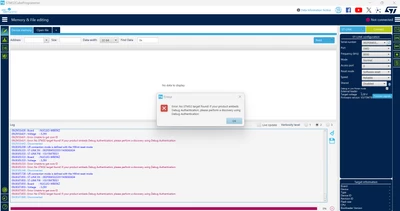
to upload the Hex file i used STM32Programmer, but when i connect the borad via USB cable to my PC i receive un error : 
ljm_0-1741681923679.png

Best Regards.

This topic has been closed for replies.
Best answer by STTwo-32

Hello @ljm 

Could you please try to follow this procedure:

  • If it is the first time you will program the board, follow the recommendation of the note on the chapter 7.12 of the STM32WB05 Nucleo-64 board (MB1801 and MB2032) - User manual and don't forget to click on the reset button before connecting to the STM32CubeProgrammer if the LD2 is still toggling.
  •  If you are used to program the board, try to fit the jumper on both pins 7 and 5 on the CN3 of the board and connect the board using the Hot plug mood

PS: Make sure to use the STM32CubeProgrammer V2.19.0


Best Regards.

STTwo-32

6 replies

STTwo-32
STTwo-32Best answer
ST Technical Moderator
March 11, 2025

Hello @ljm 

Could you please try to follow this procedure:

  • If it is the first time you will program the board, follow the recommendation of the note on the chapter 7.12 of the STM32WB05 Nucleo-64 board (MB1801 and MB2032) - User manual and don't forget to click on the reset button before connecting to the STM32CubeProgrammer if the LD2 is still toggling.
  •  If you are used to program the board, try to fit the jumper on both pins 7 and 5 on the CN3 of the board and connect the board using the Hot plug mood

PS: Make sure to use the STM32CubeProgrammer V2.19.0


Best Regards.

STTwo-32

To give better visibility on the answered topics, please click on Accept as Solution on the reply which solved your issue or answered your question.
ljmAuthor
Associate III
March 12, 2025

Hello,

Thank you for replying

i have an issue to connect the board to STM32Cube programmer 

ljm_0-1741763783933.png

thanks

STTwo-32
ST Technical Moderator
March 12, 2025

Have you followed the steps I've mentioned in my previous post.

Best Regards.

STTwo-32

To give better visibility on the answered topics, please click on Accept as Solution on the reply which solved your issue or answered your question.

