


gocchan
Associate III
July 8, 2026
Question

How to set the RF output power

  • July 8, 2026
  • 1 reply
  • 137 views

I'm investigating how to change the TX output power for hardware testing.

I was able to confirm that the power changes by writing BLE_TransparentMode to the STM32WBA25 and sending the following HCI command via UART.

0x01 0x0F 0xFC 0x02 <EnHighPower> <PowerLevel>

However, while Table 468 of AN5270 suggests that it can be set up to +6dBm, there appears to be no change in the actual output between setting it to 0dBm and setting it to +6dBm.

0x01 0x0F 0xFC 0x02 0x01 0x19

0x01 0x0F 0xFC 0x02 0x01 0x1F

Setting it to a value lower than 0dBm seems to change the output as expected.

Is it actually not possible to set it to a value higher than 0dBm?
1 reply

ST Technical Moderator
July 8, 2026

Hello ​@gocchan ,

I recommend you the following article that will help you on the RF output power configuration within STM32WBA:

STM32WBA Bluetooth® LE RF Output Power Configuration - stm32mcu

In order to give better visibility on the answered topics, please click on 'Best answer' on the reply which solved your issue or answered your question. Thanks
gocchan
gocchanAuthor
Associate III
July 13, 2026

Thank you for the information.
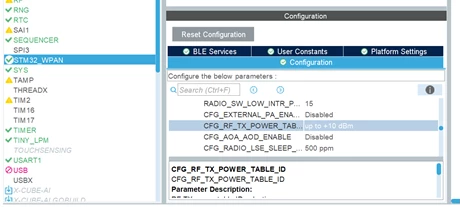
I was able to confirm that the output power changes when using the ACI_HAL_SET_TX_POWER_LEVEL command.
Setting PA_Level to 0x1D returns "Unsupported," so I think this board is currently using the low power table. Is there a way to change it to the max power table?

Issamos
Super User
July 13, 2026

Hello ​@gocchan 

To activate the max power table, you must toggle the En_High_Power parameter from 0 to 1 when calling the function ACI_HAL_SET_TX_POWER_LEVEL. This shifts the board's radio output from the standard low-power map to the high-power map:

Best Regards.

II