

MPian.1
Associate II
October 5, 2021
Solved

How to read fus and stack version installed in a STM32WB50

  • October 5, 2021
  • 3 replies
  • 1509 views

Hi,

I am using an STM32WB50 and i need to find a way to discover fus and stack versions installed not using an external tool but directly by reading some register or using specific function. Is there a way to do this?

Thanks
This topic has been closed for replies.
Best answer by Imen.D

Hello @MPian.1​ ,

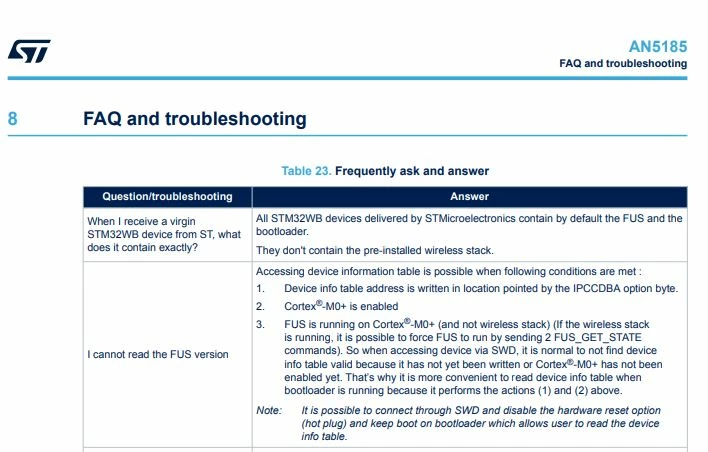
To identify the FUS version, you need to read the shared table memory in SRAM2a. This is explained in the AN5185 in the section 1.6 Shared tables memory usage and in Section 6.1 Shared tables usage.

0693W00000FBkoiQAD.jpgHope that answers your question!

When your question is answered, please close this topic by choosing Select as Best. This will help other users find that answer faster.

Imen

3 replies

Imen.DBest answer
Technical Moderator
October 7, 2021

Hello @MPian.1​ ,

To identify the FUS version, you need to read the shared table memory in SRAM2a. This is explained in the AN5185 in the section 1.6 Shared tables memory usage and in Section 6.1 Shared tables usage.

0693W00000FBkoiQAD.jpgHope that answers your question!

When your question is answered, please close this topic by choosing Select as Best. This will help other users find that answer faster.

Imen

In order to give better visibility on the answered topics, please click on 'Best answer' on the reply which solved your issue or answered your question. Thanks
NWang.2
Associate II
April 13, 2022

Hi

I have same question with my new received Nucleo-64 STM32WB55 board. I am new to the ST chipset.

I start with st web site https://www.st.com/en/evaluation-tools/p-nucleo-wb55.html and watched the first video "How to program a STM32WB55 with STM32CubeProgrammer ". The usage of STM32_Programmer_CLI.exe is shown in the video and showing erase the board first. Before I erase image on the board, I would like to know the FUS version in the board.

Below was what I did with STM32_Programmer_CLI.exe:

I set prog point to STM32_Programmer_CLI.exe first.

I have run following to try my luck:

c:\Temp>%prog% -fusopgetversion
 -------------------------------------------------------------------
 STM32CubeProgrammer v2.10.0
 -------------------------------------------------------------------
 
Error: Connection to target must be established before performing the fusOpgetVersion command.

By seeing the above error, I did the following:

c:\Temp>%prog% -c port=com11
 -------------------------------------------------------------------
 STM32CubeProgrammer v2.10.0
 -------------------------------------------------------------------
 
Serial Port COM11 is successfully opened.
Port configuration: parity = even, baudrate = 115200, data-bit = 8,
 stop-bit = 1.0, flow-control = off
 
Timeout error occured while waiting for acknowledgement.
 
Timeout error occured while waiting for acknowledgement.
Error: Activating device: KO. Please, verify the boot mode configuration and check the serial port configuration. Reset your device then try again...

Error again.

I have images with version  STM32Cube_FW_WB_V1.13.2. I really would like to know the version on the board I received. Please recommand a tool to do the job and steps to get the job done.

Anyone can help?

Nancy

NWang.2
Associate II
April 27, 2022

Issue is solved with STMCubeProgrammer tool (v2.10.0). See https://www.youtube.com/watch?v=1LvfBC_P6eg&t=314s at 3.25m.
