


markpow
Senior
February 5, 2023
Question

How to program WIO-5E mini (Seeed) using ST-LINK/V2 mini (Vaweshare)

  • February 5, 2023
  • 21 replies
  • 11554 views

I bought ST-LINK/V2 from a certified reseller, and I have WIO-5E mini with STM32WL5JC from [Seeed.com](https://Seeed.com) on the board. This WIO-5E was already programmed by another ST-LINK/V2. I connected WIO-5E to ST-LINK as required. I want to reprogam WIO-5MINI using this programator. But STM32Programmer answered:
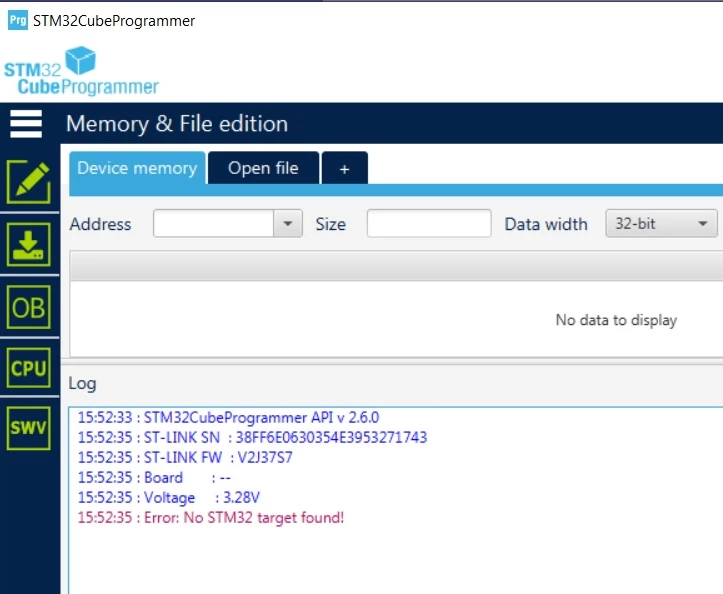
0693W00000YA1JoQAL.pngWhat should I do so STM32Programmer will see STM32WL5CJ from the WIO-5E mini board?

This topic has been closed for replies.

21 replies

AScha.3
Super User
February 7, 2023

so - what you did ? already killed the firmware ?

0693W00000YAAZ2QAP.png

If you feel a post has answered your question, please click on " Best Answer ".
markpow
markpowAuthor
Senior
February 7, 2023

Yes, the firmware was cleared, and the protecion level was set up to AA. After that, I might upload code (.hex) to WIO-5 min. In the beginning, I would ask the chip using AT commands. After clearing the firmware, it's obvious that I can't ask with AT command. But I might program this chip. I saw that WIO-5 contacts to Chirpstack gateway.

AScha.3
Super User
February 7, 2023

so...i hope, you know, what you are doing. :)

  • in CubeProgrammer, set software reset
  • connect (under reset - press reset button, then 'connect') . works ? can load program ?
  • or try bootloader: press reset, press boot, release reset , then release boot. now should connect in bootloader, select in Cubeprogrammer not STlink, but rs232 or usb - whatever your chip can do (read manual!) and for rs232 need ie rs232 - ttl adapter to connect to rs232 rx-tx on chip pins.

maybe, you have to set option bytes , or set swd on start of your program, to have it always available (to connect by STlink -> SWD ) and debug or load program.

If you feel a post has answered your question, please click on " Best Answer ".
markpow
markpowAuthor
Senior
February 8, 2023

For everyone who will search for a solution.

Steps to attach WIO-5E mini to ST-LINK.

Wire connections:

ST-LINK

1 => VCC

7 => SWDIO

9 => SWCLK

15 => NRST

20 => GND

0693W00000YAIKKQA5.png 

WIO-5E pins mini should be connected to pins with the same names as for ST-LINK.

0693W00000YAIKjQAP.pngOpen the STM32Programmer, press the button Connect (look at settings before)

0693W00000YAIJ3QAP.pngYou should see the following response (without another serial number for the ST-LINK).

0693W00000YAIMQQA5.pngSo next, run STM32CubeIDE, go to option Run => Debug configuration, switch to de Debugger tab.

Do the following steps:

  1. Click on the Shared ST-LINK checkbox.
  2. Press the ST-LINK SN checkbox and press the Scan button. The textbox should be fulfilled with the serial number of the ST-LINK programmer.
  3. Press on the Show command line button. Copy that command into the command prompt and run it.
  4. Press on the Connect to remote GDB server radio button
  5. Press the Apply button.
  6. Press the Debug button.

0693W00000YAIPFQA5.png0693W00000YAIPPQA5.pngAnd finally:

0693W00000YAIPjQAP.png 

The end of the story.

PS. Next time, when you will try to debug, don't forget about point 3 from the above list.

Explorer
August 10, 2024

Hello everyone , i followed up the conversation after a week of research i can't fix my problem.

here my setup :

20240810_201033.jpg

here my logs:

---- Opened the serial port /dev/tty.usbserial-1120 ----
15:88:09:CF:4F:3C
###### DevEui: 00:80:E1:15:05:99:98:B8
####Hz at DR 0
1s524:MAC txDone
6s558:RX_1 on freq 868100000 Hz at DR 0
6s755:IRQ_RX_TX_TIMEOUT
6s756:MAC rxTimeOut
7s558:RX_2 on freq 869525000 Hz at DR 0
7s755:IRQ_RX_TX_TIMEOUT
7s756:MAC rxTimeOut

###### = JOIN FAILED
30s041:temp= 26
30s041:VDDA= 254
30s045:TX on freq 868300000 Hz at DR 0
31s532:MAC txDone
36s566:RX_1 on freq 868300000 Hz at DR 0
36s763:IRQ_RX_TX_TIMEOUT
36s764:MAC rxTimeOut
37s566:RX_2 on freq 869525000 Hz at DR 0
37s763:IRQ_RX_TX_TIMEOUT
37s764:MAC rxTimeOut

###### = JOIN FAILED

How  can i reboot to the builtin state.

Capture d’écran 2024-08-10 à 20.17.54.png

Impossible for me to connect back with my stlink v2.

Can someone help me to find out my problem many thanks in advance.