


How to make traces work with Steval-Proteus1 (LPUART1)
I'm new to working with STM32, and I'm having issues getting some kind of output to the console (have been using both Tera Term & the built-in console in STM32CubeIDE) when working with the Steval-Proteus1 board.
I tried following two seperate guides "How to redirect the printf function to a UART for debug messages" & "How to wake up the STM32U5 from STOP2 using LPUART". The boards are different from Steval-Proteus1 but I figured the principles would be the same and I just had to adjust the pin assignments.
In my latest attempt, I created a blank project in STM32CubeIDE with MCU: STM32WB5MMGH6TR. I set LPUART1 mode to asynchronous and assigned pins PC0 and PC1. Below is two screenshots of the schematic for Steval-Proteus1 with the first being the MCU on the board and the second being for the connector connecting to the ST-Link-V3.
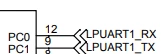
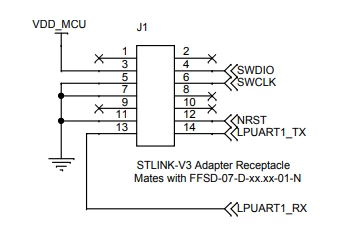 Here is the code I used from the guide "How to redirect the printf function to a UART for debug messages". Note that in: HAL_UART_Transmit I use &hlpuart1 instead of huart2
/* USER CODE BEGIN PFP */
#define PUTCHAR_PROTOTYPE int __io_putchar(int ch)
/* USER CODE END PFP */
…
 /* USER CODE BEGIN WHILE */
 while (1)
 {
 printf("Hello World\n\r");
 HAL_Delay(1000);
 /* USER CODE END WHILE */
/* USER CODE BEGIN 4 */
/**
* @brief Retargets the C library printf function to the USART.
* @param None
* @retval None
*/
PUTCHAR_PROTOTYPE
{
/* Place your implementation of fputc here */
/* e.g. write a character to the USART1 and Loop until the end of transmission */
HAL_UART_Transmit(&hlpuart1, (uint8_t *)&ch, 1, 0xFFFF);
return ch;
}
/* USER CODE END 4 */Does anyone know why I don't see any output in my console? I hope you guys can help me.
Best regards,
Nicholas