


DImre.1
Associate III
Aug 19, 2021 9:10 AM UTC
Question

How to fix "Old firmware delete failed" error while trying to firmware update?

I tried to update the firmware on P-NUCLEO-WB55 devboard, but it fails with the following error:

"Error: FUS_STATE_ERR_UNKNOWN

Error:

Old Firmware delete failed"

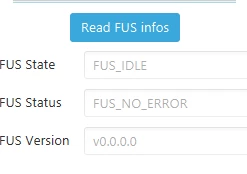
I check in STM32CubeProgrammer, and I have V.0.0.0 version:
0693W00000Dpml4QAB.png 

I do not know why it happened, maybe a previous incorrect way of upgrade process.

Any idea how can I resolve it?

Additional info:

The dongle is ok, I could update it via USB, it has fw V1.1.2.0 version.

This topic has been closed for replies.

21 replies

Remi QUINTIN
ST Technical Moderator
Aug 19, 2021 9:53 AM UTC

This means the FUS is not activated.

Using cube programmer v2.8, you can start the FUS using the "Start FUS" button.

What is the port used to connect to your board?: USB or SWD (ST-LINK) port?

DImre.1
DImre.1Author
Associate III
Aug 19, 2021 9:55 AM UTC

SWD (ST-Link) port.

Remi QUINTIN
ST Technical Moderator
Aug 19, 2021 9:57 AM UTC

OK.

So be sure to activate the FUS and then read the FUS again.

please provide a log of the FW installation if it fails again.

DImre.1
DImre.1Author
Associate III
Aug 19, 2021 10:00 AM UTC

I attached the log from STM32CubeProgrammer.

from command window:

C:\Program Files\STMicroelectronics\STM32Cube\STM32CubeProgrammer\bin>STM32_Programmer_CLI.exe -c port=swd mode=UR -startfus

   -------------------------------------------------------------------

            STM32CubeProgrammer v2.7.0

   -------------------------------------------------------------------

ST-LINK SN : 066AFF555550727867084743

ST-LINK FW : V2J37M27

Board    : P-NUCLEO-WB55

Voltage   : 3.28V

SWD freq  : 4000 KHz

Connect mode: Under Reset

Reset mode : Hardware reset

Device ID  : 0x495

Revision ID : Rev B

Device name : STM32WB5x

Flash size : 1 MBytes

Device type : MCU

Device CPU : Cortex-M4

Warning: Option Byte: nSWboot0, value: 0x0, was not modified.

Warning: Option Byte: nboot0, value: 0x1, was not modified.

Warning: Option Byte: nboot1, value: 0x1, was not modified.

Warning: Option Bytes are unchanged, Data won't be downloaded

Succeeded to set nSWboot0=0 nboot1=1 nboot0=1

Memory Programming ...

Opening and parsing file: 0x495_FUS_Operator.bin

 File     : 0x495_FUS_Operator.bin

 Size     : 8 KBytes

 Address    : 0x08000000

Erasing memory corresponding to segment 0:

Erasing internal memory sectors [0 1]

Download in Progress:

██████████████████████████████████████████████████ 100%

File download complete

Time elapsed during download operation: 00:00:00.352

Application is running, Please Hold on...

Reconnecting...

Reconnected !

Reconnecting...

Reconnected !

Error: FUS_STATE_ERR_UNKNOWN

Error: Fus is not yet running, try again

Remi QUINTIN
ST Technical Moderator
Aug 19, 2021 10:02 AM UTC

Could you try in USB DFU mode?

How old is your Nucleo board?

Is it the first time you tried to upgradde the FUS?

Could you give me the value of the SFSA and SBRV option bytes?

DImre.1
DImre.1Author
Associate III
Aug 19, 2021 10:07 AM UTC

Could you try in USB DFU mode?

--> I do it now, and will give you feedback.

How old is your Nucleo board?

-->first time it is used, unpacked yesterday. No idea when it was manufactured, but on the sheet in the package I see July 2019.

Is it the first time you tried to upgradde the FUS?

--> yes.

Could you give me the value of the SFSA and SBRV option bytes?

-> value of SFSA: val0xd0, addr: 0x080d0000, SBRV: 0x34000

Remi QUINTIN
ST Technical Moderator
Aug 19, 2021 11:28 AM UTC

Nothing strange regarding the option bytes.

Can you launch a FW delete command?

DImre.1
DImre.1Author
Associate III
Aug 19, 2021 11:31 AM UTC

No, because as I wrote earlier, the error message is:

"Error: FUS_STATE_ERR_UNKNOWN

Error:

Old Firmware delete failed"

via ST-LINK. Via USB only the dongle I can see, and the command is working. At that point I'm little bit uncertain because I did not see any info regarding the need for dongle upgrade.

DImre.1
DImre.1Author
Associate III
Aug 19, 2021 11:32 AM UTC

It looks like the old firmware is damaged and cannot be recognized. One solution would be to directly flash the memory with the fw file. Ignoring the old firmware error issue.

Remi QUINTIN
ST Technical Moderator
Aug 19, 2021 11:40 AM UTC

But The SFSA = 0xD0 which means there is a FW already and still installed on the board!!!

It is not deleted.

I assume that your board configured in USB DFU mode (with a jumper set on CN7 position (67 + the USB USER connector) is not discovered by CubeProgrammer because nSWBOOT0 = 0 while it should be set to 1 for the USB DFU mode.

DImre.1
DImre.1Author
Associate III
Aug 19, 2021 11:48 AM UTC

But The SFSA = 0xD0 which means there is a FW already and still installed on the board!!!

It is not deleted.

--> I assumed it, because I never could delete it. Looks like it is damaged.

I assume that your board configured in USB DFU mode (with a jumper set on CN7 position (67 + the USB USER connector) is not discovered by CubeProgrammer because nSWBOOT0 = 0 while it should be set to 1 for the USB DFU mode.

--> I tried it now, but the error is after trying to connect:

0693W00000DpoIEQAZ.png

Remi QUINTIN
ST Technical Moderator
Aug 19, 2021 11:46 AM UTC

I am afraid you won’t be able to flash a recent version of the FW with an old version of FUS.

I am quite puzzled by your issue.

Could you try with CubeProgrammer version 2.8?

DImre.1
DImre.1Author
Associate III
Aug 19, 2021 11:54 AM UTC

I'll do and will give you feedback.

Remi QUINTIN
ST Technical Moderator
Aug 19, 2021 11:57 AM UTC

I want to correct my statement regarding the USB configuration : the jumper must be set on position 5-7 on CN7.

Have a look at the attached document.

DImre.1
DImre.1Author
Associate III
Aug 19, 2021 12:01 PM UTC

Don't worry, I did the same from the beginnging. :)

Remi QUINTIN
ST Technical Moderator
Aug 19, 2021 1:08 PM UTC

I am out of idea. Your board is a weird state with a FUS potentially impacted.

The only lame recommendation I can give you is to try with another Nucleo board.

DImre.1
DImre.1Author
Associate III
Aug 19, 2021 1:13 PM UTC

Remi, thank you for your help! :)