Yaroslav Vushnevsky
Associate II
October 5, 2021
Solved

How to change STM32CubeMonitor-RF ZigBee channel in sniffer mode?

Hi everyone. I am trying to use WB55 dongle as ZigBee sniffer. I am program necessary binaries to dongle, install python, pyserial and wireshark. Now I can launch wireshark from cube monitor and connects to the dongle. At first try software asked me about desired ZigBee channel. And I choose one. But now I want to change channel and cant find where I can do this. If I starts capturing in wireshark it don't ask me about channel anymore.

This topic has been closed for replies.
Remi QUINTIN
Remi QUINTINBest answer
ST Technical Moderator
October 14, 2021

You first have to stop the sniffing process as there is no way to dynamically change the channel while the capture process is running.

Then

1/ Start Wireshark

2/ Refresh Interfaces Captures

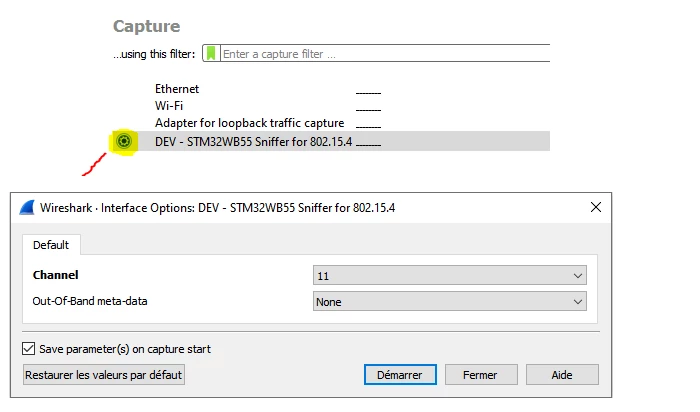
3/ Click on Wheel and select the channel

see picture bellow

0693W00000FCYetQAH.png 

4/ Start The capture process

5/ Stop the capture process

  • If no data is capture then Wireshark return back to the State 3
  • Else
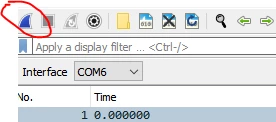
    • 0693W00000FCYlyQAH.png
    • Click on blue shark fin to return back to state 3
    • Or File > Close to return back to the state 3

Note also :

This sequence to switch to a new channel may be changed depending on the Wireshark release version the customer may use.

CubeMonitorRF embeds sniffer solution but we can consider it as an installer helper. Sniffing with STM32WB+Wireshark is a standalone application (from CubemonitorRf point of view).

2 replies

Remi QUINTIN
Remi QUINTINBest answer
ST Technical Moderator
October 14, 2021

You first have to stop the sniffing process as there is no way to dynamically change the channel while the capture process is running.

Then

1/ Start Wireshark

2/ Refresh Interfaces Captures

3/ Click on Wheel and select the channel

see picture bellow

0693W00000FCYetQAH.png 

4/ Start The capture process

5/ Stop the capture process

  • If no data is capture then Wireshark return back to the State 3
  • Else
    • 0693W00000FCYlyQAH.png
    • Click on blue shark fin to return back to state 3
    • Or File > Close to return back to the state 3

Note also :

This sequence to switch to a new channel may be changed depending on the Wireshark release version the customer may use.

CubeMonitorRF embeds sniffer solution but we can consider it as an installer helper. Sniffing with STM32WB+Wireshark is a standalone application (from CubemonitorRf point of view).

Yaroslav Vushnevsky
Associate II
February 14, 2022

Thank you for the answer. But I solve my problem with simply CC2531 TI dongle.