MKDas
Associate III
July 11, 2023
Question

Can not connect STM32WB55CGU6 with ST link

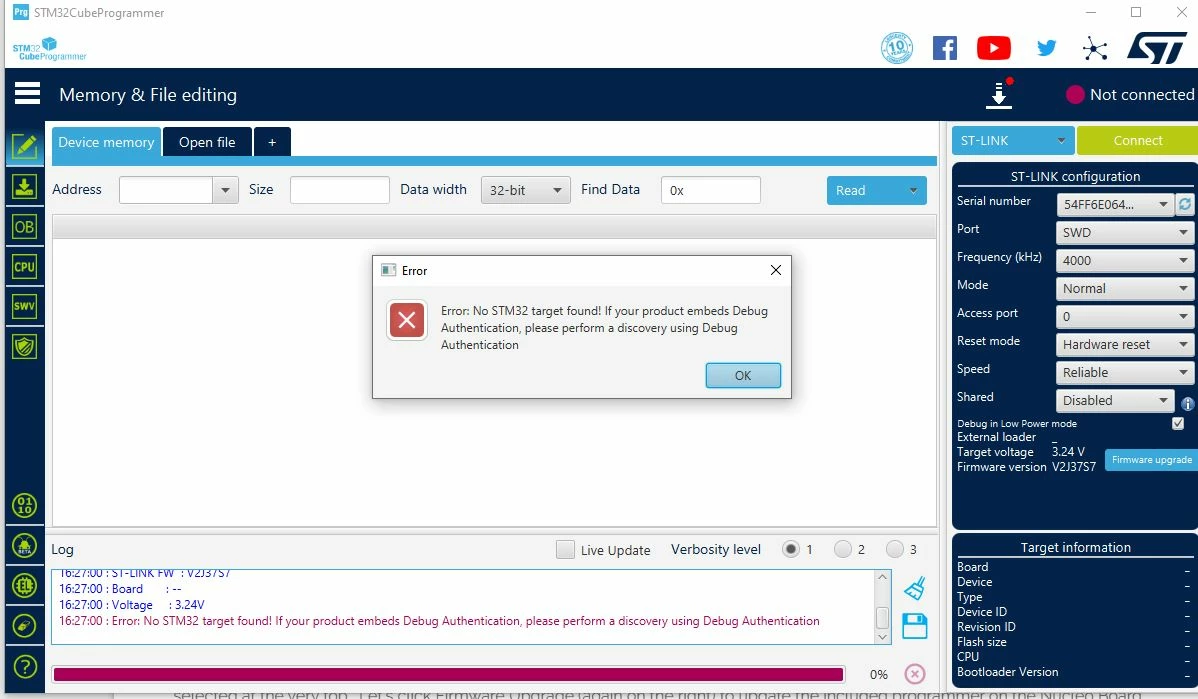
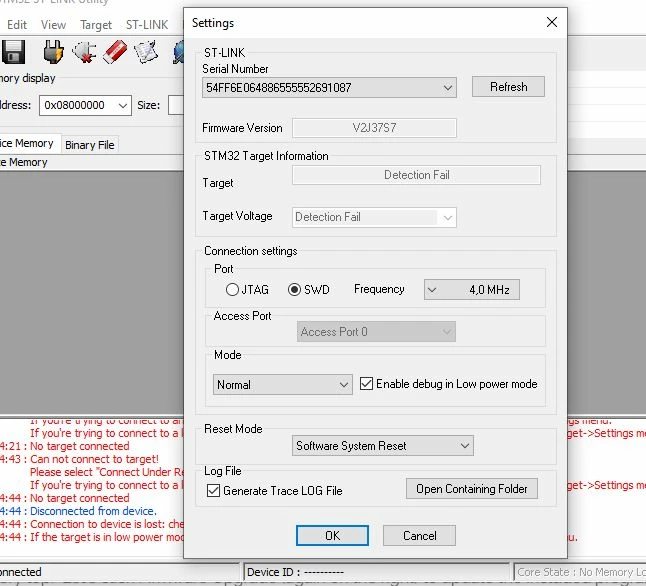
I'm using STM32WB55CGU6 (UFQFPN-48) for a design and trying to connect with the ST link. But seems like it is not connecting in any way. 
MKDas_0-1689064113929.jpeg

MKDas_1-1689064122169.jpeg


Can anyone tell me how can I connect this MCU and upload the firmware to this MCU? Why it is not responding? 


This topic has been closed for replies.

15 replies

IIRHO.1
ST Employee
July 11, 2023

Hello and welcome to ST Community

I suggest to upgrade your Firmware to the last version and try the Under reset Mode to connect your MCU.


IIRHO1_0-1689077350460.png

I hope this is helpful for you.

Issam

To give better visibility on the answered topics, please click on Accept as Solution on the reply which solved your issue or answered your question.
MKDas
MKDasAuthor
Associate III
July 12, 2023

Tried that too, but still no response. 

Peter BENSCH
ST Technical Moderator
July 12, 2023

Can you please insert a screenshot of the STM32CubeProgrammer (STLinkUpgrade) from the completed firmware update?

In order to give better visibility on the answered topics, please click on Accept as Solution on the reply which solved your issue or answered your question.
MKDas
MKDasAuthor
Associate III
July 12, 2023

yes, sure. 

1.JPG2.JPG3.JPG4.JPG5.JPG6.JPG7.JPG

MKDas
MKDasAuthor
Associate III
July 12, 2023

also the PCB design of the MCU section:

MKDas_0-1689150527251.png

I'm using ST_link v2. 


ST-LINK-V2-PROGRAMMER-FOR-STM8-STM32.jpg


Peter BENSCH
ST Technical Moderator
July 12, 2023

It is not an ST-LINK/V2, but an illegal clone from an Asian manufacturer. Tools from STMicroelectronics can only support original hardware, e.g. this original ST-LINK/V2, as the hardware used in each of the fakes differs from the original and can cause completely unpredictable effects.

It should be noted that there are also identical-looking clones of the ST-LINK/V2 that look identical to the original.. A supplier who actually sells original goods does not offer fakes like yours.

Regards
/Peter

In order to give better visibility on the answered topics, please click on Accept as Solution on the reply which solved your issue or answered your question.
MKDas
MKDasAuthor
Associate III
July 14, 2023

Agreed, already ordered the original one. once its arrive, will try again with the original one. 

AScha.3
Super User
July 14, 2023

your st-link should work fine, as the update also was successful, but use connect "under software reset".

hardware reset not working with these V2 "clones" or whatever Mr. STM calls them.

i use these also, most of time, because i was not aware, that these stlink V2 are clones or copies , and STM never allowed these things to be produced and sold.

so i tried the new stlink V3 , all 100% by STM , buyed from mouser, but had a lot of problems with them, until got them working 100% ok. the "clones" never made problems - if I may mention that.

until recently STM changed policies and new software update with CubeProgrammer tries to destroy functionality, when it can identify a chip from other manufacterer than STM. if "clone" has original STM chip inside, it working as before.

so try "software reset" and debug will work, if you connect swd and swclk , gnd and vcc 3v3.

If you feel a post has answered your question, please click on " Best Answer ".
MKDas
MKDasAuthor
Associate III
July 24, 2023

Tried with v2 both with clones& original one. It can not detect the MCU. The clonesone uses STM32F103 inside. I don't think it's ST-Link. It's the MCU itself not working. But I tried 10MCUs. also checked the circuit diagram many times. Did not find any mistake in the circuit. But don't know what is the problem. 

Tesla DeLorean
Guru
July 14, 2023

The error comes up most frequently when the Parts Not Working / Functional

Check the power, especially VDDA/VSSA. Check the state of NRST

Check the orientation and pin assignments.

Check other signs-of-life, ie strap BOOT0 HIGH and try to interact via the USART / AN2606 / AN3155 methods. Send a 0x7F pattern at 9600 8E1

Tips, Buy me a coffee, or three.. PayPal Venmo (See Profile) Up vote any posts that you find helpful, it shows what's working..
MKDas
MKDasAuthor
Associate III
July 24, 2023

VDD:3.2V, NRST:3.2V. BOOT0:0.44V if kept open. I used pull-Up/Down options to test. No way it responds. Tried USB, did not work. Did not try USART yet. But seems like all these MCUs are just sleeping. No response. No sign of life. 

MKDas
MKDasAuthor
Associate III
July 24, 2023

Both of your(both of you) suggestions did not work. also even with 3.3V VDD, the MCU seems frozen. No sign of life. Recently bought the original ST-Link v2. But the same issue. 


223.JPG

Other MCUs that we use for different circuits work fine with any of the ST-Link. But with this STM32WB55 I see no sign of life. 

Even collected 10MCU extra from different vendors. Those also not working. 

AScha.3
Super User
July 24, 2023

and you have all power+gnd pins connected ? (100% shure...?)

AScha3_0-1690187719151.png


If you feel a post has answered your question, please click on " Best Answer ".
MKDas
MKDasAuthor
Associate III
July 24, 2023

100% sure.