


mtaallah
Associate
April 14, 2023
Solved

Build BLE server profile App based on Custom Template using STM32CubeIDE 1.12.0 for STM32WB5MMGHx

I am trying to build my own BLE application for STM32WB5MMGHx using cubeMX with BLE custom Template , I followed all the needed steps to configure BLE APP the advertising data, services and chars. the projects build but nothing work.
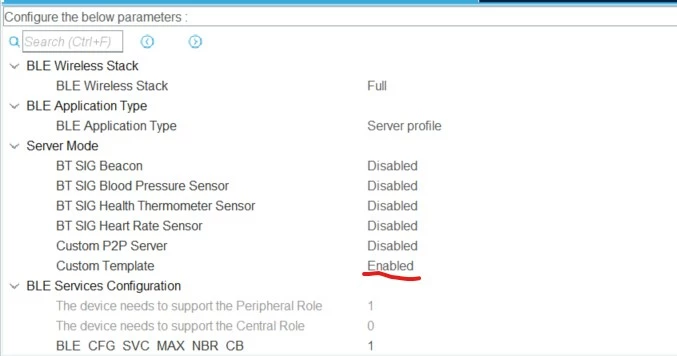

_legacyfs_online_stmicro_images_0693W00000bi6SMQAY.pngI debugged my projects and I found that I didn't get any interruption on IPCC (RX/TX handlers) after initializing the BLE stack.

I tried also to use the same steps with Custom P2P server and it doesn't work for me and I have the same symptoms.
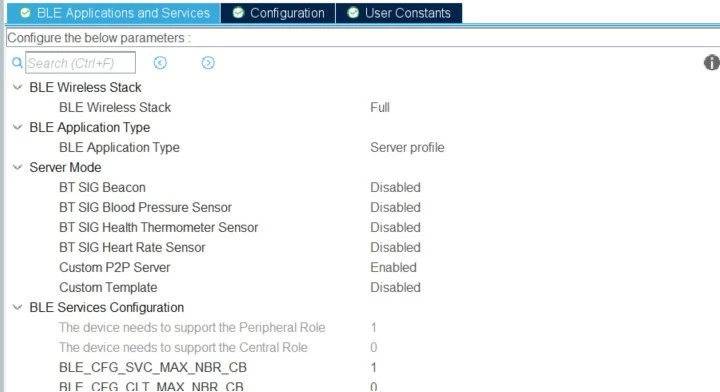

_legacyfs_online_stmicro_images_0693W00000bi6TFQAY.pngIs there any specific configuration and setting to make it working.

This topic has been closed for replies.
Remy ISSALYS
Remy ISSALYSBest answer
ST Technical Moderator
April 24, 2023

Hello,

Indeed, there is an extra dot in CubeIDE linker file: *(.MB_MEM2) ; instead of *(MB_MEM2) ;

Due to this, the buffers that need to be in SRAM2 are not placed there, so your application doesn't work. It will be corrected in the next release.

Best Regards

5 replies

KDJEM.1
ST Technical Moderator
April 14, 2023

Hello @mtaallah​ and welcome to the Community :) ;

I advise you to start with an available BLE_p2pServer example in the STM32CubeWB package.

So, when you configurated your project, try to get inspired from the instructions in the readme file and the .ioc example file.

Also, this video can help you to configure BLE server profile App based on Custom Template using STM32CubeIDE.

I hope this help you!

Kaouthar

To give better visibility on the answered topics, please click on "Best answer" on the reply which solved your issue or answered your question.
mtaallah
mtaallahAuthor
Associate
April 14, 2023

Hi,

I already tested the BLE_p2pServer example for STM32WB5MM-DK and it works for me with my own hardware, but now i am trying to work on my own application from scratch, because the example integrates many components and i would like to keep my application base on a valid ioc file to make the integration of new components easier.

please find enclosed myproject.

KDJEM.1
ST Technical Moderator
April 17, 2023

Hi @mtaallah​ ,

Please make sure that the STM32_WPAN parameters configuration and BLE Advertising are well configurated in your .ioc file.

For that, I recommend you when configurated the STM32_WPAN to take a look to this video and get inspired from the steps.

Thank you.

Kaouthar.

To give better visibility on the answered topics, please click on "Best answer" on the reply which solved your issue or answered your question.
mtaallah
mtaallahAuthor
Associate
April 20, 2023

Hi,

I followed all steps in the video but it doesn't work.

After investigating I found that there's a problem in the linker file ans startup file generated within the project. I used the linker file and startup file from the out of box BLE_p2pserver with my application and it works for me now.

STM32cube IDE : Version: 1.12.0 Build: 14980_20230301_1550 (UTC)

STM32CubeWB Firmware Package V1.16.0 / 08-February-2023

I propose that you check and fix this issue that the we can create our project using cubeIDE and run it without issues.

Thanks.

Remy ISSALYS
Remy ISSALYSBest answer
ST Technical Moderator
April 24, 2023

Hello,

Indeed, there is an extra dot in CubeIDE linker file: *(.MB_MEM2) ; instead of *(MB_MEM2) ;

Due to this, the buffers that need to be in SRAM2 are not placed there, so your application doesn't work. It will be corrected in the next release.

Best Regards