ABN
Associate III
Apr 22, 2024 11:17 AM UTC
Question

BLE Disconnection with error code 0x3E

Hey,

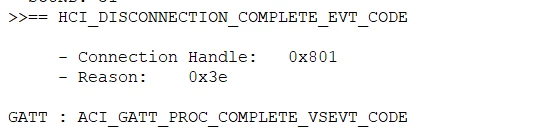
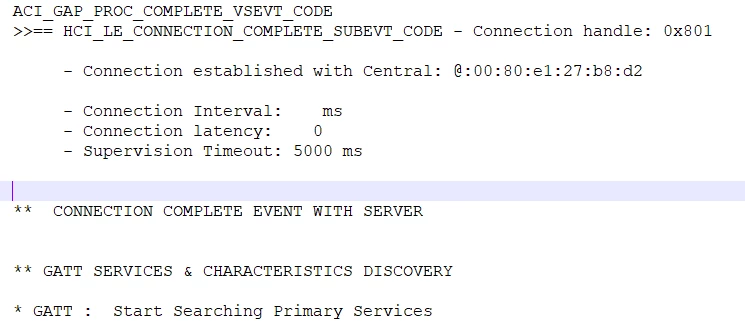
I'm working on custom BLE Central and Peripheral project to make connection and send some sensor data over BLE. For this I'm referring to BLE p2pServer and p2pClient along with p2pRouter example projects. I'm able to make a connection with the server, but immediately I get HCI_DISCONNECTION_COMPLETE_EVT_CODE with the error code for reason as 0x3E. Can anyone help me out with this.?

Attaching the snapshot of the debug messages.
ABN_1-1713784624841.png


ABN_0-1713784521635.png


This topic has been closed for replies.

10 replies

STTwo-32
ST Technical Moderator
Apr 22, 2024 5:56 PM UTC

Hello @ABN 

The error code 0x3e means "The Connection Failed to be Established / Synchronization Timeout error code". It indicates that the LL initiated a connection or initiated synchronization to periodic advertising but the connection has failed to be established or the Link Layer failed to synchronize with the periodic advertising within 6 periodic advertising events of the first attempt. 

If you are experiencing this issue directly after connecting your STM32WB to a server, it could be due to interference or instability in the connection establishment process. It is recommended to check the environmental conditions and ensure that there are no sources of interference near the devices. Additionally, reviewing the configuration of the clock sources like LSE and HSE, as well as ensuring that there are no issues with GPIO toggling or flash access, might help in resolving the issue.

For more details, you can refer to the Core Specification 5.4. 

Best Regards.

STTwo-32


To give better visibility on the answered topics, please click on Accept as Solution on the reply which solved your issue or answered your question.
ABN
ABNAuthor
Associate III
Apr 23, 2024 5:10 AM UTC

Hello @STTwo-32 ,

1. There are no sources of interference. Only central and peripheral devices are present.

2. Snapshot of the clock config of Central device.

ABN_0-1713848863011.png

3. Snapshot of clock config of Peripheral device.

ABN_1-1713848980265.png

4. How can GPIO toggling and flash access help in resolving the issue?

STTwo-32
ST Technical Moderator
Apr 23, 2024 7:13 AM UTC

1) You should ensure that there is no source of interference on the place that you are working on.

2+3) I suggest you to add the following line of code to your central and Perpheral.

int main(void)
{

 /* USER CODE BEGIN 1 */
	 HAL_PWR_EnableBkUpAccess();
	 while(HAL_IS_BIT_CLR(PWR->CR1, PWR_CR1_DBP));
	 __HAL_RCC_LSE_CONFIG(RCC_LSE_OFF);
	 __HAL_RCC_LSEDRIVE_CONFIG(RCC_LSEDRIVE_MEDIUMHIGH);
 /* USER CODE END 1 */

4) Not helping, But just to ensure that everything else works fine on the Code.

Best Regards.

STTwo-32

To give better visibility on the answered topics, please click on Accept as Solution on the reply which solved your issue or answered your question.