Senior II
August 2, 2023
Solved

Wrong position of a "." on a Button with Label

  • August 2, 2023
  • 2 replies
  • 1879 views

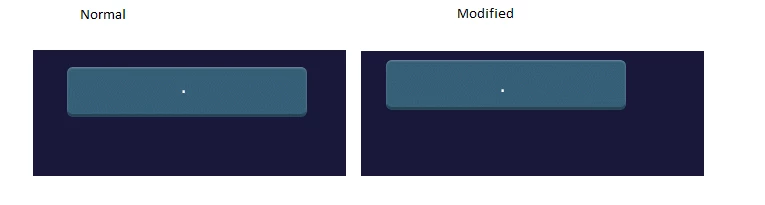
The position of the text containing only a dot on a Button with Label is wrong. Left picture is a screenshot from TouchGFX Designer, where the dot is well aligned. To the right a framebuffer-screenshot of the actual application running on target hardware. The dot is vertically aligned to the middle of a typical character height.

Sometimes already the Designer shows the wrong position of the dot. Not sure when this happens.

Versions are up-to-date (CubeMX, CubeIDE and TouchGFX)
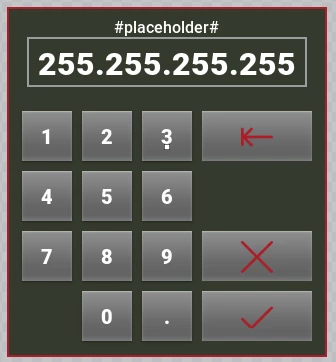
Dot in the Designer.png2023-07-10 15-06-04 Screenshot.bmp

This topic has been closed for replies.
Best answer by JTP1

Hello

ButtonWtihLabel centers the text in vertical direrction based on the actual text height, as you noticed. Maybe use flexButton where you can set the text Y position ?

Other option is to modify file "/Middlewares/ST/touchgfx/framework/include/touchgfx/widgets/ButtonWithLabel.hpp" and set alternative calculation in function void updateTextPosition() line:


textHeightIncludingSpacing = f->getHeight() * f->getNumberOfLines(s) + f->getSpacingAbove(s);


to for example:


if(s[0]=='.')
 textHeightIncludingSpacing = f->getHeight() * f->getNumberOfLines(s) + f->getSpacingAbove(s)-12;
 else
 textHeightIncludingSpacing = f->getHeight() * f->getNumberOfLines(s) + f->getSpacingAbove(s);


JTP1_0-1691045895457.png

(just idea,your implementation can be smarter :grinning_face_with_sweat:)

Br J.T

2 replies

JTP1Best answer
Graduate II
August 3, 2023

Hello

ButtonWtihLabel centers the text in vertical direrction based on the actual text height, as you noticed. Maybe use flexButton where you can set the text Y position ?

Other option is to modify file "/Middlewares/ST/touchgfx/framework/include/touchgfx/widgets/ButtonWithLabel.hpp" and set alternative calculation in function void updateTextPosition() line:


textHeightIncludingSpacing = f->getHeight() * f->getNumberOfLines(s) + f->getSpacingAbove(s);


to for example:


if(s[0]=='.')
 textHeightIncludingSpacing = f->getHeight() * f->getNumberOfLines(s) + f->getSpacingAbove(s)-12;
 else
 textHeightIncludingSpacing = f->getHeight() * f->getNumberOfLines(s) + f->getSpacingAbove(s);


JTP1_0-1691045895457.png

(just idea,your implementation can be smarter :grinning_face_with_sweat:)

Br J.T

t.deckerAuthor
Senior II
August 3, 2023

HI @JTP1, thanks for the hint. Undocumented feature of ButtonWithLabel... :face_with_rolling_eyes:
I changed the type of this button to a FlexButton and now the dot is shown at the correct position.

When this account seems to be inactive, try @tdecker2 - ST can't change mail addresses, so I had to create a new account.