

heyo
Associate III
April 17, 2023
Question

Why simulator crashes when I call function in another class?

  • April 17, 2023
  • 2 replies
  • 2391 views

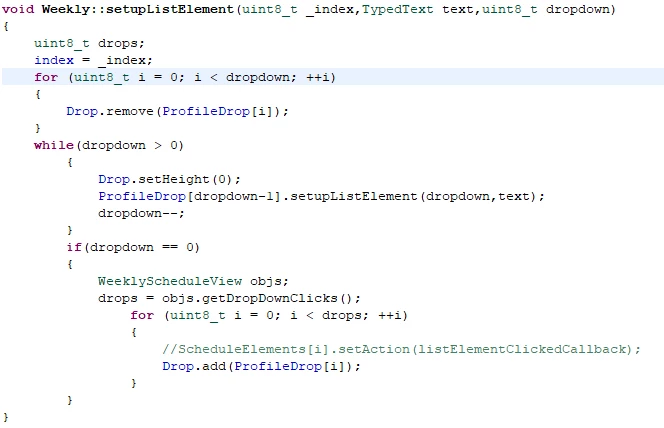
I've created a list and need to get value from model.hpp and using

WeeklyScheduleView objs;

drops = objs.getDropDownClicks();

to get value. But when it calls it crashes.

_legacyfs_online_stmicro_images_0693W00000biCtxQAE.png
_legacyfs_online_stmicro_images_0693W00000biCtnQAE.png

This topic has been closed for replies.

2 replies

Senior II
April 17, 2023

Check if presenter is a valid pointer, maybe it is uninitialized.

When this account seems to be inactive, try @tdecker2 - ST can't change mail addresses, so I had to create a new account.
heyo
heyoAuthor
Associate III
April 17, 2023

Do you mean about this?
_legacyfs_online_stmicro_images_0693W00000biEFLQA2.png

Senior II
April 17, 2023

Set a breakpoint to the line return presenter->getScheduleDropDown() and see if presenter has a valid address or check at runtime with if (presenter != nullptr) { the line before

When this account seems to be inactive, try @tdecker2 - ST can't change mail addresses, so I had to create a new account.
Osman SOYKURT
Technical Moderator
April 20, 2023

Hello heyo,

It crashes at Drop.remove(ProfileDrop[i]) or drops = objs.getDropDownClicks() ?

Also, what is your Drop object?

/Osman

Osman SOYKURTST Software Developer | TouchGFX
heyo
heyoAuthor
Associate III
April 20, 2023

At drops = objs.getDropDownClicks(). It always crashes when I try to call function in other class.

Do you mean Drop? Drop is a list. The only way calls other function in other class works when container is included in view window

Osman SOYKURT
Technical Moderator
May 8, 2023

Hello,

Did you resolve your issue? If not, can you share your project?

/Osman

Osman SOYKURTST Software Developer | TouchGFX

