


Zui
Senior
July 17, 2019
Question

Why my application acts normal if launched via touchGFX designer, but acts weird and crash with visual studio

  • July 17, 2019
  • 1 reply
  • 1216 views

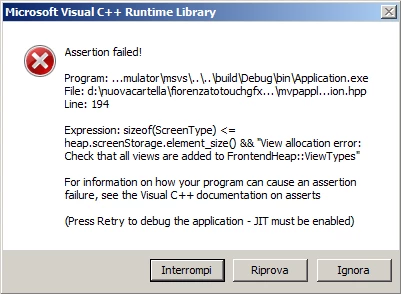
I have this problem just today, my application works as intended if i start it vua TouchGFX designer, but if i start simulator from visual studio, it acts weird, like showing wrong images, and some buttons instead of changing screens leads to this error:0690X000009Yq1SQAS.png
This topic has been closed for replies.

1 reply

Anders Nedergaard PETERSEN
Senior II
July 18, 2019

Hi @Zui​,

It seems that not all code generated by the Designer has been fully updated in Visual Studio.

Lets have a look at the post generate command used by TouchGFX Designer to update the Visual Studio project:

Open the .touchgfx file in any editor and locate the entry called PostGenerateCommand, to work correctly it should have a command in line with this:

"PostGenerateCommand": "touchgfx update_project --project-file=simulator/msvs/Application.vcxproj",

/Anders