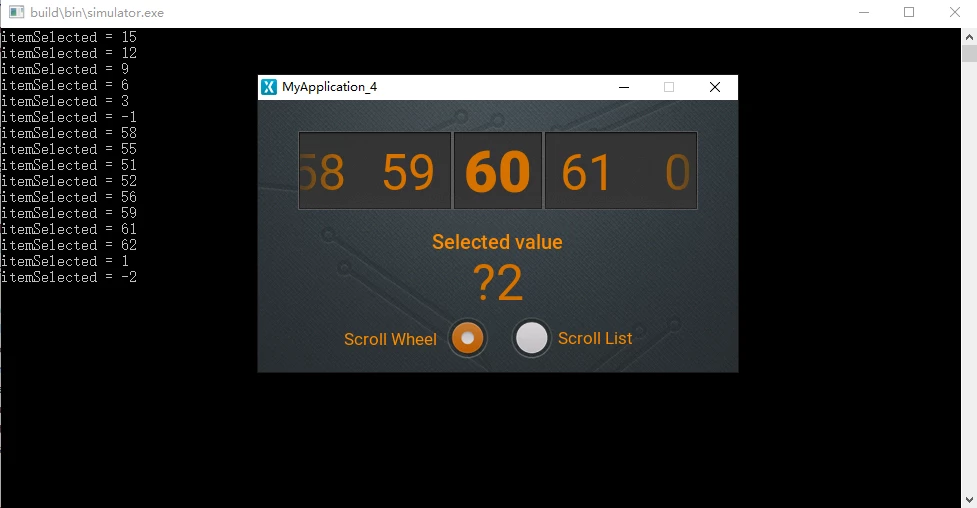
Why does the LIST APPEARANCE property of the scrollWheel control run incorrectly when set to Circular?
Why does the LIST APPEARANCE property of the scrollWheel control run incorrectly when set to Circular?
When I run TouchGFX's "Scroll Wheel and List Example", if the LIST APPEARANCE property of the scrollWheel control is set to Circular,
When I slide the data to the left or right, and then quickly swipe, the system prompts an error. I check the source file and find that it is the parameter itemSelected = -1 of the function "scrollWheelAnimateToHandler (int16_t itemSelected)",
-1 is incorrect data, which causes the program to be abnormal. If the LIST APPEARANCE property of the scrollWheel control is not set to Circular, the program runs normally.
I refer to this example, I have made a scrollWheel control, but I need to set the LIST APPEARANCE property to Circular, but itemSelected = -1 causes my program to not run properly. What should I do?
// The callback updates the selected Val on the itemSelected parameter
void Screen1View :: scrollWheelAnimateToHandler (int16_t itemSelected)
{
// I added for testing
touchgfx_printf ("itemSelected =% d \ r \ n", itemSelected);
selectedVal.invalidate ();
Unicode :: snprintf (selectedValBuffer, SELECTEDVAL_SIZE, "% d", itemSelected);
}
Below is the error I caught