

ihsanoglu
Senior
August 15, 2019
Question

Weird bug in custom keyboard

  • August 15, 2019
  • 10 replies
  • 4644 views

I am creating a custom keyboard following the example provided.

The code in the example is simple to understand and follow.

However, in my custom keyboard the following function behave weirdly

getBufferPosition()

I have 2 callback areas in my keyboard, one for backspace, and the other for 'Enter' functionality.

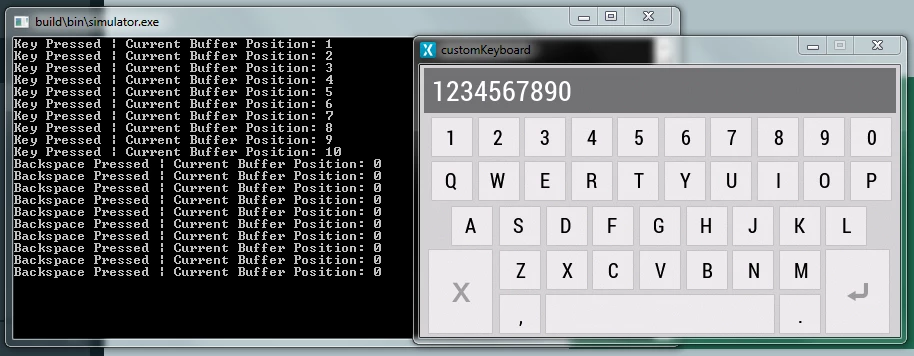
When I call the function from the key pressed callback the function return the correct value.

However, when I call the same function from the backspace callback it always returns 0.

What is going on in here ?

please see the attached screenshots.
0690X00000A9cDfQAJ.png

This topic has been closed for replies.

10 replies

ihsanoglu
ihsanogluAuthor
Senior
August 15, 2019

The function behaves in a similar manner when called from the Enter callback. It seems like the callbackAreas' callbacks not reaching the class of keyboard or something and getting 0 always?

Martin KJELDSEN
Principal III
August 15, 2019

Hi @Abdullah İhsanoğlu​,

I'd have to see some code in order to be of any help; Otherwise i'd just be guessing. Maybe send your project.

/Martin

ihsanoglu
ihsanogluAuthor
Senior
August 15, 2019

Sure, here is my CustomKeyboard.cpp file

#include <gui/common/CustomKeyboard.hpp>
 
CustomKeyboard::CustomKeyboard() : keyboard(),
 backspacePressed(this, &CustomKeyboard::backspacePressedHandler),
	enterPressed(this, &CustomKeyboard::enterPressedHandler),
 keyPressed(this, &CustomKeyboard::keyPressedhandler)
{
 //Set the callbacks for the callback areas of the keyboard and set its layout.
 layout.callbackAreaArray[0].callback = &backspacePressed;
	layout.callbackAreaArray[1].callback = &enterPressed;
 
 keyboard.setLayout(&layout);
 keyboard.setKeyListener(keyPressed);
 keyboard.setPosition(0, 0, 480, 272);
 keyboard.setTextIndentation();
 //Allocate the buffer associated with keyboard.
 memset(buffer, 0, sizeof(buffer));
	keyboard.setBuffer(buffer, BUFFER_SIZE);
 
	keyboard.setKeymappingList(&keyMappingList);
 add(keyboard);
}
 
void CustomKeyboard::backspacePressedHandler()
{
 int pos = keyboard.getBufferPosition();
 if (pos > 0)
 {
 //Delete the previous entry in the buffer and decrement the position.
 buffer[pos - 1] = 0;
 keyboard.setBufferPosition(pos - 1);
 }
	touchgfx_printf("Backspace Pressed | Current Buffer Position: %d\n", keyboard.getBufferPosition());
}
 
void CustomKeyboard::enterPressedHandler()
{
	touchgfx_printf("Enter Pressed | Current Buffer Position: %d\n", keyboard.getBufferPosition());
}
 
void CustomKeyboard::keyPressedhandler(Unicode::UnicodeChar keyChar)
{
	if (keyChar)
	{
		touchgfx_printf("Key Pressed | Current Buffer Position: %d\n", keyboard.getBufferPosition());
	}
}
 
void CustomKeyboard::setTouchable(bool touch)
{
 Container::setTouchable(touch);
 keyboard.setTouchable(touch);
}

The project is attached as well

Martin KJELDSEN
Principal III
August 15, 2019

Hi @Abdullah İhsanoğlu​,

Just to let you know, i've verified your issue and you're right to be confused :) I'm tied up today so i'll have to do some deeper digging tomorrow or monday.

/Martin

ihsanoglu
ihsanogluAuthor
Senior
August 15, 2019

No problem. Just to let you know, this problem is solved when I create and use keyboard instance from a View. However I need to use it from a custom container.

Dejan Nedeljkovic
Associate III
September 10, 2019

Hi @Abdullah İhsanoğlu​ 

Did you solve the problem with creating the keyboard from a custom container?

In my project I have a problem displaying/crearting the keyboard a second time. When I press the keyboard button it creates the keyboard. Then I'm writing some text and by hitting enter it's getting removed. So far so good.

When I press the keyboard button again it's no more displaying the keyboard.

@Martin KJELDSEN​  maybe you have a hint for me.

Regards

Dejan

ihsanoglu
ihsanogluAuthor
Senior
September 10, 2019

Nope , I just used my custom keyboard as an object without implementing it in a custom container. As shown in the example.

Dejan Nedeljkovic
Associate III
September 10, 2019

How did you manage to close/exit the keyboard widget and entering it from the same ScreenView?

Regards

Dejan

RMoha.2
Associate III
January 14, 2021

Hi @Abdullah İhsanoğlu​ , were you able to enable "Enter" key on the keyboard?