


Pirol
Associate III
November 22, 2022
Question

Upper and lower bound in scroll wheel

  • November 22, 2022
  • 2 replies
  • 1655 views

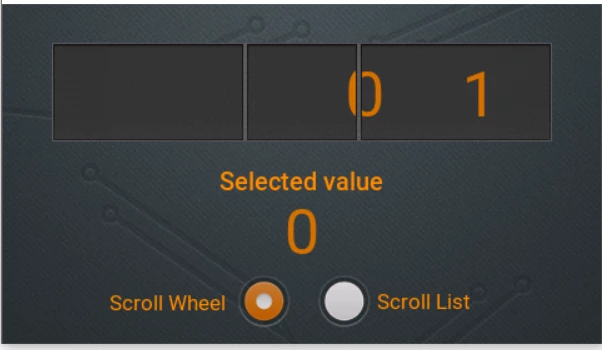
In the scroll wheel with selected item, you can drag the last item (the top or bottom item of the whole list) nearly out of the area of the selected (highlighted) item. How can you change how far the last item can be dragged out of that area?

I thought it might be the overshoot percentage but changing the value of that in scroll base initializer list does not change anything.

Example image from "scroll whell and list example": The zero is last item and can be dragged out of the "selected item area". How can you make the value how far the zero can be dragged out of the region, smaller?
0693W00000WJDfrQAH.png

This topic has been closed for replies.

2 replies

Osman SOYKURT
ST Technical Moderator
November 29, 2022

Hello Pirol,

This is done by the setOvershootPercentage function indeed you're correct, but we noticed a bug few months ago on it as reported on this thread. The status about it is still ongoing.

As a workaround, I can suggest you to use the scroll list instead, the setOvershootPercentage() function seems to work fine with this widget.

/Osman

ST Software Developer | TouchGFX
Pirol
PirolAuthor
Associate III
November 30, 2022

Alright. Thank you for your answer.