Karan 123
Senior
May 1, 2020
Solved

Update Array (String) to Scroll List Element with FreeRTOS queue .

  • May 1, 2020
  • 7 replies
  • 2077 views

Hi,

I am working on below setup:

Software Tool Chain:

STM32CubeMX 5.6.0

TouchGFX 4.13.0 Designer

STM32CubeIDE 1.3.0

STM32F746G Discovery Kit v3.0.1 (AT)

Hardware:

STM32F746G-DISCO (Discovery Board)

USB Mass Storage Drive (32 GB)

I have worked on LED, BUTTON , ADC, External Interrupts, UART with TouchGFX Buttons and TextArea Wildcard. 

Now, I have to send USB Files Names to Scroll List Elements.

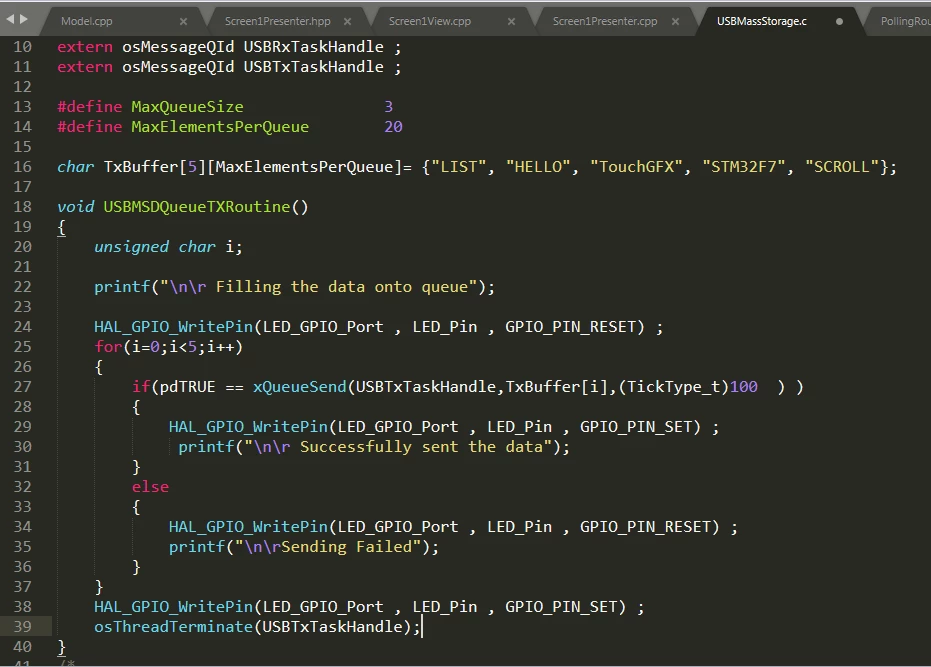
For Simplicity As for now , I have created in 2D Array and Send One by one with FreeRTOS Queue .

char TxBuffer[5][MaxElementsPerQueue]= {"LIST", "HELLO", "TouchGFX", "STM32F7", "SCROLL"};
 
if(pdTRUE == xQueueSend(USBTxTaskHandle,TxBuffer[i],(TickType_t)100 ) )

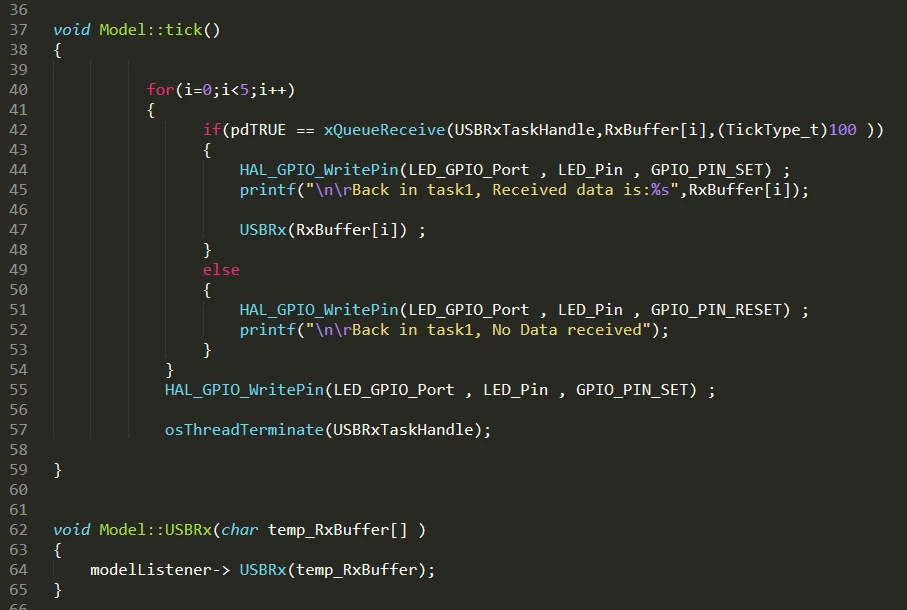
Same ways receiving in Model.c

void Model::tick()
{	
		if(pdTRUE == xQueueReceive(USBRxTaskHandle,RxBuffer[i],(TickType_t)100 	
 
}
void Model::USBRx(char temp_RxBuffer[] )
{
	modelListener-> USBRx(temp_RxBuffer);
}

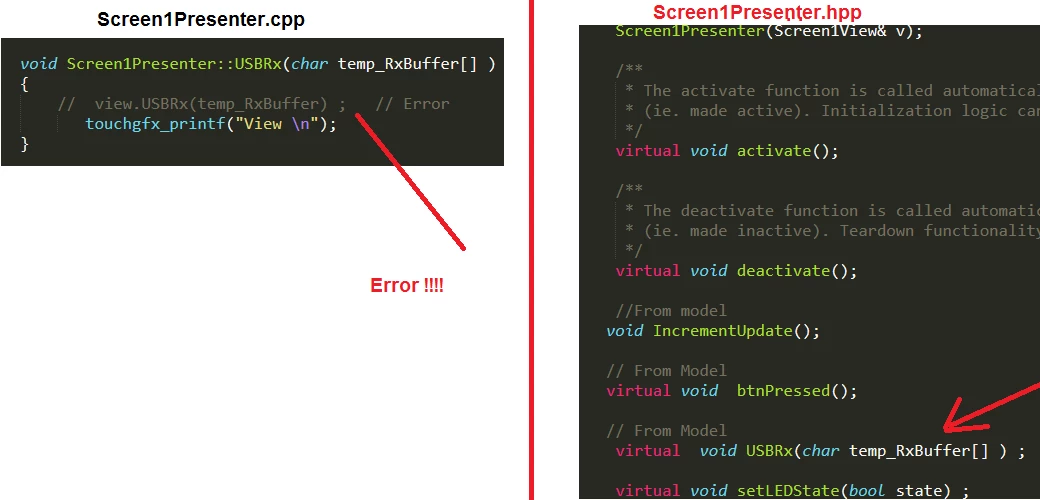
But Getting Error .. As below :

void Screen1Presenter::USBRx(char temp_RxBuffer[] )
{
	// view.USBRx(temp_RxBuffer) ; // Error
	 touchgfx_printf("View \n");
}

Is it right way ? Is there any application note or example for that .. ?

C++ Issue?

I have seen link as below:

https://support.touchgfx.com/docs/development/ui-development/ui-components/containers/scroll-list/

--

Karan
0693W000000Wn54QAC.png0693W000000Wn5JQAS.png

0693W000000Wn5TQAS.png

This topic has been closed for replies.
Best answer by Jagdish Bisawa

Hi @Community member​ ,

Are you trying to ask how to update the list with, say a text string ?

If so, then you need to look into the API of the ScrollList. Your list consists of a custom container that has string elements. Try to set these string elements using the ScrollList object your code has created - I feel this should work.

/Jagdish

7 replies

Jagdish Bisawa
Visitor II
May 2, 2020

Hi @Community member​ ,

You have not specified what error you get. Further, I find that you are creating & terminating thread for Tx & Rx. Normally, that is not a good practice when you use an RTOS. You can block these 2 tasks, waiting for an event & let them be in the memory. In the long run creation/termination can lead to run-time memory issues.

As regards your error, can you share more information about it ?

/Jagdish

Karan 123
Karan 123Author
Senior
May 2, 2020

Hi,

@Jagdish Bisawa (Community Member)

Please check the screen short for error ..

0693W000000WngFQAS.png

Apart from termination , Is is right way to move array information ?

--

Karan

Jagdish Bisawa
Visitor II
May 2, 2020

Hi @Community member​ ,

The error shown by you is a compile time error reported during the linker stage. This error means that the function USBRx(char*) has not been defined, i.e., the body of the function is missing. You need to define the body of the function in the .cpp file.

Regarding the thread termination, I suggest that you get familiar with RTOS workings. What I meant was that you can have USBTX & USBTx threads which will pass on the data using the queue & when they are done they can be blocked waiting for a semaphore. I am assuming that the USBTx thread will transmit data out of the USB port ( after receiving it from the GUI or another thread in the system ) & the USBRx thread will receive data from the USB port & send it further into the GUI framework.

/Jagdish

Karan 123
Karan 123Author
Senior
May 2, 2020

HI,

Thanks for pointing out error and it resolved now.

OK .. I am also working on RTOS to get more familiar .

Yes , Your assumption is Right

1) USBTX - > Read Files Names from USB Thumb Drive Send with help of Queue in StartTaskUSBTx.

2) USBRX - > Read Files Names Queue from StartTaskUSBTx in Model.c , then to Presenter to View for Final Display GUI Framwork.

I have worked on

LED, Hardware BUTTON , External Interrupts -> TextArea Wildcard with Queue

ADC, UART with TouchGFX Buttons and -> TextArea Wildcard with Semaphore

How to update Array Value for List Element is New for me .

void Screen1View::USBRx(char temp_RxBuffer[] )
{
 // How to Update Here..
}

0693W000000WnsBQAS.png

0693W000000WnsaQAC.png0693W000000WnsQQAS.png

0693W000000WnskQAC.png

Am I do Correct Configuration for Scroll List in TouchGFX Framework.?

How to Update Here. in List Layout ?

--

Karan

Jagdish Bisawa
Jagdish BisawaBest answer
Visitor II
May 3, 2020

Hi @Community member​ ,

Are you trying to ask how to update the list with, say a text string ?

If so, then you need to look into the API of the ScrollList. Your list consists of a custom container that has string elements. Try to set these string elements using the ScrollList object your code has created - I feel this should work.

/Jagdish

Karan 123
Karan 123Author
Senior
May 3, 2020

Hi,

 @Jagdish Bisawa (Community Member) Thanks for update..

Yes , I want to Update "NEW TEXT 00" with

char TxBuffer[5][MaxElementsPerQueue]= {"LIST", "HELLO", "TouchGFX", "STM32F7", "SCROLL"};

ln Screen1ViewBase.cpp .

void Screen1ViewBase::buttonCallbackHandler(const touchgfx::AbstractButton& src)
{
 if (&src == &ledCtrlBtn)
 {
 //Interaction1
 //When ledCtrlBtn clicked call virtual function
 //Call updateLEDState
 updateLEDState();
 }
}
 
void Screen1ViewBase::updateItemCallbackHandler(touchgfx::DrawableListItemsInterface* items, int16_t containerIndex, int16_t itemIndex)
{
 if (items == &scrollList1ListItems)
 {
 touchgfx::Drawable* d = items->getDrawable(containerIndex);
 MenuElement* cc = (MenuElement*)d;
 scrollList1UpdateItem(*cc, itemIndex);
 }
}

ln Screen1ViewBase.hpp .

 virtual void scrollList1UpdateItem(MenuElement& item, int16_t itemIndex)
 {
 // Override and implement this function in Screen1
 }

I think I have to use concrete version of scrollList1UpdateItem in Screen1View.cpp.

void Screen1View::USBRx(char temp_RxBuffer[] )
{
 // How to Update Here..
 // scrollList1UpdateItem(MenuElement& item, int16_t itemIndex) ??
}

But could not find how to use here in

https://support.touchgfx.com/docs/api/classes/classtouchgfx_1_1_scroll_list

Am I right ? or any there API .

Thanks again ..

--

Karan

Karan 123
Karan 123Author
Senior
May 3, 2020

Anybody have some idea ?

--

Karan

Karan 123
Karan 123Author
Senior
May 4, 2020

Hi,

I am able to update "number" as per below tutorial

https://support.touchgfx.com/docs/development/ui-development/ui-components/containers/scroll-list

0693W000000WsTuQAK.png

But still unable to update array .Also could not find any tutorials for that...

Please update if anybody have some idea.

--

Karan