


wired
Senior II
Jul 27, 2022 7:19 PM UTC
Solved

Undefined reference to setDrawableSize after update to TouchGFX 4.20

After updating TouchGFX to 4.20, my auto-generated file for <screen>ViewBase.cpp is resulting in an undefined reference to setDrawableSize:
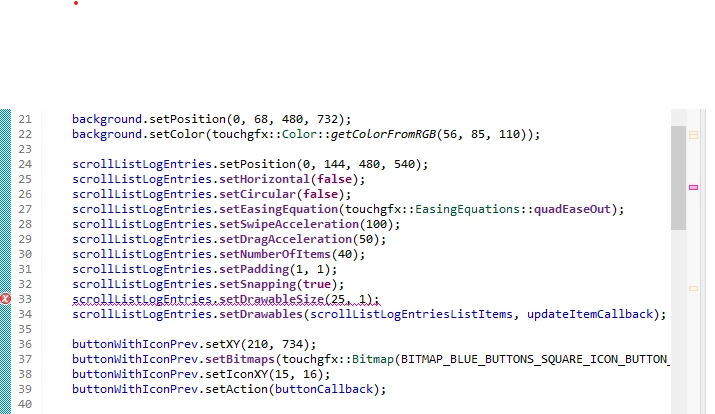
0693W00000QMIfoQAH.pngThis is for a scroll list I have on one of my screens. Has anyone else had this issue? I'm wondering if it's a bug. I was previously at 4.18.

This topic has been closed for replies.
wired
wiredBest answer
Senior II
Jul 28, 2022 8:07 PM UTC

Problem solved!

For some reason, the project was accumulating library paths from other locations, versions of the project, etc. I went into the Properties of the project, and in the Paths and Symbols I selected the Library Paths tab, and deleted all of the paths except for the first path (a git pat) and the path to my current project. I rebuilt and all 52 errors disappeared. Wh my project accumulated so many paths, I don't know.

6 replies

Yoann KLEIN
ST Employee
Jul 28, 2022 7:50 AM UTC

Hello @wired​ ,

Did you already try to generate code from TouchGFXDesigner and also from STM32CubeMX (if you are using a TouchGFX Board Setup) ?

/Yoann

Yoann KLEINST Software Developer | TouchGFX
wired
wiredAuthor
Senior II
Jul 28, 2022 11:48 AM UTC

Yes. I have tried a multitude of different things trying to find the magic solution. This is undoubtedly tied in with the other problems I have been having with the upgrade of my project to 4.20. I have a case with tech support (00161718). This is the only error showing in the Project Explorer with a red icon, but there are actually over 50 undefined references I do not know how to get rid of.

wired
wiredAuthor
Senior II
Jul 28, 2022 11:57 AM UTC

FYI, in the 4.18 online documentation, setDrawableSize isdeclared a void function. In the 4.20 documentation, it is declared a virtual void function. However, this being an auto-generated call, I would expect that the code generation software would handle it as needed.

wired
wiredAuthor
Senior II
Jul 28, 2022 1:50 PM UTC

In summary of what I did to get to this point: I wanted to update to 4.20 of TouchGFX. This required me to update to CubeMX 6.6.1. Since I was at 1.7.1 of CubeIDE, I updated to 1.10.1, and to 6.61 of CubeMX. The project still built with no errors.

I then updated my TouchGFX GUI from 4.18 to 4.20. I had to change all references to getColorFrom24BitRGB() to getColorFromRGB(), as the former was apparently depracated, but the GUI ran in the simulator.

After generating the code in 4.20, I went back into the IDE and opened CubeMX and forced a code generation by changing something and then changing it back (BW, it's really stupid to have to do this, they should just have a GENERATE CODE button like when you run directly from the desktop).

The only red X icon I get in my project is on the setDrawableSize auto-generated call as shown in the earlier post. However, I get 52 link errors in total, which are listed in the attached log file.

If I can get the answer on how to resolve these errors, I can move on, after three days of messing with this.

Note: one thing I noticed in the online documentation is that in 4.20, setDrawableSize is a public function of the ScrollList class, and is declared as:

virtual void setDrawableSize(int16_tdrawableSize ,int16_tdrawableMargin)

and in 4.18, it is a public function inherited from ScrollBase, and declared as:

void setDrawableSize(int16_t drawableSize, int16_t drawableMargin)

wired
wiredAuthor
Senior II
Jul 28, 2022 5:07 PM UTC

I tried creating a new TouchGFX project based on the STM32F469i-DISCO board. In the description to the right when you select the board, it gives the following information:

0693W00000QMOoIQAX.pngCould the fact that I installed CubeMX 6.6.1, and which uses FW_F4 V1.27.1, be causing any issues? Incompatible with the board setup, perhaps?

wired
wiredAuthorBest answer
Senior II
Jul 28, 2022 8:07 PM UTC

Problem solved!

For some reason, the project was accumulating library paths from other locations, versions of the project, etc. I went into the Properties of the project, and in the Paths and Symbols I selected the Library Paths tab, and deleted all of the paths except for the first path (a git pat) and the path to my current project. I rebuilt and all 52 errors disappeared. Wh my project accumulated so many paths, I don't know.