Associate
November 22, 2022
Solved
Turorial 4 Scroll Wheel: problem with textbuffer & TEXT_SIZE (V4.20.0)
- 2 replies
- 1716 views
Hi everyone
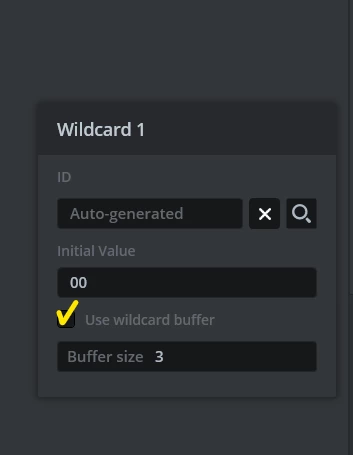
I am new to toughgfx and need a scroll wheel for our new project. So I started with the tutorial 4. I think I followed every step, but when I copy the code, I get an error. The problem seems to be the textBuffer and TEXT_SIZE (Unicode::itoa(no, textBuffer, TEXT_SIZE, 10);). I get the message that they are not defined.
As far as I know the tutorial should have all the steps and all the code needed.
Any Idea what I'm missing?
Thank you!
#ifndef MENUELEMENT_HPP
#define MENUELEMENT_HPP

#include <gui_generated/containers/MenuElementBase.hpp>
#include <BitmapDatabase.hpp>

class MenuElement : public MenuElementBase
{
public:
 MenuElement();
 virtual ~MenuElement() {}

 virtual void initialize();


 void setNumber(int no)
 {
 Unicode::itoa(no, textBuffer, TEXT_SIZE, 10);
 switch (no % 7)
 {
 case 0:
 icon.setBitmap(Bitmap(BITMAP_ICON00_ID));
 break;
 case 1:
 icon.setBitmap(Bitmap(BITMAP_ICON01_ID));
 break;
 case 2:
 icon.setBitmap(Bitmap(BITMAP_ICON02_ID));
 break;
 case 3:
 icon.setBitmap(Bitmap(BITMAP_ICON03_ID));
 break;
 case 4:
 icon.setBitmap(Bitmap(BITMAP_ICON04_ID));
 break;
 case 5:
 icon.setBitmap(Bitmap(BITMAP_ICON05_ID));
 break;
 case 6:
 icon.setBitmap(Bitmap(BITMAP_ICON06_ID));
 break;
 }
 }
protected:
};

#endif // MENUELEMENT_HPP
#ifndef SCREEN1VIEW_HPP
#define SCREEN1VIEW_HPP
#include <gui_generated/screen1_screen/Screen1ViewBase.hpp>
#include <gui/screen1_screen/Screen1Presenter.hpp>
class Screen1View : public Screen1ViewBase
{
public:
Screen1View();
virtual ~Screen1View() {}
virtual void setupScreen();
virtual void tearDownScreen();
virtual void scrollWheelUpdateItem(MenuElement& item, int16_t itemIndex)
{
item.setNumber(itemIndex);
}
protected:
};
#endif // SCREEN1VIEW_HPP