ksale.1
Senior II
February 3, 2026
Solved

TRying unuccessfuly to copy/paste Screen1 to a new project

  • February 3, 2026
  • 3 replies
  • 227 views

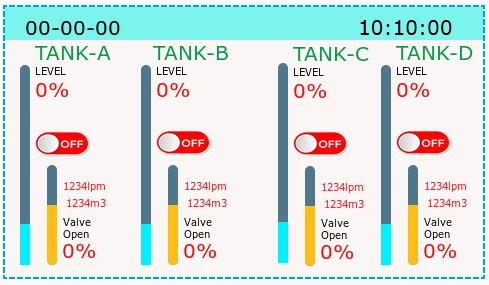
The screen has 4 containers and many widgets. I am interested in keeping the names during the export to save lot of repertitive workscreen.png

    Best answer by JohanAstrup

    Hello @ksale.1.

    Unfortunately, there is currently no very nice way to export and import, or copy and paste TouchGFX screens between different projects. The copy and paste option only works within the same project.

    What I usually do, when I need to copy a screen, is to open the .touchgfx in a text editor and copy the required screen to the other project. This requires manually adding images with the same names and in the same locations as in the source project. Furthermore, you also need to add the typographies with the same names.

    I have an example below. Although this is a simple example, I have previously successfully been able to do the same for very complex screens.

     "Screens": [
     {
     "Name": "Screen1",
     "Components": [
     {
     "Type": "Box",
     "Name": "box1",
     "Width": 480,
     "Height": 480,
     "Color": {
     "Red": 255
     }
     }
     ],
     "Interactions": []
     },
     {
     "Name": "Screen1_copied",
     "Components": [
     {
     "Type": "Box",
     "Name": "box1",
     "Width": 480,
     "Height": 480,
     "Color": {
     "Red": 255
     }
     }
     ],
     "Interactions": []
     }
     ],

    Adding a built-in feature to improve this process is already in the backlog. However, it will not come in the near future.

    Best regards,
    Johan

     

    3 replies

    ksale.1
    ksale.1Author
    Senior II
    February 4, 2026

    Please note "Right-click completely broken, no context menu"

    ksale.1
    ksale.1Author
    Senior II
    February 4, 2026

    export.png

    Please note no 'Export' in the context menu v 4.26.0 

    JohanAstrupBest answer
    ST Technical Moderator
    February 5, 2026

    Hello @ksale.1.

    Unfortunately, there is currently no very nice way to export and import, or copy and paste TouchGFX screens between different projects. The copy and paste option only works within the same project.

    What I usually do, when I need to copy a screen, is to open the .touchgfx in a text editor and copy the required screen to the other project. This requires manually adding images with the same names and in the same locations as in the source project. Furthermore, you also need to add the typographies with the same names.

    I have an example below. Although this is a simple example, I have previously successfully been able to do the same for very complex screens.

     "Screens": [
     {
     "Name": "Screen1",
     "Components": [
     {
     "Type": "Box",
     "Name": "box1",
     "Width": 480,
     "Height": 480,
     "Color": {
     "Red": 255
     }
     }
     ],
     "Interactions": []
     },
     {
     "Name": "Screen1_copied",
     "Components": [
     {
     "Type": "Box",
     "Name": "box1",
     "Width": 480,
     "Height": 480,
     "Color": {
     "Red": 255
     }
     }
     ],
     "Interactions": []
     }
     ],

    Adding a built-in feature to improve this process is already in the backlog. However, it will not come in the near future.

    Best regards,
    Johan