Aksl
Associate III
March 25, 2022
Solved

TouchGFX - Truncated line when using word wrapping

  • March 25, 2022
  • 9 replies
  • 2578 views

Hello,

I'm working on a TouchGFX GUI and I have some text areas which need to be automatically wrapped on several lines.

I'm using

Text_guideline.setTypedText(touchgfx::TypedText(guideline));
Text_guideline.setWideTextAction(WIDE_TEXT_WORDWRAP);
Text_guideline.resizeHeightToCurrentText();

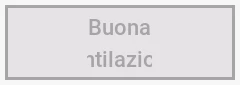
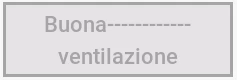
then the text is wrapped on several lines (as expected), but the 2nd line is truncated : its width is equal to that of the first line. I included images with the text "Buona ventilazione" on 2 lines, note that I fully see the second line only when I pad the first one to be wider.

Here is my question : How can I fully display each line even if they are wider than the first line, for a line-wrapped text ?

Thank you in advance for any help !0693W00000LvlAfQAJ.png0693W00000LvlAVQAZ.png
This topic has been closed for replies.
Best answer by Aksl

I found the solution ! The problem I had was on a project created under TouchGFX Designer 4.17.0, I migrated to version 4.19.0 and recreated the text areas that didn't display well (I deleted them & remade them), and now they work great !

9 replies

MM..1
Super User
March 25, 2022

Try use other method, this do what you ask

Text_guideline.resizeHeightToCurrentText();

Aksl
AkslAuthor
Associate III
March 28, 2022

Hi ! Thanks for your answer, but I don't understand, I'm already using this method (see the code snippet in my question), should I use it differently ?

I forgot to mentio that I disabled the option "Auto-size". Moreover, when I print the width of my text are at run time, I see that it is as wide as the whole box, thus wider than the first line...

MM..1
Super User
March 28, 2022
void resizeHeightToCurrentText()
Sets the height of the TextArea to match the height of the current associated text for the current selected language.

void resizeHeightToCurrentTextWithRotation()
Sets the height of the TextArea to match the height of the current associated text for the current selected language.

void resizeToCurrentText()
Sets the dimensions of the TextArea to match the width and height of the current associated text for the current selected language.

void resizeToCurrentTextWithAlignment()
Sets the dimensions of the TextArea to match the width and height of the current associated text for the current selected language, and for centered and right aligned text, the position of the TextArea widget is also updated to keep the text in the same position on the display.
Aksl
AkslAuthor
Associate III
March 28, 2022

Alright, I tried to replace the 3rd line of

 Text_guideline.setTypedText(touchgfx::TypedText(guideline));
 Text_guideline.setWideTextAction(WIDE_TEXT_WORDWRAP);
 Text_guideline.resizeHeightToCurrentText();

by each of the functions you mentionned, but the display never changed, it remains as showed in the images in the question. But I agree that it should work, I don't get what I am missing here.

MM..1
Super User
March 28, 2022
You miss fourth line
Text_guideline.invalidate();
Aksl
AkslAuthor
Associate III
March 28, 2022

Oops, sorry I didn't show it but I am actually using it :

Text_guideline.setTypedText(touchgfx::TypedText(guideline));
Text_guideline.setWideTextAction(WIDE_TEXT_WORDWRAP);
Text_guideline.resizeToCurrentTextWithAlignment();
Text_guideline.invalidate();

Aksl
AkslAuthorBest answer
Associate III
March 28, 2022

I found the solution ! The problem I had was on a project created under TouchGFX Designer 4.17.0, I migrated to version 4.19.0 and recreated the text areas that didn't display well (I deleted them & remade them), and now they work great !

djunho
Associate II
May 18, 2022

What was the change in the code that fixed this?

Aksl
AkslAuthor
Associate III
May 18, 2022

I think there was none, maybe it was an issue with Designer 4.17.0...