Chandan Bhatia1
Associate III
October 8, 2020
Solved

Touchgfx TFT Display Flickering Issue

  • October 8, 2020
  • 29 replies
  • 12596 views

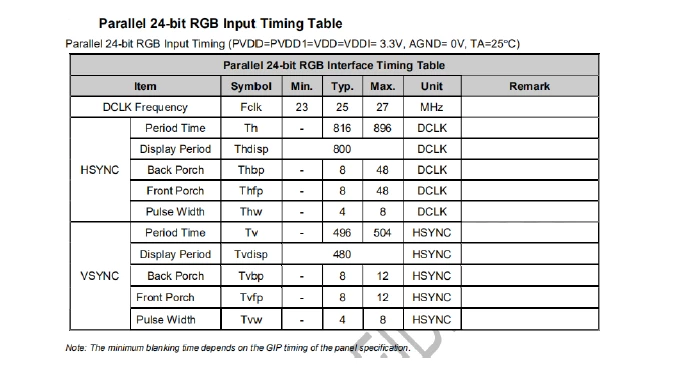
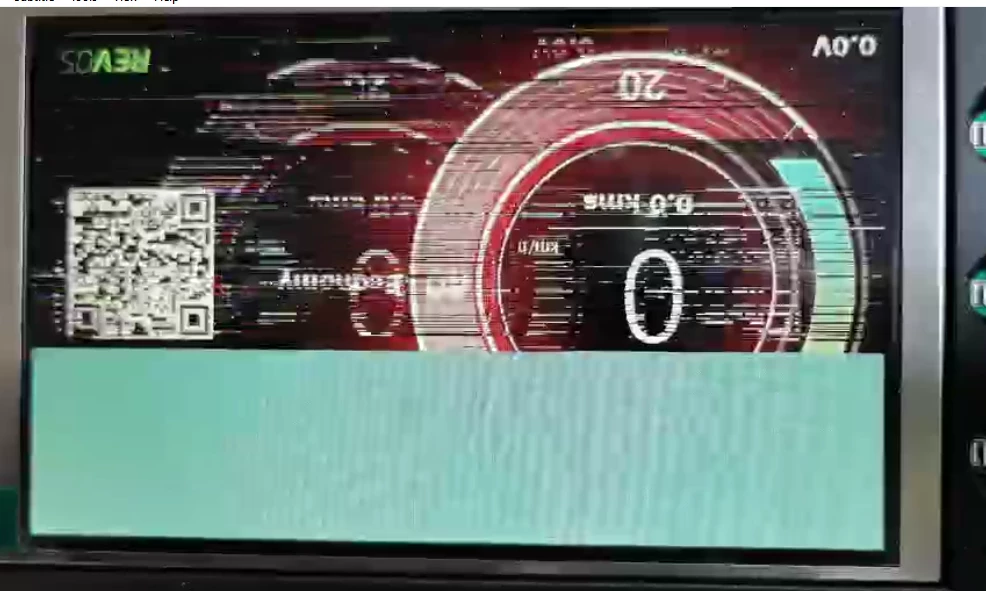
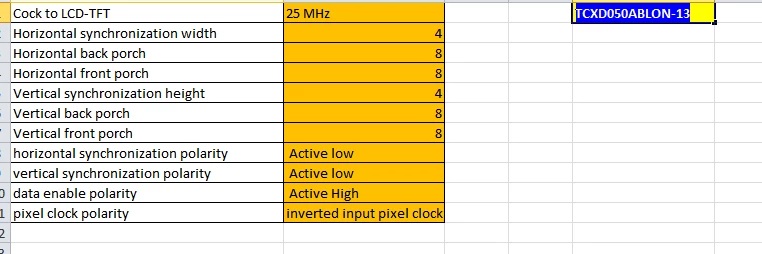
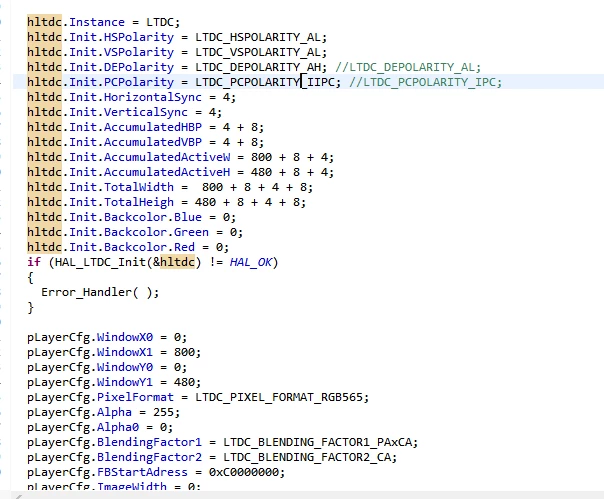
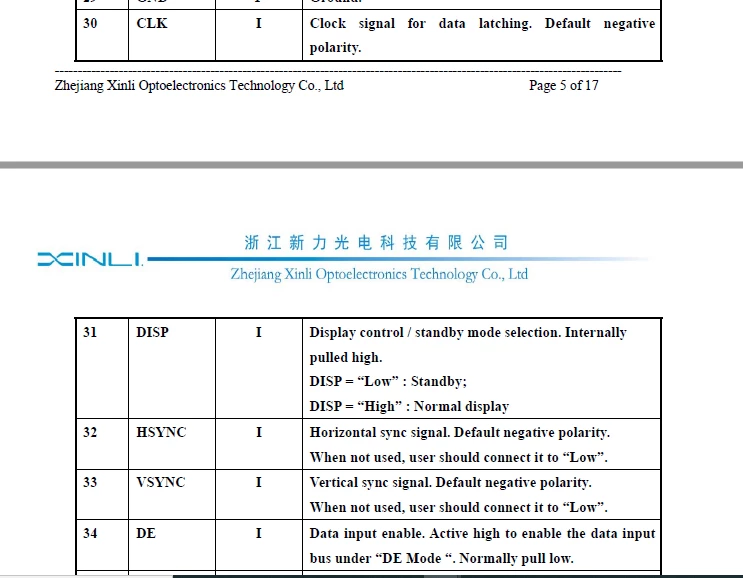
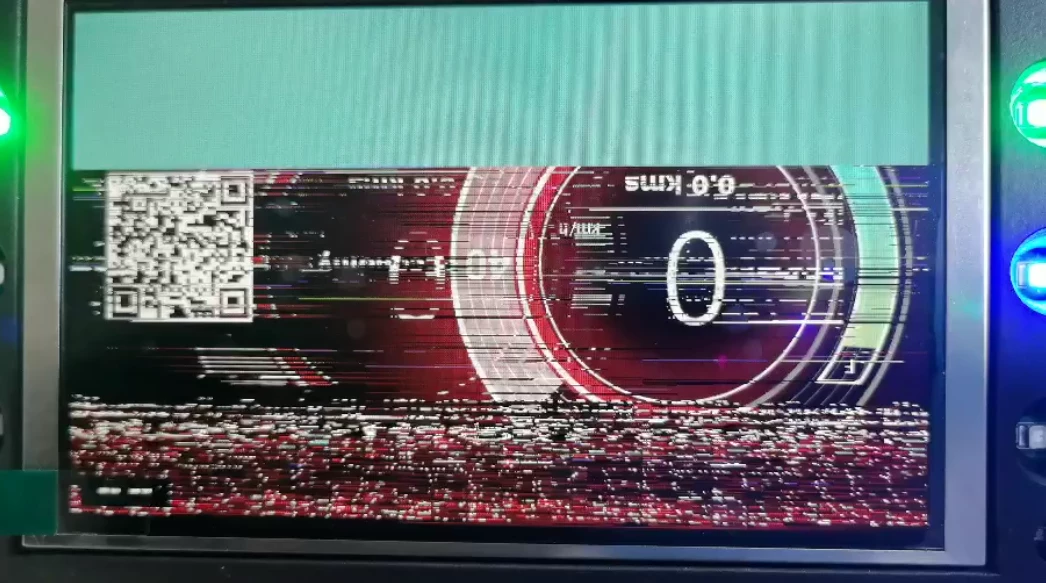
Hello, I am using display TCXD050ABLON (Data sheet Attached) with STM32F746. As per datasheet I did below LTDC setting and still display is flickering badly.
0693W000004IvUUQA0.png

0693W000004IvYlQAK.png

Few screen shots of display setting as per datasheet is below.
0693W000004IvWGQA0.png

0693W000004IvWuQAK.png

Few Images of flickering display is as below.
0693W000004IvahQAC.png

0693W000004IvbLQAS.png

Any suggestions?

This topic has been closed for replies.
Best answer by MM..1

When i see your images from first post, this dont seems as ltdc trouble. Try check firstly display and ltdc without touchgfx started.

I mean your troble is SDRAM when you use external.

For test only display prepare in flash memory fullscreen image in proper format and replace address in ltdc layer config to this image.

Then in main disable starting touchgfx resp all rtos.

29 replies

ST Technical Moderator
October 8, 2020

Hello @Chandan Bhatia​ ,

Ensure that you have enough RAM and try improve the performance.

You can have a look on how achieving Better Performance with CacheableContainer, I hope this helps you !

Imen

In order to give better visibility on the answered topics, please click on 'Best answer' on the reply which solved your issue or answered your question. Thanks
Chandan Bhatia1
Associate III
October 8, 2020

@Imen DAHMEN​ Its static images so don't think this problem can occur. Anyway I am using external RAM for it.

Btw did you check my LTDC setting ? Does it look correct as per requited TFT settings?

Can you please check? I put few screenshots of datasheet down in post.

Alexandre RENOUX
Visitor II
October 9, 2020

Hello,

Have you used CubeMX for your LTDC settings ?

Because this should be automatically generated by CubeMX if you put the values in the lTDC settings in CubeMX.

For instance AccumulatedActiveH should be calculated as follows :

AccumulatedActiveH = Vertical Synchronization Width + Vertical Back Porch + Active Height - 1 = 4 + 8 + 480 -1 = 491

Also where is your image stored ? In your external Flash ? If so, are you sure your external Flash is correctly set ?

To check you could store the images in internal Flash or use shapes and boxes to see if you have some artifacts on the screen.

/Alexandre

Chandan Bhatia1
Associate III
October 9, 2020

@Alexandre RENOUX​ 

I am using internal flash for initial testing. Also have used CubeMX for initial settings. As display was flicking I was changing paraments like AccumulatedActiveH directly from code.

I feel like issue is with horizontal synchronization, vertical synchronization, data enable, pixel clock polarity. Is it fine as per you ?

0693W000004IvYlQAK.png0693W000004IvWGQA0.png

Chandan Bhatia1
Associate III
October 9, 2020

I tried below combine too.

0693W000004JC4nQAG.png

Alexandre RENOUX
Visitor II
October 9, 2020

I guess you tried the config LTDC_HSPOLARITY_AL, LTDC_VSPOLARITY_AL, LTDC_DEPOLARITY_AL and LTDC_PCPOLARITY_IPC.

Please try try to remove you image and put a box instead, does it display correctly ?

Could you show me your clock config ?

/Alexandre

Chandan Bhatia1
Associate III
October 9, 2020

@Alexandre RENOUX​  My clock settings are as below ?

Also Does correct config is LTDC_HSPOLARITY_AL, LTDC_VSPOLARITY_AL, LTDC_DEPOLARITY_AL and LTDC_PCPOLARITY_IPC ?

0693W000004JCBjQAO.png

Alexandre RENOUX
Visitor II
October 9, 2020

Yes I do think that the config I mentioned is the correct one.

Maybe could you try changing the LTDC clock to something lower (9.6 MHz for example like the F746G-DISCO) and see how it behaves ?

/Alexandre

MM..1
MM..1Best answer
Super User
October 15, 2020

When i see your images from first post, this dont seems as ltdc trouble. Try check firstly display and ltdc without touchgfx started.

I mean your troble is SDRAM when you use external.

For test only display prepare in flash memory fullscreen image in proper format and replace address in ltdc layer config to this image.

Then in main disable starting touchgfx resp all rtos.

Chandan Bhatia1
Associate III
October 15, 2020

@MM..1​ Thanks for the comment.

You mean something like below screenshot. Here I replaced "color frame buffer address " to background image array _background_800x480 (generated by touchgfx stored in internal flash) from SDRAM address 0xC0000000. I don't have display with me right now to validate. I will send it to factory for validation.

0693W000004JxUEQA0.pngWhy do you feel like that its might be SDRAM issue ? Just wanted to know the reason,

Also I validated external SDRAM using below code. Basically I am checking at random address at bank 1.

void validateSDRAM (void){
	uint32_t uwWriteReadStatus = 0 , BUFFER_SIZE = 100, uwIndex = 0;
	uint32_t aTxBuffer[BUFFER_SIZE] , aRxBuffer[BUFFER_SIZE];
	 /* Fill the buffer to write */
	 Fill_Buffer(aTxBuffer, BUFFER_SIZE, 0xA244250F);
 
	 /* Write data to the SDRAM memory */
	 for (uwIndex = 0; uwIndex < BUFFER_SIZE; uwIndex++)
	 {
	 *(__IO uint32_t*) (0xC0000000 + 0x100 + 4*uwIndex) = aTxBuffer[uwIndex];
	 }
 
	 /* Read back data from the SDRAM memory */
	 for (uwIndex = 0; uwIndex < BUFFER_SIZE; uwIndex++)
	 {
	 aRxBuffer[uwIndex] = *(__IO uint32_t*) (0xC0000000 + 0x100 + 4*uwIndex);
	 }
 
	 /*##-3- Checking data integrity ############################################*/
 
	 for (uwIndex = 0; (uwIndex < BUFFER_SIZE) && (uwWriteReadStatus == 0); uwIndex++)
	 {
	 if (aRxBuffer[uwIndex] != aTxBuffer[uwIndex])
	 {
	 uwWriteReadStatus++;
	 }
	 }
 
	 if (!uwWriteReadStatus)
	 {
	 	SDRAM_Working = true;
	 }
}

MM..1
Super User
October 16, 2020

yes as you write static image data and in main add comment to line osKernelStart

 /* USER CODE END RTOS_THREADS */

 /* Start scheduler */

 //osKernelStart();

 /* We should never get here as control is now taken by the scheduler */

 /* Infinite loop */

 /* USER CODE BEGIN WHILE */

 while (1)

 {

  /* USER CODE END WHILE */

  /* USER CODE BEGIN 3 */

 }

in this config you need handle all hw init to ok display, only after this you can use TouchGFX process.

And you ask why SDRAM. TouchGFX use for output only RAM internal or external and all graphics is copied, moved handled in this RAM.

When you set ChromART D2DMA is used for manipulate and may go to timing or other conflict . Your SDRAM test dont test DMA speed transfers.